When revenue rises but orders stay flat, average order value on Shopify may be doing more of the work. The fastest way to increase it is rarely a sitewide discount. It is usually a clearer reason to add a relevant item, reach a useful threshold, or choose a better option.
Short answer: Increase Shopify AOV by helping customers add one more relevant item, reach a useful spending threshold, or choose a higher-value option. Test one lever at a time, then measure AOV alongside conversion rate, items per order, and contribution margin.
7 ways to increase average order value on Shopify
| Metric | Formula or definition | Why it matters |
|---|---|---|
| Average order value | Total revenue divided by total orders | Shows average basket value |
| Items per order | Units sold divided by total orders | Shows whether customers add more products |
| Conversion rate | Orders divided by store sessions | Flags whether an AOV tactic harms completion |
| Contribution margin | Revenue less variable product, shipping, discount and fulfillment costs | Tests whether added revenue is profitable |
Calculate AOV with one formula
Average order value equals total revenue divided by total orders for a selected period, as Shopify explains in its guide to sales analytics. Use one consistent revenue definition. If you use net revenue for AOV, do not compare it against gross-sales targets.
Start with margin, not just revenue
A larger basket can cost more to fulfill, require a larger discount, or increase returns. A free gift that pushes an order over a threshold may still reduce contribution margin if its landed cost and shipping outweigh the incremental profit.
Read the trade-offs in discounts versus points, then test the smallest incentive that gives customers a useful reason to spend more.
Before changing the store, pull AOV, order count, revenue, items per order, conversion rate, refund rate, and margin for a normal period. Also check median order value. A handful of large orders can make mean AOV look healthier than the basket most customers actually place.
1. Set a free-shipping or gift threshold just above typical basket size
A threshold works when a shopper can reach it with one sensible addition. Shopify recommends testing free-shipping thresholds above median or average order value, depending on store economics, in its free-shipping guidance.
If your median basket is close to the price of one common add-on, test a threshold that can be reached with one sensible addition. Asking a shopper to make room for a second major purchase usually creates more friction than suggesting one relevant add-on.
Make the gap visible in the cart. Show the remaining amount needed to unlock free shipping rather than relying on a generic banner.
A gift can work the same way. Choose something with low merchant cost, simple fulfillment, and a perceived value that fits the products already in the cart.
Shopify supports free-shipping, percentage, monetary, and Buy X Get Y discounts through the Discounts area. Track threshold-qualified orders, AOV, conversion rate, shipping expense, incentive cost, and contribution margin.
2. Build bundles around the customer's intended outcome
A bundle should answer, “What else do I need to get the result I came for?” Pair the core item with the likely next refill, complementary routine step, or useful accessory rather than a generic bestseller.
Fixed bundles work when the combination is obvious. Shopify Bundles supports fixed and multipack bundles through its Bundles app.
A build-your-own option suits products with personal preferences, such as color, scent, size, or flavor. Keep the structure simple: core product first, then a short selection of compatible additions.
Show individual value, bundle price, and savings clearly. Check inventory and fulfillment before launch. Shopify notes that bundles can have compatibility limitations with purchase options such as subscriptions and pre-orders in its bundle considerations.
Compare bundle AOV, margin, return rate, and conversion rate against comparable single-product orders.
3. Use relevant upsells and cross-sells at the right moment
An upsell moves a customer to a more expensive or capable version of the product they intended to buy. A larger size, premium material, or higher-capacity version can work when it solves a real need.
A cross-sell adds a product that makes the original purchase more useful, such as a care product, replacement part, matching accessory, or refill.
Use product-specific relationships, not a generic bestseller carousel. Configure recommendations around products that genuinely belong together, then show a single recommendation tied to the cart state.
Start in the cart before adding checkout friction. Track attach rate, incremental AOV, conversion rate, and returns for exposed orders. If the offer produces bigger orders but more removals or refunds, narrow the pairing or remove it.
4. Offer quantity breaks, buy-more promotions or a gift with purchase
Quantity incentives fit consumables, low-cost accessories, and items customers reasonably buy in multiples. A product that lasts a year is a poor candidate for buy-more messaging.
Set the break around normal behavior. If customers regularly buy two units, an offer at three may be realistic. A much higher threshold may simply train customers to ignore it.
Shopify Buy X Get Y discounts can require a minimum item quantity or minimum purchase amount, according to Shopify’s Buy X Get Y documentation. The reward can be a free product, a percentage off, or a fixed amount off.
Customers must add all qualifying items themselves. The free or discounted item is not automatically added by the native discount. Make eligible products and cart instructions obvious.
Measure units per order, gross margin per order, discount cost, inventory movement, and refund rate. Avoid stacking quantity breaks, free shipping, and gifts before you know whether one incentive works.
5. Add a loyalty reward that makes the next spend level attractive
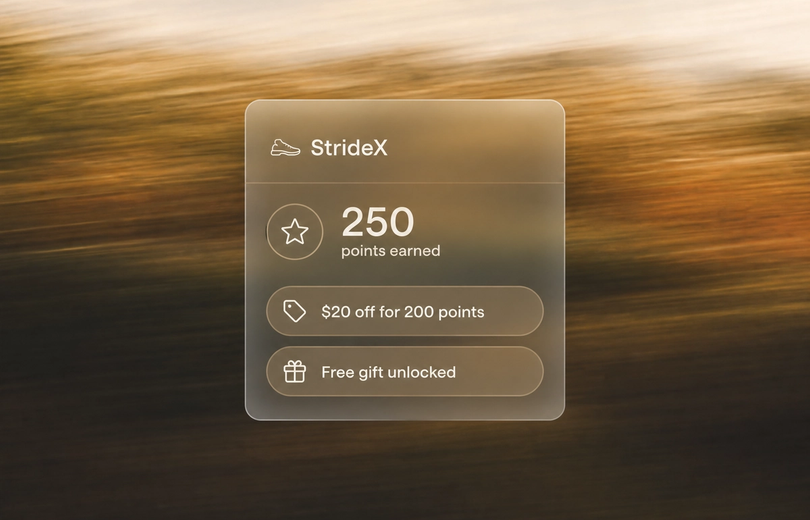
A loyalty reward can encourage a customer to reach a higher basket value now or return with enough value to make a larger future purchase worthwhile. The exchange should be clear: spend or earn toward something useful.
Mage rewards can be fixed-amount discounts, percentage discounts, free shipping, free products, or store credit. Minimum purchase requirements let you set a reward that applies only once the basket reaches a target value.
Points make progress visible across several purchases. Store credit can be easier for customers to understand as a future-order balance. Mage’s loyalty store-credit mode is a Mage-internal loyalty ledger redeemed through Mage rewards and checkout extensions, not Shopify-native store credit.
For a deeper comparison, see loyalty points versus store credit. A high-AOV jewelry brand may get more value from spend-based VIP progression, early access, or upgraded shipping than from a large first-order discount.
Mage supports up to 10 VIP tiers, with entry based on spend, points earned, or order count. Higher tiers can receive multipliers, automatic discounts, early access, or shipping perks.
Configure and test the reward in Mage
In Shopify admin, open Mage Loyalty, select Loyalty, open Redeeming Points, and select Add Reward. Choose the reward type, complete its settings, and save. The full setup detail is in Mage’s Ways to Redeem guide.
Rewards can appear in the Rewards Widget, Account Sidebar, and Loyalty Pages. They apply at Shopify Checkout without requiring customers to copy a code. The Shopify loyalty program can connect basket thresholds with the next purchase and VIP progression.
In the Loyalty Page editor, select Ways to Redeem to change the title, subtitle, grid or carousel display, and reward visibility. Test the full customer journey before publishing. Mage Test Mode limits earning, redemption, and connected integration events to customers on a test list.
“I looked into so many different integrations for loyalty and referrals for our Shopify Store, but no one impressed me more than Mage on human connection, customer service, and value.”


Read the Reelie case study →
6. Personalize recommendations and post-purchase offers
Recommendations should reflect what a shopper viewed, added, or purchased. A refill after a replenishable product, a care item after a premium purchase, or a compatible accessory in the cart all make commercial sense.
Personalization means narrowing the offer to the next likely useful item, not showing more products.
A post-purchase offer can be lower risk than an aggressive pre-checkout upsell because it does not interrupt the original checkout decision. Measure acceptance, added revenue, fulfillment cost, cancellations, and refunds.
Shopify reported that a home-storage brand increased AOV by 15% after adding cart upsells, a wishlist, and personalized recommendations. Treat that as a Shopify case example, not a benchmark your store should expect.
Use a connected marketing tool to follow up after a purchase, reward redemption, or points event. Mage can trigger Points Awarded, Reward Redeemed, Birthday, and Gift Reminder events for a Klaviyo loyalty integration.
7. Use Shopify checkout and account surfaces to make higher-value buying easier!Mage Checkout Extensions showing loyalty points and available rewards in Shopify Checkout
Customers should see eligible benefits where they can use them. Hidden reward codes, unclear shipping offers, and confusing discount rules create hesitation.
Mage Checkout Extensions can show points to earn in the Shopify Checkout order summary and provide a rewards wallet for eligible rewards. This gives logged-in customers a clear view of what the current order earns and what they can use.
Shopify reported that Shop Pay users had a 15% higher AOV than customers without Shop Pay in its cited historical analysis. That result is not a promise for every store, but faster checkout can remove friction for customers who have already decided to buy.
Mage Accounts can show points balance, tier progress, and rewards inside an on-site account drawer. Returning customers can see what they have earned and continue shopping from the store’s own domain.
How to choose your first AOV test and measure the result
| Store signal | Best first test | Primary metric | Guardrail metric |
|---|---|---|---|
| Orders usually contain one item | Complementary cart recommendation or bundle | Items per order | Conversion rate |
| Carts cluster below a value point | Free-shipping or gift threshold | Threshold-qualified orders | Contribution margin |
| Customers buy multiples naturally | Quantity break | Units per order | Gross margin |
| Returning customers spend more | Loyalty reward or VIP progression | Returning customer AOV | Reward cost |
| Product pairings are obvious but underused | Product-specific cross-sell | Attach rate | Refund rate |
Do not launch all seven tactics at once. Match the tactic to the problem, change one meaningful variable, and keep the audience, product set, promotion calendar, and traffic context as stable as possible.
Track AOV, conversion rate, items per order, net revenue, incentive cost, contribution margin, refund rate, and repeat purchase rate. Learn how to increase repeat revenue after the first purchase alongside AOV, because a larger first basket can be less valuable than a profitable customer who returns.
Before launch, confirm incentive economics, eligible products, inventory, shipping impact, discount combinations, and customer-facing messaging. Test the cart, checkout, mobile experience, and post-purchase follow-up.
Mage Analytics can compare member AOV with non-member AOV and report AOV by VIP tier, loyalty-attributed revenue, redemption rate, repeat purchase rate, and purchase frequency.
FAQ
What is average order value on Shopify?
Average order value on Shopify is the average revenue generated per order during a selected period. Calculate it by dividing total revenue by total orders, then compare it across customer types, products, devices, and traffic sources.
How do you calculate average order value?
Average order value is calculated by dividing total revenue by total orders. Use the same revenue definition each time, preferably net revenue if refunds and discounts materially affect your store.
What is a good average order value for a Shopify store?
A good average order value supports profitable acquisition, fulfillment, and repeat purchasing for that store’s category and price point. Use historical AOV, median order value, contribution margin, customer mix, and repeat behavior as the benchmark rather than chasing a universal number.
How can you increase average order value without discounting?
You can increase average order value without discounting by using relevant cross-sells, product upgrades, bundles, quantity incentives, shipping thresholds, personalized recommendations, and loyalty perks. Measure each tactic against conversion rate, returns, fulfillment cost, and contribution margin.
What is the difference between upselling and cross-selling?
Upselling moves a customer to a more expensive or capable version of the item they intended to buy. Cross-selling adds a complementary item, such as a care product with a premium product purchase.
How long should you test an AOV strategy on Shopify?
Test an AOV strategy until you have enough orders for a meaningful comparison and have covered ordinary variation in weekdays, campaigns, and traffic mix. Review AOV alongside conversion rate, items per order, margin, refunds, and repeat purchase rate before deciding whether to keep it.
Ready to see Mage in action? Book a demo.

Graeme is the co-founder at Mage Loyalty. He heads product development, from complex loyalty migrations and large-scale data handling to building the features shaping the future of loyalty on Shopify.