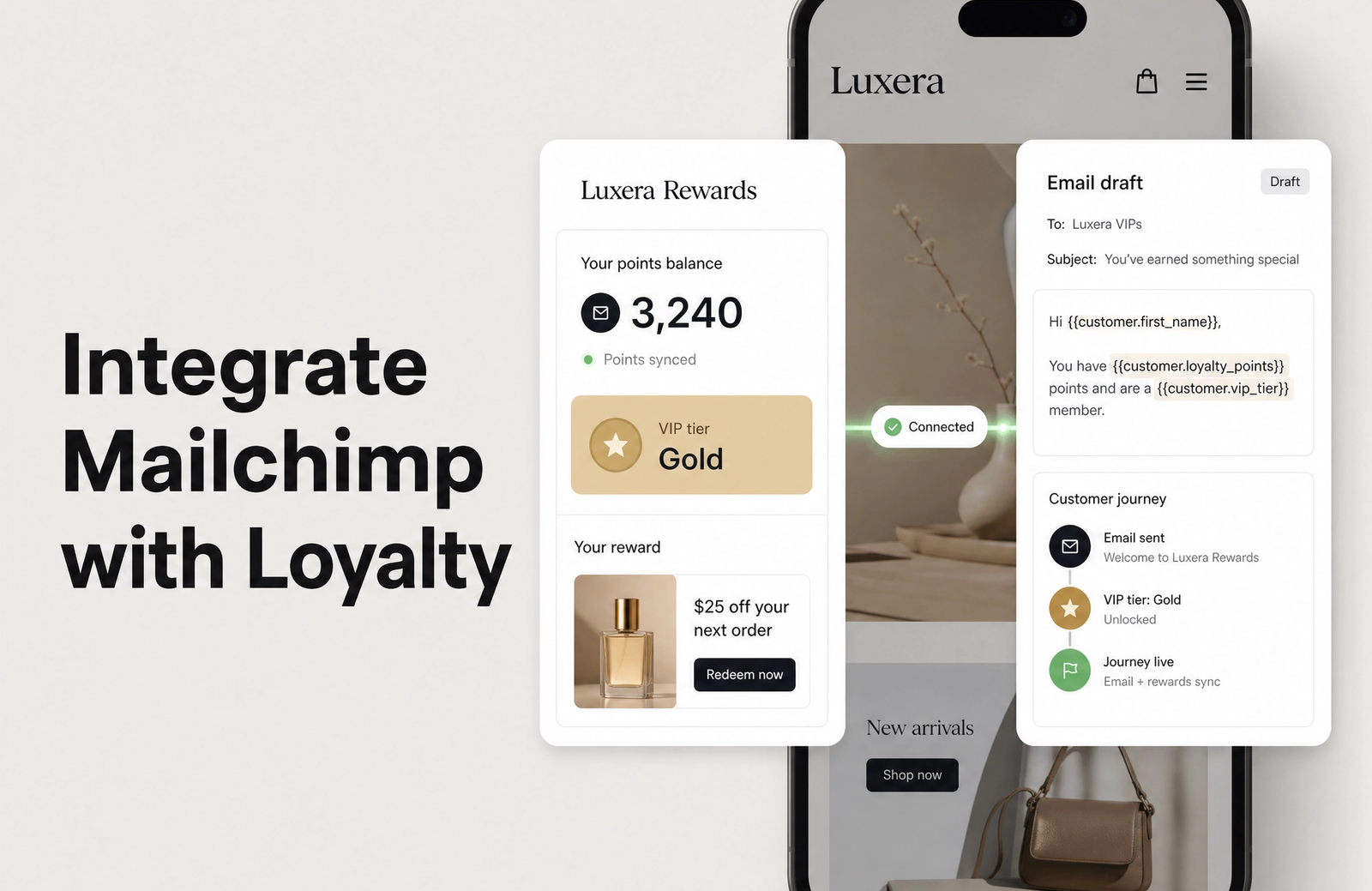
A Mailchimp loyalty integration is what turns a quiet points program into email that actually reacts to what shoppers do. When you integrate Mailchimp with your loyalty program, the data your members generate (points earned, VIP status reached, balances about to lapse) lands on their contact profile, ready to use. From there you can segment by tier, build a Customer Journey that fires when someone climbs a level, and write subject lines that name a real reward instead of a generic offer. Most Shopify stores enroll thousands of members, watch them earn points, then never mention it again. This guide closes that gap, and with Mage Loyalty the loyalty data needed to power it already syncs onto your email contacts the moment a customer earns or redeems.
Key Takeaways
- Integrating Mailchimp with your loyalty program lets you segment contacts by points balance, VIP tier, redeemed points, and enrollment date instead of guessing who to message.
- Mage pushes loyalty attributes (points balance, lifetime points, redeemed points, VIP tier, date of birth, enrolled date) onto contact profiles, which you map to Mailchimp merge fields and tags.
- Syncing loyalty data automatically keeps your audience current, so segments and journeys never run on stale balances or outdated tiers.
- Customer Journeys triggered by loyalty moments (points earned, reward redeemed, tier change, expiring points) consistently outperform batch sends.
- Loyalty data is matched by email address, the same approach Mailchimp recommends, which keeps profiles clean and prevents duplicates.
- The capability is available on every Mage plan and works across both Loyalty and Referrals, with no developer build required to get started.
What You Gain by Connecting Mailchimp to Loyalty
Email marketing and a loyalty program are built for each other. Your program is a behavior engine: it records who earned points, who just hit a VIP tier, and whose balance is days from expiring. Mailchimp is the channel where people actually read what you send. On their own, each is half a system. Together, loyalty signals become the input that makes every send feel personal rather than promotional.
Why Email Plus Loyalty Is a Powerful Combination
The integration creates a loop where each platform feeds the other. Three patterns do most of the work:
- A loyalty moment prompts an email. A member crosses a points threshold and a journey suggests what that balance can buy.
- An email pulls members back into the program. A birthday note with bonus points re-activates someone who had drifted.
- Each platform sharpens the other. Purchase history shapes the tier, and that tier then shapes how you segment in Mailchimp.
Retention Wins From Connecting the Two
When the two systems share data, retention improves on several fronts at once:
- Lower churn. A reminder that points are about to expire gives a lapsing customer a concrete reason to come back.
- Higher repeat purchase rate. Tier-only offers create urgency for the members who already spend the most.
- Stronger lifetime value. Messages that reflect a customer's real status build the kind of attachment a generic blast never will.
Returning customers are worth far more than first-time buyers, and the customer retention gains compound once your loyalty data drives the segmentation rather than sitting in a report nobody opens.
Preparing Your Mailchimp Account for Loyalty Program Data
Before loyalty data starts flowing in, give your Mailchimp account a structure that can hold it. Skip this and the attributes arrive with nowhere meaningful to live, which makes segmentation a chore later.
Optimizing Mailchimp Audiences for Loyalty
Start with how your audience is organized:
- Decide where loyalty members belong. Most brands keep one primary audience and use tags to mark members, rather than splitting members into a separate audience.
- Make sure email addresses line up. Loyalty data matches on email, so a contact in Mailchimp and the same shopper in your loyalty program need to share an address.
- Confirm your consent settings. If GDPR or your own policy calls for double opt-in, set that before you start syncing.
Creating Merge Fields and Tags for Loyalty Attributes
Mailchimp's default fields do not account for loyalty data, so add the equivalents yourself. A practical set of merge fields and tags to create:
| Loyalty attribute | Mailchimp field type | Example value |
|---|---|---|
| Points balance | Number merge field | 100 |
| Lifetime points | Number merge field | 500 |
| Redeemed points | Number merge field | 400 |
| VIP tier | Text merge field or tag | Gold |
| Date of birth | Date merge field | September 17, 1990 |
| Enrolled date | Date merge field | January 1, 2025 |
Tags work best for the values you filter on constantly, like tier names, because they are quick to build segments from. Merge fields are the right home for numbers and dates you want to personalize copy with or set range conditions on.
Connecting Mailchimp to Your Store
Mailchimp's own Shopify connection keeps your contact list and purchase data current, which is the layer your loyalty attributes sit on top of. Make sure that link is healthy before you start mapping loyalty fields, because the integration relies on contacts already existing in your audience. Treat any API credentials you generate for connecting tools like a password, since they grant write access to your contact data.
Leveraging Loyalty Data Sync for Seamless Transfer into Mailchimp
A one-time CSV export is fine for a single migration, but it creates a maintenance problem for anything ongoing. Balances change daily, tiers shift, and a static export is stale within hours. The goal is to keep loyalty data current on the contact record so your segments and journeys always run on real numbers.
How Loyalty Data Lands on a Contact
The pattern is simple once you see it. Loyalty attributes write onto the matching Mailchimp contact, keyed by email address, and update whenever the underlying value changes. With Mage, the following properties sync automatically onto each customer profile:
| Property | What it holds | Example |
|---|---|---|
| Mage Loyalty Points Balance | Current spendable points | 100 |
| Mage Loyalty Lifetime Points | Total points ever earned | 500 |
| Mage Loyalty Redeemed Points | Total points spent on rewards | 400 |
| Mage Loyalty VIP Tier Name | Current VIP tier | Gold |
| Mage Loyalty Date of Birth | Customer's birthday, if provided | September 17, 1990 |
| Mage Loyalty Enrolled Date | When the customer joined | January 1, 2025 |
| Mage Points as Cash Balance | Cash value of current points (flexible redemption on) | $17.50 |
Map each of these to the merge field or tag you created in the previous step, matching names exactly so segments behave predictably.
Loyalty Events That Trigger Journeys
Beyond static attributes, loyalty events are what make automation timely. Each event marks a moment you can build a journey around. Mage can fire the following loyalty events, several of which are on by default:
| Event | Fires when |
|---|---|
| Points Awarded | Points are added to a customer's balance |
| Reward Redeemed | A customer redeems points for a reward or discount |
| VIP Tier Changed | A customer moves up or down a tier on lifetime points |
| Referral Claimed | A referred friend claims their discount code |
| Points Expiry Soon | A customer has points expiring within 7 days (off by default) |
| Birthday | A customer earns birthday points (off by default) |
| Mage Welcome | A customer joins the program for the first time |
Keeping the Sync Reliable
A reliable sync depends on a few habits. Match on email everywhere so a customer is one profile in both systems. Mirror your loyalty field names into Mailchimp exactly. And confirm which events you actually need, since a few (expiring points, birthdays) stay off until you switch them on. Get these right and your Mailchimp audience always reflects the live state of your program.
The Shopify loyalty program growing brands trust
See how Mage helps Shopify brands lift repeat purchase rate with loyalty, referrals and store credit.
Book a demoMapping Loyalty Events and Customer Data to Mailchimp
A thoughtless data dump creates clutter. A deliberate map creates marketing leverage. The job here is to decide which loyalty signals become contact attributes you segment on, and which become events you build journeys around.
Synchronizing Customer Activity Data
Line up each loyalty action with the Mailchimp field or event it should update:
| Loyalty action | Mailchimp target | Update timing |
|---|---|---|
| Points earned | Points balance, lifetime points | On change |
| Points redeemed | Redeemed points, points balance | On change |
| Tier upgrade | VIP tier field or tag | On change |
| Tier downgrade | VIP tier field or tag | On change |
| Referral claimed | Referral tag | On change |
| Birthday set | Date of birth | On change |
Mapping Loyalty Points and Tiers to Mailchimp
VIP tiers are the attribute you will lean on most, so map them carefully. Mage syncs the tier name onto each contact, which you can hold as a tag or a merge field for clean segmentation. A few tips:
- Match tier names exactly between platforms so a "Gold" segment never quietly misses a "gold" contact.
- Pair the tier with the points balance and lifetime points fields if you want to show progress, like how close someone is to the next level.
- Keep redeemed points alongside the balance so you can spot big earners who rarely cash in, a prime audience for a nudge.
For brands structuring those levels, our guide to Shopify VIP tiers walks through how to design the tiers themselves before you map them.
Integrating Referral Program Status
Referral activity adds another useful dimension to your Mailchimp segments. Because Mage covers loyalty and referrals on one platform, that data flows through the same connection. Use a tag to mark contacts who have claimed a referral, then build campaigns that recognize your advocates with milestone rewards or early access. Referral signals tend to identify your most engaged members, which makes them some of the most responsive people on your list.
“Cannot say enough good things about the team at Mage Loyalty, one of the absolute best organizations we have ever worked with, full stop! So glad we connected with them, completely redid our loyalty program, new concepts, use of loyalty, increasing user engagement, showing us where we were not valuing our best customers, just WOW, amazing team!”


Read the West Coast Goalkeeping case study →
Automating Personalized Campaigns with Loyalty Data in Mailchimp
With loyalty attributes and events on your contacts, you can build Customer Journeys that respond to program activity as it happens, not days later when the moment has cooled. In Mailchimp, the pattern repeats: create a journey, set the starting point to the loyalty event or attribute change you care about, then branch on tier or balance from there.
Setting Up Automated Post-Purchase Loyalty Emails
Trigger sequences off purchase moments enriched with loyalty context:
- First purchase plus sign-up. A welcome journey that explains how earning and redeeming work.
- Repeat purchase. A points-earned confirmation that shows the new balance and suggests what it can buy.
- High-value purchase. A tier-progress note showing how close the customer is to the next level.
Triggering Journeys Based on VIP Status
Build tier-specific journeys using the VIP tier attribute as the branch:
For new VIP members:
- A congratulations email that lays out the perks of their tier.
- An early-access announcement reserved for that level.
- A tier-only discount code to mark the upgrade.
For at-risk VIPs:
- A heads-up before their status resets, sent on the tier-change or expiry signal.
- A bonus-points offer to help them hold their tier.
- Recommendations shaped by what they have bought before.
Harnessing Points Balances for Engagement
Roughly half of all loyalty points are never redeemed, which is the cheapest revenue most stores leave on the table. Turn on the expiry event and let Mailchimp do the chasing:
- Threshold reached. "You have enough points for a free product" when a balance crosses a line.
- Expiring soon. A short sequence at 14, 7, and 3 days out, each with a clear path to redeem.
- Large unused balance. A re-engagement journey for members sitting on a big balance who have not redeemed in a while.
Enhancing Customer Loyalty Program Engagement Through Mailchimp
Transactional journeys are only half the value. Mailchimp is also where you actively promote the program and pull non-members in.
Promoting Your Loyalty Program to New Subscribers
Not every subscriber is a loyalty member. Tag the ones who are not, then target them with:
- A plain-language overview of what they are missing by staying out.
- Social proof, like the size of your member base, to make joining feel obvious.
- A time-boxed enrollment bonus, such as extra points for signing up this week.
A branded loyalty landing page gives these campaigns somewhere to send people, so the customer journey from email to enrollment stays smooth and on-brand.
Nurturing VIPs With Exclusive Offers
Your top tiers should feel different, and the VIP attribute lets you treat them that way:
- Early access. New drops 24 to 48 hours ahead of everyone else.
- VIP-only sales. Discount events you never promote to the general list.
- Surprise and delight. Unexpected bonus points or a small gift for loyal behavior.
Driving Program Awareness and Participation
Use your loyalty fields to find the features members under-use, then teach them:
- Referrals. Members who have never shared their link, prompted to start.
- Earning actions. Members who have not completed the easy point-earning steps.
- Redemption hesitancy. High balances that never get spent, nudged toward a reward.
Monitoring Performance and Optimizing Your Mailchimp Loyalty Integration
A loyalty integration is not set-and-forget. A little ongoing attention shows you what is working and where to adjust.
Tracking Key Performance Indicators
Watch the health of the connection itself:
- Data accuracy. Do the loyalty attributes on a Mailchimp contact match what your program shows?
- Sync freshness. How quickly does a tier change or new balance appear on the contact?
- Journey trigger rates. Are your loyalty-based journeys actually firing when events occur?
Utilizing Mailchimp Reports for Loyalty Impact
Cross-reference Mailchimp's campaign reports against your loyalty segments:
- Open rates by tier. Do VIP members engage more than the rest of your list?
- Clicks on redemption calls to action. Which offers actually move people?
- Revenue by segment. How much comes from loyalty-segmented sends versus broadcasts?
Segmented campaigns reliably outperform untargeted ones, which is the whole argument for piping loyalty data into your email in the first place.
Continuous Optimization Strategies
Let the numbers guide what you change next:
- Segment definitions. Tighten tier criteria or points thresholds as patterns emerge.
- Journey timing. Test send times for loyalty-triggered messages.
- Personalization. A/B test tier-specific copy against a generic version.
- Field mapping. Add attributes as your program grows and new signals become useful.
Comparing Alternatives: Mailchimp Integration vs. Dedicated Loyalty ESPs
Mailchimp serves plenty of Shopify brands well. It is still worth knowing when a more specialized email platform fits a loyalty program better.
When to Use Mailchimp for Loyalty Emails
Mailchimp is a sensible choice when:
- Your program is relatively simple, mostly points and a few tiers.
- Email volume is moderate.
- Budget is a real constraint on email spend.
- Your team already knows the Mailchimp interface well.
Benefits of an Advanced Loyalty ESP Integration
Other platforms offer deeper, event-native integrations. Mage syncs loyalty data and events into both Klaviyo and Omnisend, where the connection is built directly into the platform:
- Native event tracking, with loyalty events passed automatically as triggers.
- More granular behavioral segmentation than a general-purpose tool tends to offer.
- Tighter fit with a Shopify-first data model.
If that sounds closer to your needs, our Klaviyo integration and Omnisend integration pages cover how those connections work.
Making the Right Choice for Your Shopify Brand
Lean toward a dedicated ESP integration when:
- Your program's complexity outgrows simple list filtering.
- You need real-time behavioral triggers beyond standard automations.
- Revenue attribution calls for deeper, per-event analytics.
- Consolidating around Shopify-native tools simplifies your stack.
Getting Started With Mage Loyalty and Mailchimp
For Shopify brands ready to connect loyalty and email, Mage gives you the foundation that makes the integration practical instead of painful.
The loyalty side does the heavy lifting. Mage keeps points balances, lifetime and redeemed points, VIP tier, birthday, and enrollment date current on each customer profile, matched by email, so the attributes you map into Mailchimp merge fields and tags stay accurate. Connect Mailchimp to your store, mirror those fields, and you can segment by tier, push balances into expiry reminders, and start Customer Journeys from real loyalty moments.
Beyond the connection, Mage supports the program that makes email integration worth the effort. Build customizable VIP tiers that map cleanly to your Mailchimp segments, set expiration rules that create the urgency your reminder journeys depend on, and track referrals to find your best advocates, all on one Shopify-native platform across every plan. You can browse the full set of connected tools on our integrations overview, or book a quick demo to walk through your own setup.
Frequently Asked Questions
Can I integrate my loyalty program with Mailchimp without developer help?
You can integrate a loyalty program with Mailchimp without writing code. With Mage, loyalty attributes sync onto customer profiles automatically, and you map them to Mailchimp merge fields and tags, then build segments and Customer Journeys in Mailchimp's own builder. A developer API exists for custom work, but day-one value needs none of it.
What loyalty data syncs from my program to Mailchimp?
The loyalty data you can sync to Mailchimp includes points balance, lifetime points, redeemed points, VIP tier name, date of birth, and enrollment date, plus a cash value of points when flexible redemption is on. Create matching merge fields or tags in Mailchimp first, then map each attribute so segments and personalization read the right values.
How can I re-engage inactive loyalty members using Mailchimp?
Re-engaging inactive members starts with a segment built on loyalty attributes, such as members with no recent earning or a large unused balance. Build a Customer Journey that offers bonus points, highlights what their balance can buy, or warns that points are expiring soon. Send them to your loyalty landing page with one clear call to action.
Is Mailchimp suitable for advanced loyalty segmentation compared to other ESPs?
Mailchimp handles core loyalty segmentation well, filtering by tier, points range, or enrollment date. For predictive scoring or real-time behavioral triggers, an event-native platform fits better. Mage syncs loyalty data and events into both Klaviyo and Omnisend, where the integration is built directly into the platform for these more sophisticated automations.
What challenges should I expect when integrating Mailchimp with my loyalty program?
The common challenges are stale segments from infrequent syncing, mismatched merge field names, duplicate contacts from email variations, and journeys that fire on the wrong condition. Most trace back to thin planning during field mapping. Document your attributes and events before you sync, match on email everywhere, and confirm which loyalty events are switched on.
TLDR
Integrating Mailchimp with your loyalty program connects the data your members generate to the channel they actually read, turning silent points balances into email that reacts to real behavior. With Mage Loyalty, attributes like points balance, lifetime and redeemed points, VIP tier, birthday, and enrollment date sync onto customer profiles by email, ready to map into Mailchimp merge fields and tags. From there you create segments (VIPs, expiring points, big earners who never redeem) and build Customer Journeys triggered by loyalty events like points earned, reward redeemed, tier change, and expiring points. It works on every Mage plan, across both Loyalty and Referrals, with no developer build required. Mirror your loyalty fields, keep the sync matched on email, and your audience always reflects the live state of your program.

Kris is the co-founder of Mage Loyalty. I spend most days talking to merchants, shipping features, and making sure our customers get real results. If you run a Shopify store or Agency we should chat!