Imagine a Monday support ticket asking why a customer’s 2,400-point balance now shows as $24, while a Klaviyo flow still promises “500 points until your next reward.” To migrate points to store credit safely, the data conversion and customer experience have to change together.
Short answer: Freeze earning and redemption briefly, export a complete backup, convert each balance with an approved value-preserving formula, then import, test, update customer messaging, remove old points surfaces, and relaunch.
A Shopify loyalty program can use points or store credit, but customers should not have to decode two currencies at once.
Before you migrate points to store credit, define what must stay equivalent
Decide whether you are changing the currency or redesigning the economics
A currency migration can preserve the value customers already earned while changing how clearly they see it. It can also be a wider program redesign with new earning rates, reward rules, expiry terms, or VIP benefits.
Decide what is fixed before anyone builds a spreadsheet. In most cases, the non-negotiable is the redeemable value of an approved balance. A customer should not lose purchasing power because the program now displays dollars rather than points.
Document the current points liability
Record the current earning rate, reward table, minimum purchase rules, expiry policy, approval delays, refund handling, VIP thresholds, and active promotions. Include every place customers can see or use a balance.
Export more than email and current points. Keep current balance, lifetime points, redeemed points, VIP tier, enrollment date, loyalty status, pending activity, active rewards, and transaction history where available.
Choose the customer promise for the new credit balance
Write the customer-facing promise before launch: “Your existing points have been converted to store credit with the same redeemable value.”
Do not preserve the old points number just because it feels safe. A customer who sees $12 in credit understands the value immediately.
Separate active balances from pending activity
Approved balances, pending points, expired points, redeemed rewards, and refund adjustments are different records. Decide whether pending earnings convert during the migration or remain pending until their approval date.
Assign one owner to document exceptions, especially refunds, referral rewards, and manual adjustments raised during the change window.
Calculate the points conversion rate before touching the live program
| Input | Example | What to decide |
|---|---|---|
| Old reward value | $5 off for 500 points | Redeemable value per point |
| Customer balance | 1,000 points | Converted credit amount |
| Rounding rule | Nearest cent | Who receives any adjustment |
| VIP status | Gold | Whether tier remains unchanged |
| Expiry policy | Existing date or new policy | How customers are notified |
Use the old reward table, not the headline earn rate
Start with what customers could actually redeem. If 500 points gave a customer $5 off, each point had a value of $0.01. In that illustrative example, 1,000 points convert to $10 in credit.
The formula is:
new store credit balance = current points balance × cash value of one point
Use your actual reward table. The earning rate alone can be misleading because redemption thresholds and reward rules determine the customer’s redeemable value.
For a broader framework on customer-perceived value, read loyalty points versus store credit.
Build a conversion worksheet
Create one controlled worksheet with:
- Customer email
- Old approved points balance
- Cash value per point
- Calculated store credit
- Rounding adjustment
- Old and new VIP tier
- Pending activity status
- Import status
- Exception notes
Keep the raw export separate from the transformed file. You need both if a customer questions their balance later.
Round consistently and protect small balances
Choose a rounding rule before import. You might retain two decimal places, round to the nearest cent, or add a small merchant-funded amount so no customer loses value through rounding.
Do not silently remove balances below an old redemption threshold. Visible credit may give those customers a clearer reason to return.
Replenishment-led brands should also consider how credit expiry fits purchase timing. A food and beverage loyalty program may need a different window from a brand customers buy from once or twice a year.
Decide how VIP progress and expiry carry over
Keep VIP status separate from the balance conversion. A customer can retain their tier while the program changes from points to credit.
Also decide whether existing expiry dates carry over, reset, or are replaced by a new policy. Historical lifetime points and redeemed points can remain reporting fields rather than being relabeled as credit.
Choose a short freeze window and create a migration runbook
Pick a low-volume period
Choose a quiet window with support coverage. Avoid major sales, launches, subscription renewals, and large lifecycle sends.
The goal is to stop balance drift long enough to export, transform, import, test, and reconcile the data.
Communicate what customers can and cannot do
Pause points earning, redemptions, referral rewards, bonus campaigns, and automated points messages before the final export. Tell customers that their existing value is being moved to a clearer store-credit balance and that they do not need to take action.
Export, validate, and lock the source data
Take one source-of-truth export immediately before the freeze. Save:
- Raw source export
- Transformed conversion worksheet
- Final import file
- Error log
- Reconciliation report
- Written conversion policy
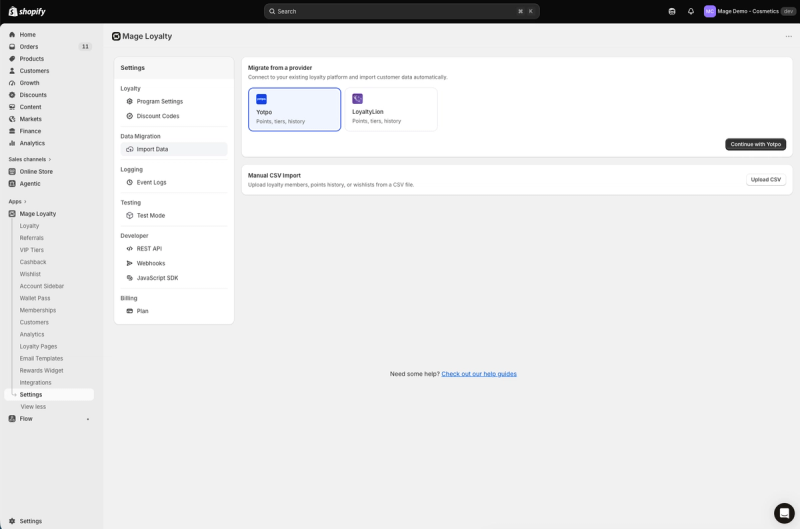
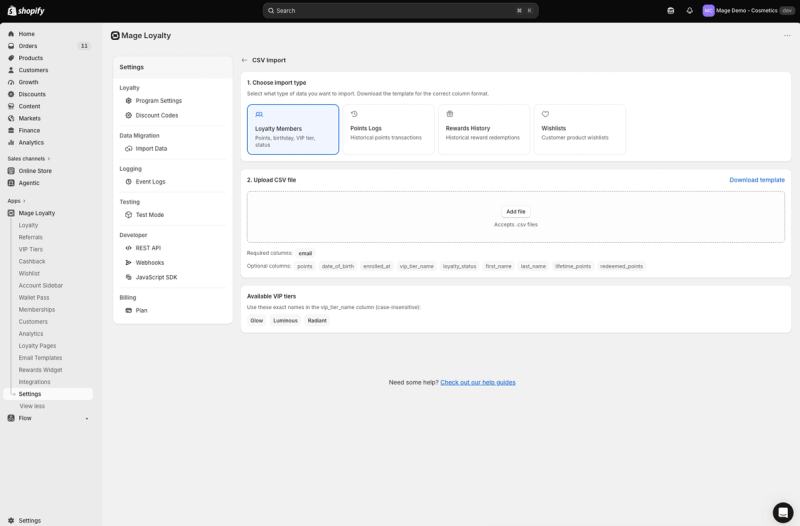
If you use Mage, go to Settings > Data Migration > Import Data. Its Loyalty Members CSV import supports balances, VIP tiers, birthdays, enrollment details, lifetime points, redeemed points, and loyalty status. See the CSV import guidance for accepted member fields.
Plan for orders created during the freeze
Define how you will treat orders, refunds, referrals, and manual adjustments created during the window. For example, an order paid during the freeze may need a post-launch adjustment under the new rules.
“Cannot say enough good things about the team at Mage Loyalty, one of the absolute best organizations we have ever worked with, full stop! So glad we connected with them, completely redid our loyalty program, new concepts, use of loyalty, increasing user engagement, showing us where we were not valuing our best customers, just WOW, amazing team!”


Read the West Coast Goalkeeping case study →
Import the new balances and verify the customer experience
| Test area | Expected result | Owner | Pass/fail |
|---|---|---|---|
| Customer import | Correct balance and tier | Migration owner | |
| Account view | Credit shown in correct format | Ecommerce owner | |
| Checkout | Reward or credit behavior matches policy | Checkout owner | |
| Refund | Balance adjustment follows policy | Operations owner | |
| Email profile | New fields render correctly | CRM owner | |
| Support macro | Team explains conversion consistently | Support lead |
Map the transformed file
Check emails for duplicates, invalid formatting, missing customers, and records excluded from the loyalty program before loading balances.
Mage matches Loyalty Members imports to existing Shopify customers by email. Customers must already exist in Shopify, and matching VIP tiers must be created before importing tier assignments.
Load balances and supporting records
Import converted balances through the destination system’s approved workflow. In Mage, Loyalty Members is the relevant import type for member balances and profile details. Points Logs and Rewards History imports can retain historical activity where needed.
Do not force historical activity into the current balance field. Current credit, historical earning, historical redemptions, and tier status answer different reporting questions.
Test representative customer types
Test a customer with no balance, a small balance, a high balance, an active VIP tier, and pending, recently redeemed, or recently refunded activity.
Check the visible currency label, decimal formatting, balance amount, expiry treatment, tier status, reward eligibility, and minimum-spend rules across the loyalty page, account, widget, and checkout.
Check checkout, accounts, POS, refunds, and expiry
Shopify-native store credit has different behavior from an app-managed loyalty balance. Shopify says native store credit can be used by customers signed in through new customer accounts or Shop Pay, and is available on the online store, Shopify POS, and Shop, subject to Shopify restrictions, in its store credit documentation.
Mage’s loyalty store-credit mode is a Mage-managed ledger. Do not describe it as the customer’s Shopify-native store-credit account.
Test refunds, redemptions, manual adjustments, expiry, and POS behavior where relevant. Use Test Mode or a limited internal audience before making the new experience visible to all customers.
Replace Klaviyo variables, email logic, and points-based images
| Surface | Old points reference | New store-credit reference | Updated | Tested |
|---|---|---|---|---|
| Welcome flow | Signup points | Opening credit or program message | ||
| Balance email | Points balance | Store-credit balance | ||
| Expiry flow | Points expiring | Credit expiry policy | ||
| Loyalty page banner | Points threshold | Credit value or reward message | ||
| Account module | Points label | Store-credit label | ||
| Support macro | Points conversion | Approved conversion explanation |
Audit profile properties and event triggers
Search Klaviyo templates, flows, campaigns, forms, SMS messages, landing pages, and support macros for “points,” “pts,” “earn points,” old thresholds, and expiry language.
Mage’s Klaviyo loyalty integration syncs loyalty data to customer profiles and supports loyalty-triggered flows. Confirm the fields available in your setup before rewriting templates.
Rewrite balance and reward language
Review flow filters as well as copy. Mage’s documented events include Points Awarded, Reward Redeemed, VIP Tier Changed, Cashback Credited, and Cashback Code Issued. A flow built around a points-only event may need to be paused, rewritten, or replaced.
Use updated language consistently in your loyalty email templates. The customer should not receive a credit email that links to a page still showing points.
Update image assets and dynamic blocks
Audit every image with points baked into the design, including email banners, product-page badges, loyalty graphics, popups, account drawer content, and Rewards Widget art.
Mage Canvas can update customer-facing loyalty surfaces without code, including loyalty pages, the Rewards Widget, account sidebar content, referral campaigns, wishlist, and saved-for-later surfaces.
Send a controlled test series
Send test messages to internal profiles with zero, low, medium, and high balances. Check dynamic fields, fallback copy, mobile rendering, and link destinations.
Decommission the old loyalty views instead of leaving two currencies live
Remove old widgets and theme snippets
Once QA passes, disable the old app embed, widget, app blocks, theme snippets, checkout blocks, navigation links, and account links.
Check custom theme code and customer metafields too. A legacy header badge or account snippet can survive after the main widget has been removed.
Archive legacy pages and links
Replace old loyalty URLs or redirect them to the new loyalty page where appropriate. Remove old links from the footer, post-purchase content, account menus, email templates, SMS templates, and help content.
Keep a private archive of the old reward table, rules, export, and migration policy for support and reconciliation.
Retire obsolete rewards and automation
Deactivate old earning rules, points rewards, bonus campaigns, expiry notices, referral messages, and automated flows that refer to points. Check scheduled sends carefully.
Prepare a support macro with the conversion formula, launch date, expiry treatment, refund policy, and escalation route.
Relaunch with a store credit drop and measure the migration
Announce the new currency
Send a launch message explaining the customer’s old balance, new credit value, where to view it, and how to use it. Explain any expiry policy, VIP treatment, or pending-balance process.
MiaDonna provides one implementation example. Its store-credit program gives customers $1 in store credit for every $20 spent, and customers spend that balance like cash at checkout.
Schedule a targeted credit drop
A modest credit drop can give customers a reason to revisit the program. In Mage, schedule a one-time amount for a selected Shopify customer segment or VIP tier, with an expiry window.
Announce it separately. Use a defined audience and a clear expiry date so the bonus remains measurable.
For a wider recovery plan, see how to relaunch a loyalty program.
Measure more than redemption
Review delivered messages, account visits, visible balances, first redemption, repeat purchases, contribution margin after credit, support contacts, failed imports, and unexpected balance changes.
Use seven, 30, and 60 days as review points. Separate converted-balance redemptions from bonus-drop redemptions before adjusting the new program economics.
For help designing a store-credit program around your Shopify setup, explore the Shopify loyalty program page or book a demo.
FAQ
What is the safest way to convert points to store credit?
Preserve the approved redeemable value, document the formula, freeze activity briefly, and reconcile every imported balance. Keep pending activity separate and retain an exception log for orders and refunds created during the freeze.
How do I calculate a points conversion rate migration?
Multiply the current points balance by the cash value of one point. If 500 points redeemed for $5 off, each point was worth $0.01, so 1,000 points become $10 in credit. Account for minimum spends, caps, expiry rules, and rounding before importing.
How do I migrate loyalty balances without losing VIP tiers?
Import tier assignments separately from the currency conversion and create matching tiers before import. A customer’s current tier can remain unchanged even when their balance changes from points to store credit.
How do I update Klaviyo after switching from points to credit?
Audit profile properties, event triggers, flow filters, dynamic variables, SMS content, and image assets. Confirm the properties available in your loyalty setup, then test messages against profiles with zero, low, medium, and high balances.
Can Shopify store credit be used at checkout after a loyalty migration?
Shopify store credit can be used at checkout when the balance is Shopify-native store credit and the customer is signed in through new customer accounts or Shop Pay. Shopify also supports it on the online store, Shopify POS, and Shop. See Shopify’s store credit guidance.
Should I give customers a bonus when I relaunch loyalty as store credit?
A customer bonus can support a relaunch when it is funded, targeted, time-bound, and measured separately from migrated balances. Use a defined audience, set an expiry window, and evaluate repeat purchases and margin rather than redemption volume alone.
A points-to-credit migration is complete when customers see one understandable balance everywhere they interact with your brand. Preserve the value they earned, test the operational edges, remove the old currency completely, and relaunch with a clear reason to return.

Graeme is the co-founder at Mage Loyalty. He heads product development, from complex loyalty migrations and large-scale data handling to building the features shaping the future of loyalty on Shopify.