Shopify merchants generated $14.6 billion in BFCM sales in 2025, so a black friday store credit campaign needs to give customers a reason to return before promotional inboxes hit full volume. The play is simple: let customers earn credit before BFCM, hold it through your returns window, then release it when holiday shopping is about to begin.
Short answer: A strong black friday store credit strategy starts about 31 days before you want customers to receive their credit. Schedule a cashback offer, hold approval through the returns window, then email customers when their store credit is ready during the week before BFCM. Set eligibility, credit limits, expiry, and margin exposure before launch.
Why release store credit before Black Friday instead of during BFCM
A BFCM discount asks a customer to buy now because the price is lower. Store credit gives them value they have already earned and can use on a later order.
Use the period before BFCM to create a balance customers expect to spend during BFCM. This can sit inside a broader Shopify loyalty program without replacing points, VIP tiers, or other earning rules. Mage Cashback can run alongside a points program, so the seasonal offer does not require rebuilding your existing loyalty mechanics.
Why the week-before inbox matters
Cyber Week generated $44.2 billion in US online sales during 2025, including $11.8 billion on Black Friday and $14.25 billion on Cyber Monday. Waiting until those peak days means your message competes with every other sale announcement.
A credit-ready email sent the week before gives customers time to decide what they want from you. Compare the campaign against a holdout group or a prior-period campaign, then judge whether the second purchase was incremental and profitable.
“Cannot say enough good things about the team at Mage Loyalty, one of the absolute best organizations we have ever worked with, full stop! So glad we connected with them, completely redid our loyalty program, new concepts, use of loyalty, increasing user engagement, showing us where we were not valuing our best customers, just WOW, amazing team!”

Read the West Coast Goalkeeping case study →
Step 1: Pick the credit release date and work backward
| Campaign milestone | Recommended timing | What the merchant does | Customer-facing message |
|---|---|---|---|
| Credit release date | Week before BFCM | Choose when approved credit should appear | Your credit is ready |
| Offer launch | Approval delay before release | Start qualifying cashback offer | Earn credit on qualifying orders |
| Reminder | Near offer end date | Remind eligible customers to qualify | Last chance to earn holiday credit |
| BFCM follow-up | Black Friday through Cyber Monday | Connect available credit to holiday products | Use your credit at checkout |
The timing formula
Start with the date you want customers to receive approved credit. Then subtract your approval delay.
If your returns window is 31 days and you want credit released on November 18, launch the qualifying offer around October 18. Use your store timezone and verify the scheduled dates in your app before publishing campaign emails.
A 2026 example
Black Friday falls on November 27, 2026, and Cyber Monday falls on November 30. A November 16 through November 20 credit-release window gives customers several days to see their balance before the main sale period.
A workable calendar looks like this:
- October 18: qualifying cashback offer starts.
- Early November: remind customers that qualifying orders can earn credit.
- November 18: approved credit begins to release.
- November 24 to 27: send the BFCM message to customers with available balances.
When 31 days is not the right delay
A 31-day delay is useful when it matches your returns policy. Shorter return windows can support a shorter approval time, while longer windows require more caution.
Youswim uses a 31-day returns period before issuing cashback as store credit. That is a useful operational example, not a default every merchant should copy.
How to build a black friday store credit strategy around margin
| Setting | Use it when | Margin control | Common mistake |
|---|---|---|---|
| Flexible cashback | Credit should scale with spend | Add a maximum per order | Leaving high-AOV orders uncapped |
| Fixed cashback | Every qualifying order earns the same amount | Set a minimum order amount | Paying the same credit on small and large carts |
| Shopify Segment or VIP tier | The offer is for a defined audience | Limit exposure to high-value customers | Giving broad eligibility without a budget |
| Product or collection targeting | Only selected items support the offer | Exclude low-margin products | Applying the offer across the full catalog |
| Maximum awards per customer | The campaign should pay once | Prevent repeated earning | Forgetting the default award limit |
Choose flexible or fixed credit
Use flexible cashback when credit should rise with order value. For example, a rate of 5% on a $100 qualifying product subtotal produces an illustrative $5 credit.
Use fixed cashback when you want a simple message, such as a set amount back on a qualifying order. Fixed rewards need a minimum order amount so the incentive does not overwhelm margin on small carts.
Mage Cashback calculates rewards from product subtotal, excluding tax and shipping. Build your economics from that number, not the final amount shown at checkout.
Set qualification rules
Decide who should earn the offer before you decide how loudly to promote it. You can target all customers, new customers, a Shopify Segment, or a VIP tier. You can also limit eligibility to specific products or collections.
For replenishment-led businesses, a seasonal credit can give regular customers a reason to stock up before gift shopping begins. The same logic can apply in a food and beverage loyalty program, where repeat buying cycles may be shorter than in a high-consideration category.
Set a maximum per order for flexible offers and a maximum awards per customer if each person should earn once. Mage defaults the award limit to one, so check that setting before assuming an always-on offer will reward every order.
Estimate maximum liability before launch
Calculate three figures:
- Maximum credit issued if every eligible customer qualifies.
- Expected credit redeemed based on your own historical behavior.
- Contribution margin after redeemed credit, shipping, product cost, and any stacked promotion.
The conservative budget is the first figure. Do not treat unredeemed credit as guaranteed profit. It remains a customer liability until expiry or another valid accounting treatment.
If you need a wider planning framework, use this guide to budget for a loyalty program. The campaign should have a pre-agreed cost ceiling before it becomes a promotion.
Step 3: Configure the campaign in Mage Cashback
Create and schedule the offer
In Shopify admin, open Mage Loyalty, select Cashback, and choose Create Offer. Give the offer an internal name that includes the year, audience, reward, and approval period, such as “BFCM 2026 Existing Customers 5% 31 Day.”
Choose flexible or fixed cashback, add your qualifying conditions, set the approval time, then schedule the start and optional end date. Leave it as Draft while you review the setup. Set the status to Active only when the campaign is ready to award cashback.
Mage Cashback supports an approval time in days, including a 31-day delay before payout.
Choose store credit or discount code
Choose Shopify store credit when you want a balance applied at checkout on a future order. Choose a single-use, customer-locked discount code when the campaign needs a specific fixed-value code and defined discount-combination rules.
Shopify store credit is available online when customers sign in with customer accounts or Shop Pay, and it is not available for legacy customer accounts. Confirm your account configuration before promising customers they can spend a balance at checkout.
Discount-code notifications are off by default. Turn on Mage email templates or build the notification in Klaviyo so customers receive the code when it is approved.
Test the customer path
Place a real test order where possible. Check that the cashback enters Pending status, then confirm approval timing, customer balance visibility, checkout use, and refund behavior.
Mage automatically reverses cashback when an order is cancelled or refunded. Partial refunds reduce the cashback proportionally. That is why this tactic should use Cashback, not a Points Drop. A Points Drop adds a scheduled flat bonus to an audience, while this campaign depends on a qualifying order and approval hold.
Step 4: Use a pre Black Friday email strategy that earns the return visit
| Send timing | Audience | Core message | Primary CTA | |
|---|---|---|---|---|
| Earning-window launch | Offer start | Eligible customers | Earn credit on qualifying orders before BFCM | Shop qualifying products |
| Qualification reminder | Before offer closes | Eligible customers without qualifying order | Deadline and conditions | Earn your credit |
| Credit-ready notice | When credit is approved | Customers with approved credit | Your balance is ready to spend | Shop with credit |
| BFCM balance reminder | Start of BFCM | Customers with available credit | Use your existing balance on holiday products | Apply credit at checkout |
Email 1: announce the earning window
Explain what customers need to buy, when the offer runs, how much credit they can earn, and when it is expected to become available. Say that credit is held through the returns period, then released automatically once approved.
Email 2: remind customers before the offer closes
Make the deadline clear. Mention the qualifying collection or minimum order requirement, then use one strong call to action.
Suppress customers who have already qualified unless you are sending a different message about their pending credit.
Email 3: announce that credit is ready
Lead with the value waiting for the customer. “You have $X in store credit ready to use” is clearer than a vague loyalty message.
Send customers to a landing page, account area, or collection where they can see the balance and immediately shop. Use loyalty email templates as a starting point, then adapt the copy to your approval rules and BFCM assortment.
Email 4: connect the balance to BFCM
Send this shortly before Black Friday or at the start of your sale. Connect the existing balance to products customers may want to buy now, including gifts, bundles, replenishment items, or best sellers.
A Shopify survey found that 84% of consumers said they would compare prices to find the best BFCM deals. Tell customers what is available, where it applies, and whether it can combine with sale discounts.
Use Klaviyo or another connected messaging platform for event-based email and SMS. Mage does not send SMS directly.
Step 5: Make the credit visible where customers shop

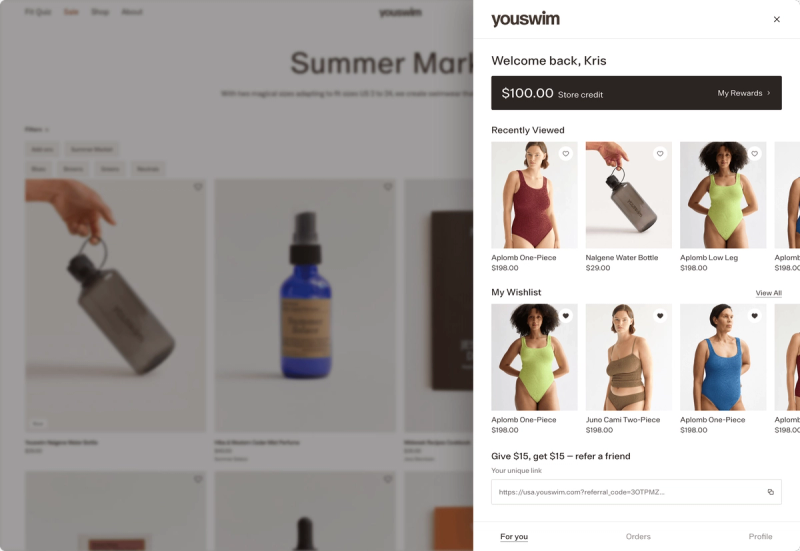
Account and checkout visibility
The email should not send customers into a scavenger hunt. Land them somewhere they can confirm their balance and understand how it applies.
Shopify displays store credit at checkout for signed-in customers using customer accounts or Shop Pay, subject to its store credit requirements and channel restrictions. Validate the full customer path before launch.
If you use Mage, surface the relevant balance through the loyalty page, customer account experience, or configured checkout extensions.
Product and collection messaging
Use a simple line on the landing page: “Your credit is ready. Apply it at checkout.” If the offer only applies to selected products or collections, show those items directly.
Explain minimum purchases, expiry, and whether the credit can combine with BFCM promotions.
Use the balance as a decision aid
Store credit works best when it reduces hesitation. MiaDonna makes its store credit visible in the cart and at checkout. Show customers what their earned value is worth before the payment step.
Step 6: Measure the campaign after BFCM, not just at launch
Primary measures
Track qualifying orders, issued credit, approved credit, redeemed credit, redemption rate, average order value, and contribution margin after credit. Separate customers who received credit from those who actually redeemed it.
Mage Cashback activity lets you inspect Pending, Approved, Rejected, Cancelled, and Refunded records. Review those statuses after the campaign, not only during launch week.
Margin and retention measures
Measure the time from approval to redemption. Then measure how many redeemers purchase again after their BFCM order.
A high email open rate or large issued-credit total does not prove the campaign created profitable retention. Compare the campaign group with a holdout group where practical, and avoid claiming incremental lift without that comparison.
The post-campaign decision
Use the results to decide whether to repeat the offer, narrow the audience, alter the delay, or change the reward rate. For a wider framework, see the BFCM second-purchase playbook.
FAQ
What is a black friday store credit strategy?
A black friday store credit strategy awards credit from qualifying orders before BFCM, holds it through the returns window, then tells customers when the balance is ready to spend. The purpose is to create a funded reason for a customer to return during holiday shopping, rather than only lowering the price of the first order.
How far before Black Friday should I launch a store credit campaign?
A store credit campaign should launch far enough before Black Friday to cover the intended approval delay and returns window. With a 31-day delay, start roughly 31 days before the planned release date, then adjust for your store’s policy, timezone, campaign end date, and operational ability to handle refunds.
Can Shopify issue store credit automatically?
Shopify store credit can be used automatically at online checkout when the customer is signed in through customer accounts or Shop Pay. An automated qualifying-order campaign also needs a loyalty or cashback workflow that calculates eligibility, holds the reward through approval, and applies or reverses credit as orders change.
Should I use bonus points before Black Friday or store credit?
Store credit is usually easier to explain when the message is “you have money waiting to spend.” Points can work well when customers already understand your points program and redeem regularly. Choose based on customer familiarity, margin, account setup, and whether you need an order-based approval delay.
How do I write a pre Black Friday email strategy?
A pre Black Friday email strategy should include an earning-window announcement, a deadline reminder, a credit-ready message, and a BFCM balance reminder. Segment customers by whether they qualified, have pending credit, hold approved credit, or already redeemed, so each message reflects their actual status.
How do I protect margin in a BFCM store credit campaign?
A BFCM store credit campaign protects margin with a minimum order amount, maximum per-order credit, customer award limit, product targeting, and conservative liability forecast. Calculate credit from product subtotal, exclude tax and shipping, and ensure refunded or cancelled qualifying orders reverse the associated credit.
Pick the release date first, then work backward through the returns window.

Graeme is the co-founder at Mage Loyalty. He heads product development, from complex loyalty migrations and large-scale data handling to building the features shaping the future of loyalty on Shopify.