Bundles are one of the simplest ways to raise your average order value: buy two and save, a starter kit at a set price, or a box customers fill themselves. The app you choose decides which of those you can offer, how good they look on your product pages, and how much you pay as bundle sales grow. I've used all five apps in this guide with Mage merchants, and set each one up again on my own store to compare them side by side.
This guide is written by Graeme, co-founder of Mage. Mage is a loyalty and customer accounts platform for Shopify. We don't sell a bundle app, and none of the apps here is a Mage partner.
Our quick picks
- Best overall: Kaching Bundles. Quantity breaks, buy X get Y and free gifts presented as easy cards, with A/B tests of up to five versions.
- Best for build-your-own bundles: Easy Bundles. The most modern builder of the five, with no-code design and custom CSS and JavaScript when you need it.
- Best for the widest range of bundle types: Fast Bundle. Every bundle type in one app, plus AI touches such as bundle images generated from your products.
- Best free plan: Bundler. Simple, reliable bundles with no cap on how much you sell.
- Best if you also want free gifts: BOGOS. Basic bundles alongside the free gifts, discounts and upsells it is known for.
The five apps compared
| App | Free plan | Price at about $3,000 a month in bundle sales | How pricing scales | Bundle types | My setup time | App Store rating |
|---|---|---|---|---|---|---|
| Kaching Bundles | Development stores only | $29.99 (Scale, up to $5,000 extra revenue) | By extra revenue from bundles | Quantity breaks, BXGY, complete the bundle, subscription, progressive gifts | Under 5 minutes | 5.0 (6,381) |
| Easy Bundles | Up to $500 in bundle sales | $29 (Essential, up to $3,000) | By bundle sales | Mix and match, pre-curated, quantity breaks | About 15 minutes | 4.9 (1,433) |
| Fast Bundle | Development stores only | $49 (up to $3,000) | By bundle sales | Fixed, volume, BXGY and free gift, mix and match, bundle builder page, add-ons | About 10 minutes | 5.0 (3,564) |
| Bundler | Yes, unlimited revenue | Free, or $9.99 for mix and match | Flat, no caps | Classic, quantity breaks, frequently purchased, standalone product, volume, mix and match | About 5 minutes | 4.9 (2,737) |
| BOGOS | First 30 orders | From $29.99 (by orders, tied to your Shopify plan) | By orders | Classic, mix and match (builder and product page on paid plans) | About 10 minutes | 5.0 (4,506) |
Pricing and App Store ratings as listed on 17 October 2026.
How I used these apps
I've used each of these apps on live Mage merchant stores, from Kaching Bundles across several clients and plans to shorter setups with Bundler and BOGOS. To compare them fairly, I set each one up again on my own Shopify store with the same snowboard products, so the screenshots show no merchant data. Where a report needed real sales to show anything, I've described it instead of showing an empty screen.
These are the factors I weighed most:
- Bundle types. Which offers you can build: quantity breaks, fixed bundles, mix and match, free gifts.
- The builder. How quickly you can get a good-looking bundle onto a product page, and how much control you have.
- Testing and reporting. Whether you can A/B test offers and see what bundles add.
- Cost as you grow. Most bundle apps cap plans by bundle sales or orders, so the entry price can mislead.
1. Kaching Bundles: best for quantity breaks and A/B testing
Best for: stores that want quantity breaks, buy X get Y deals and free gifts on the product page, and want to test which offer sells best.
Pricing: free on development stores; Starter $14.99 a month (up to $1,000 in extra revenue from bundles), Scale $29.99 (up to $5,000) and Pro $59.99 (up to $10,000), with higher tiers for larger stores and a 7-day free trial (as of 17 October 2026).
App Store rating: 5.0 from 6,381 reviews (as of 17 October 2026).
Kaching Bundles is to the point: it does one job and does it well. It gives you a big variety of bundle offers, each presented as an easy-to-understand card, and getting the one you pick onto your storefront and product pages is dead simple. I've used it with several Mage clients across different plans, and the screenshots here come from my own store.
Setting it up
The dashboard opens with a founder-led video that walks through the app in two to three minutes. On install, Kaching picks up your brand colours from your store automatically, so the widgets match your theme before you've changed a setting. My first bundle was live on a product page in under five minutes.
Bundle types and offers
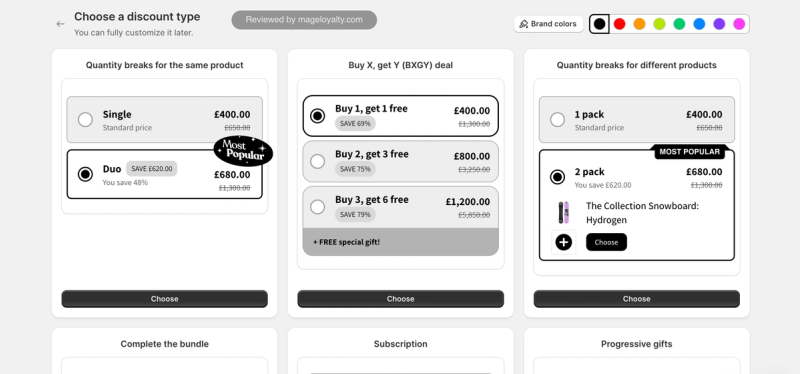
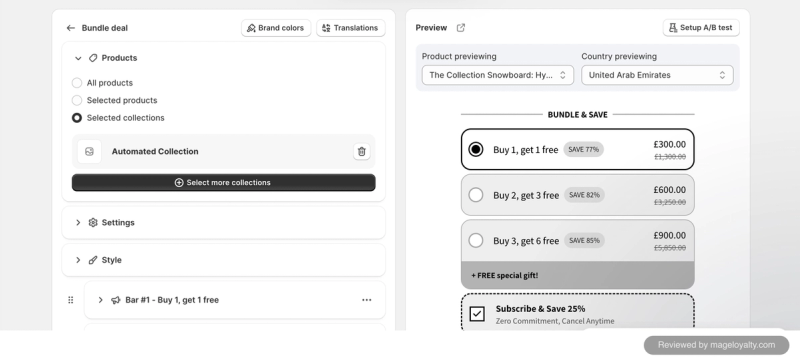
You start by choosing a discount type: quantity breaks for the same product, buy X get Y deals, quantity breaks across different products, complete-the-bundle offers, subscription bundles and progressive gifts. Each one opens in the same builder, which is easy to use and configure. You choose which products, selected products or whole collections the offer applies to, with exceptions, then set each tier as its own bar, such as "Buy 1, get 1 free" and "Buy 2, get 3 free".
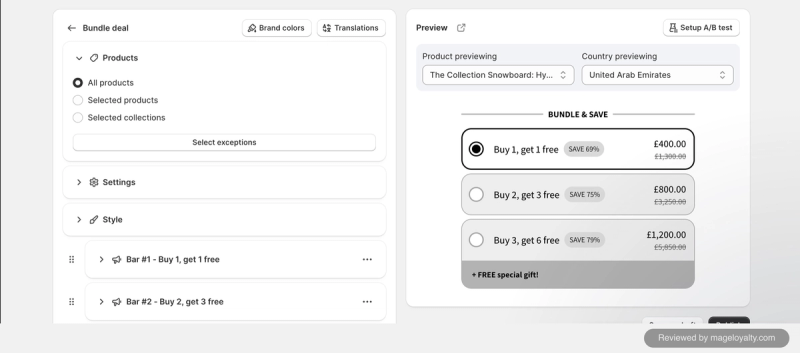
Offers can carry a free gift on the top tier, a separate "unlock free gifts with your order" block such as free shipping, and a subscribe and save option alongside the bundle.
What shoppers see
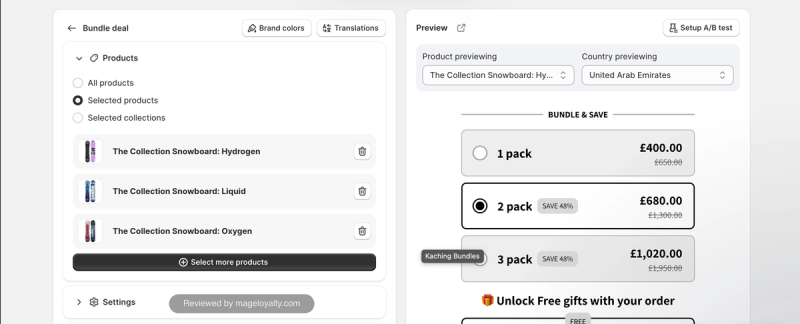
The builders are thorough: colour pickers, spacing and corner radius controls, and a choice of layouts. You can preview the widget on different products and in different countries, which is useful for checking prices in other currencies, and the translations sit beside the brand colours in the editor.
Measuring results
A/B testing is built into every bundle. You design one version for A and another for B, and you can add more variants beyond two, so a test can compare three, four or five versions. The analytics track revenue, the extra revenue from bundles, bundle orders, visitors, conversion rate, average order value, revenue per visitor and add-to-carts, with a CSV export.
Drawbacks
- The builder is thorough, but it feels a little clunky and outdated, and it hasn't moved to Shopify's latest Polaris design yet.
- Pricing is metered on the extra revenue bundles bring in, so the bill rises as your bundles succeed. Rising costs are the most common complaint in its App Store reviews.
Kaching also makes Kaching Cart, which features in our cart upsell app roundup. If you want a free plan without revenue limits, Bundler is the alternative.
Kaching Bundles on the Shopify App Store
2. Easy Bundles: best for build-your-own bundles with a modern builder
Best for: stores that want shoppers to build their own bundles, or want fully designed bundle pages without code, inside the Shopify admin.
Pricing: free up to $500 a month in bundle sales; Essential $29 (up to $3,000), Growth $49 (up to $5,000) and Scale $99 (up to $10,000). Stores on Shopify Plus or Advanced start on Growth (as of 17 October 2026).
App Store rating: 4.9 from 1,433 reviews (as of 17 October 2026).
Easy Bundles has the most modern builder of the apps I've used for this roundup. It is fully fledged: great if you want to build everything without code, with custom CSS and JavaScript there when you need more flexibility. It also runs inside the Shopify admin. I've used it on the free plan for a Mage merchant, and the screenshots here come from my own store.
Setting it up
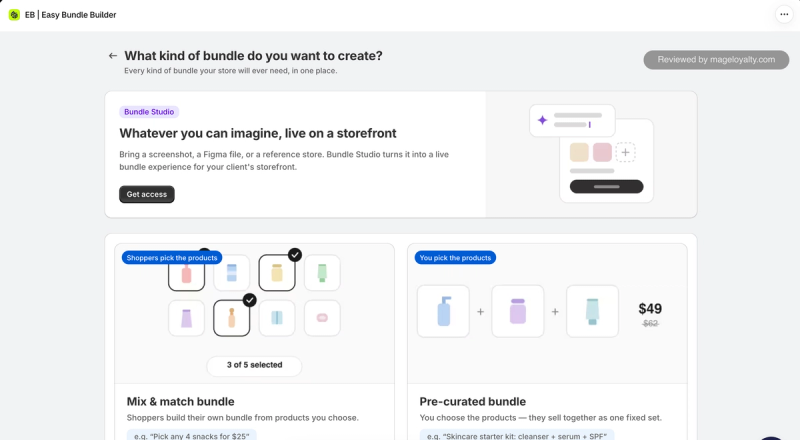
You start by choosing what kind of bundle to create: a mix and match bundle, where shoppers build their own from products you choose ("pick any 4 snacks for $25"), or a pre-curated bundle, where you choose the products and they sell as one fixed set ("skincare starter kit: cleanser, serum and SPF"). Bundle Studio, which you request access to, turns a screenshot, a Figma file or a reference store into a live bundle page. When the editor first opens, it reads your store's branding so the bundle starts out matching your theme. My first bundle took about 15 minutes to set up.
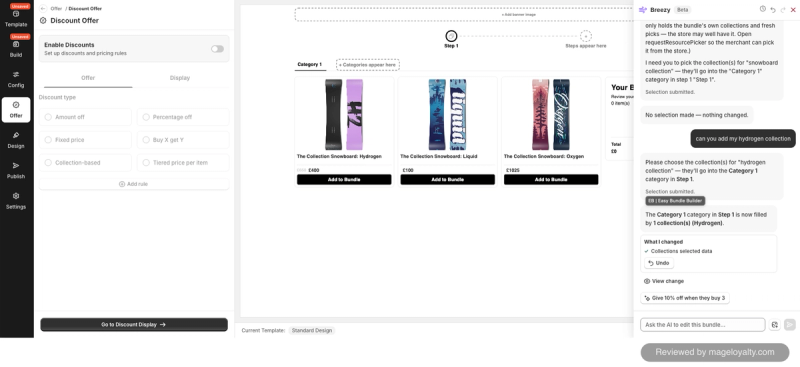
The editor has its own AI assistant, Breezy, in beta. It was okay, but it didn't quite do what I wanted. When I asked it to add my Hydrogen collection, it gave me a button to open the collection picker rather than adding it for me. That's a reasonable middle ground, and better than nothing.
Bundle types and offers
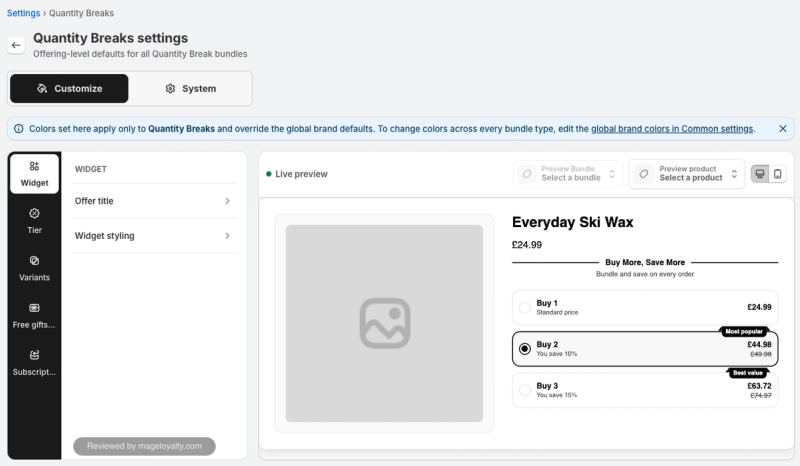
Each bundle's offer can be an amount off, a percentage off, a fixed price, buy X get Y, a collection-based discount or a tiered price per item, and you can add more than one rule. Quantity breaks have their own settings for tiers, variants, free gifts and subscriptions, and pre-curated bundles support subscriptions and tiered bundles too.
What shoppers see
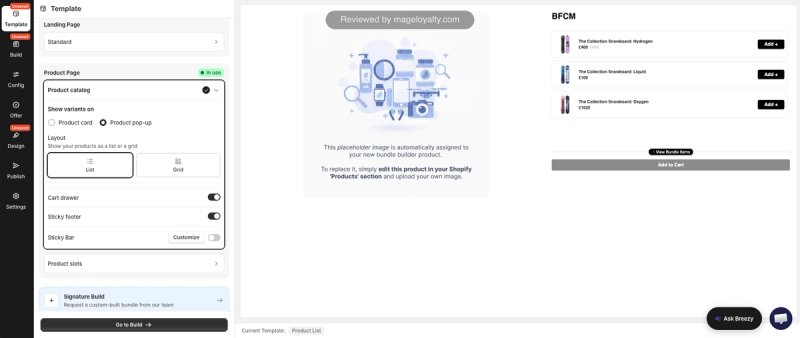
The design controls go further than the other apps here. A bundle can have its own landing page, and the product page template lets you show variants on the product card or in a pop-up, lay products out as a list or a grid, and switch on a cart drawer, a sticky footer and a sticky bar. If you want something bespoke, a Signature Build lets you request a custom-built bundle from the Easy Bundles team.
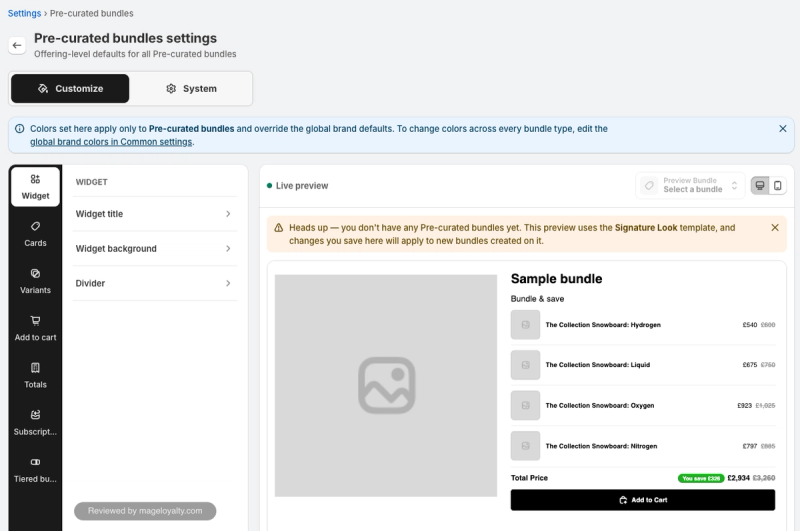
Defaults can be set for each bundle type, covering the widget, product cards, variants, add-to-cart button, totals, subscriptions and tiered bundles, with a live preview on desktop or mobile.
Drawbacks
- Breezy, the AI assistant, is still in beta and doesn't always carry out a request itself. It can hand you the right tool to finish the job instead.
- Plans are capped by monthly bundle sales, and stores on Shopify Plus or Advanced can't use the free or Essential plans.
- Several App Store reviewers found it complex and needed a call with the team to configure their bundles.
If you mainly want quantity breaks on product pages, Kaching Bundles is quicker to set up.
Easy Bundles on the Shopify App Store
3. Fast Bundle: best for the widest range of bundle types
Best for: stores that want every kind of bundle in one app, from fixed bundles and volume discounts to mix and match, add-ons and a bundle builder page.
Pricing: free on development stores; Standard plans are $19, $49 or $139 a month, capped at $1,000, $3,000 or $10,000 in monthly bundle sales, with higher plans for larger stores (as of 17 October 2026).
App Store rating: 5.0 from 3,564 reviews (as of 17 October 2026).
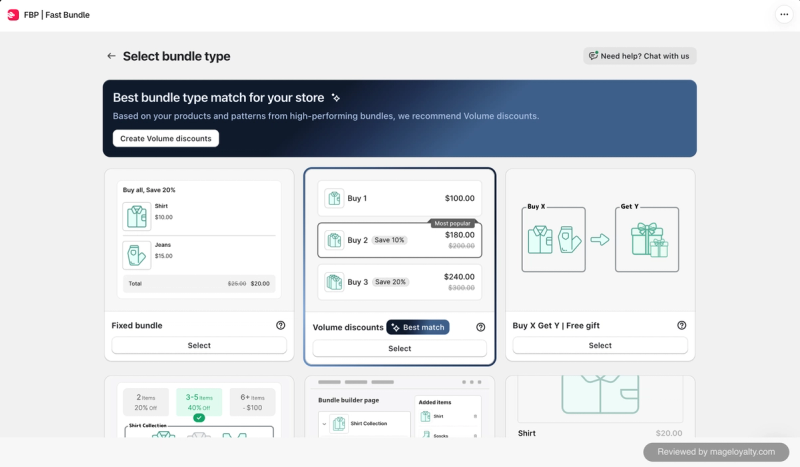
Fast Bundle's bundle options are vast, the widest range of any app here. It even suggests where to start: when I opened the bundle types, it recommended volume discounts as the best match for my store, based on my products and patterns from high-performing bundles. I've worked with Fast Bundle on a Mage merchant's store, and the screenshots here come from my own.
Setting it up
Each bundle type has a tutorial video, with a voiceover rather than a presenter on screen, which feels less personal than Kaching's founder-led video. A bundle visibility page checks the app embed and each product page widget, and opens the theme editor with the widget already added so you can drag it into place. It took me about 10 minutes to get a bundle onto a product page.
Bundle types and offers
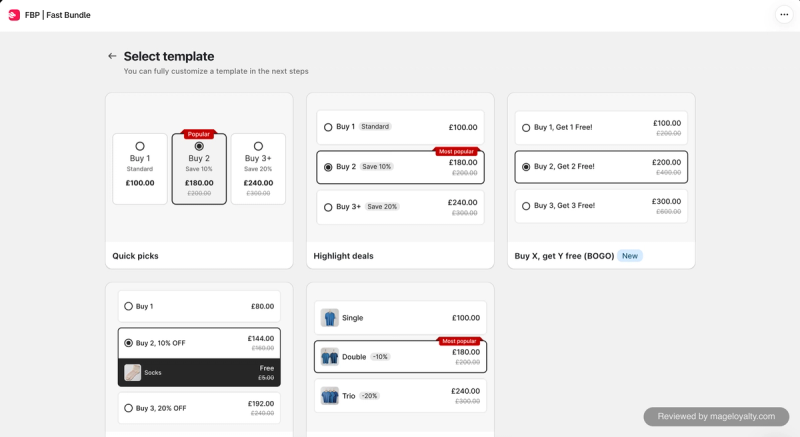
Fixed bundles, volume discounts, buy X get Y and free gifts, mix and match, a bundle builder page and product add-ons are all here. Volume discounts start from a template, such as quick picks, highlighted deals, buy one get one free, a free gift deal or visual offers with product images, and can apply to all products, a group of products or a single product. Each option has its own title, subtitle, badge and image, and a bundle can be published to Shopify POS (in beta) and limited to chosen markets.
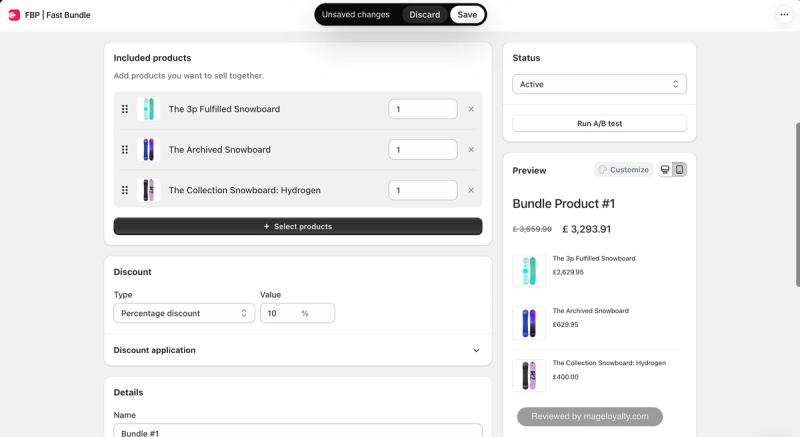
A fixed bundle combines products you choose, each with a quantity, at a percentage or fixed discount, and creates its own product page for the bundle.
What shoppers see
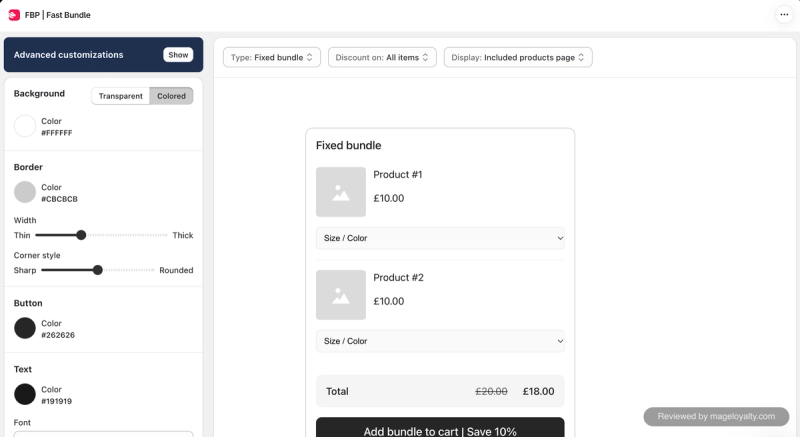
Bundle customisation is decent, with options for layouts, titles, images and markets. The designer itself is basic: background, border, corner style, button and text colours and font, with more advanced customisation reserved for paid plans. The preview is fine, but out of the box I didn't think the widgets looked as good or as punchy as Kaching's.
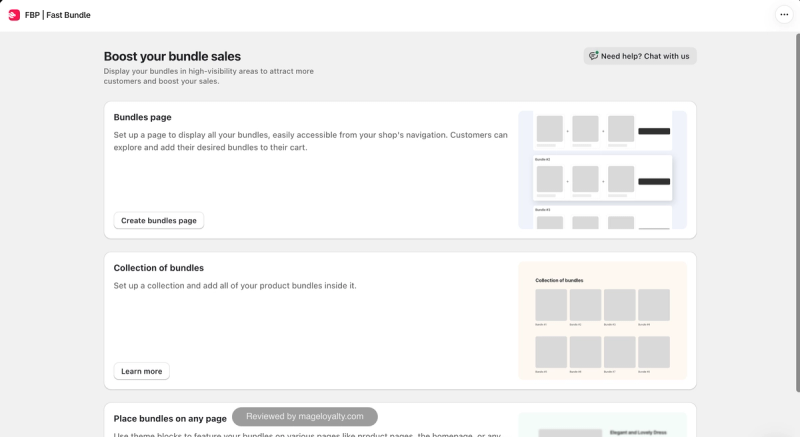
Bundle Booster helps shoppers find your bundles beyond product pages: a dedicated bundles page you can add to your store's navigation, a collection of bundles, and theme blocks to place bundles on any page.
Measuring results
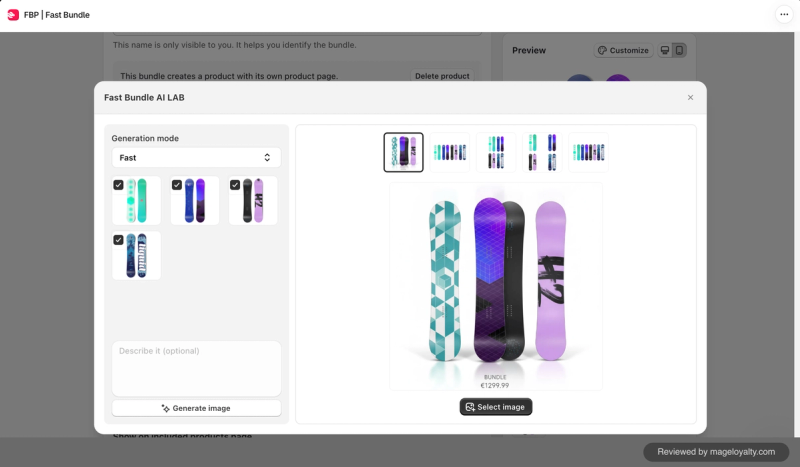
Fast Bundle has a couple of nice AI touches. An AI assistant sits at the top of the analytics, so you can ask questions about your bundle performance, alongside bundle revenue, bundles sold, add-to-carts, views and a funnel. The Fast Bundle AI Lab generates a bundle image from the products you select. A/B tests can be run on volume discounts.
Drawbacks
- The designer is basic, and the more advanced customisation needs a paid plan.
- Out of the box, the widgets look plainer than Kaching's.
- There is no free plan for live stores, and each plan is capped by monthly bundle sales. Pricing and plan limits are the most common complaints in its App Store reviews.
If you want punchier widgets for quantity breaks, Kaching Bundles is the stronger choice.
Fast Bundle on the Shopify App Store
4. Bundler: best free plan with no revenue caps
Best for: stores that want simple, reliable bundles and quantity breaks for free, with no cap on how much they sell.
Pricing: free plan with unlimited revenue, covering quantity breaks, volume discounts, buy X get Y and Shopify POS; Premium $9.99 a month adds mix and match, landing pages and funnels; Executive $19.99 a month adds analytics. No plan is capped by revenue or orders (as of 17 October 2026).
App Store rating: 4.9 from 2,737 reviews (as of 17 October 2026).
Bundler's charm is its simplicity. It is a classic bundle app: pick your bundle type, design how it looks, configure a few settings, and that's it. It doesn't do much more than that, but it does it well, and it does what it says on the tin. I've used Bundler with a Mage merchant, and the screenshots here come from my own store.
Setting it up
Setup is two steps: a welcome screen, then turning Bundler on in your theme. A video tutorial pops up on the right of the screen when you need it. It is slow but clear, and I'd recommend watching it at 1.5x speed. My first bundle was live in about five minutes.
Bundle types and offers
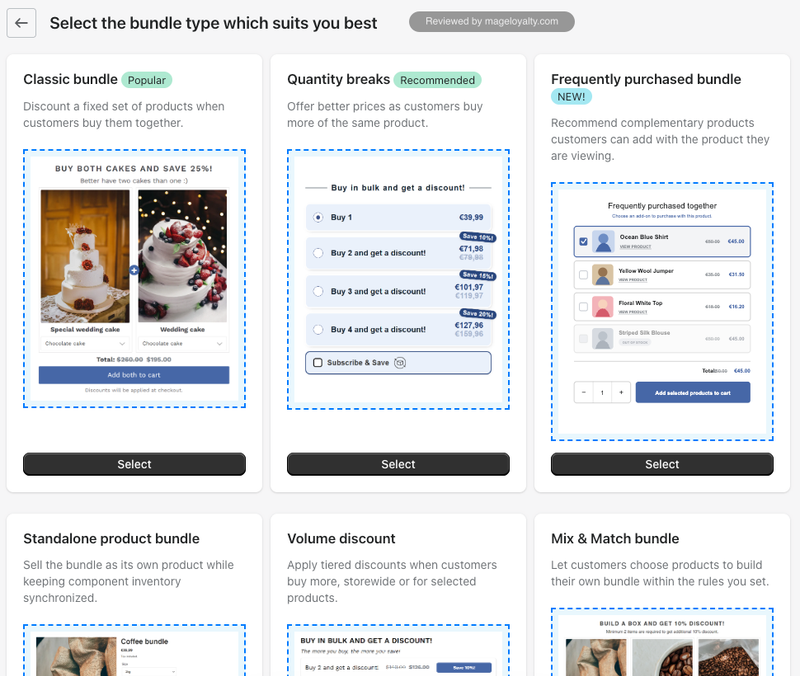
There are six bundle types to choose from: a classic bundle that discounts a fixed set of products bought together, quantity breaks, a frequently purchased bundle that suggests add-ons on a product page, a standalone product bundle sold as its own product with the component inventory kept in sync, volume discounts storewide or for selected products, and mix and match.
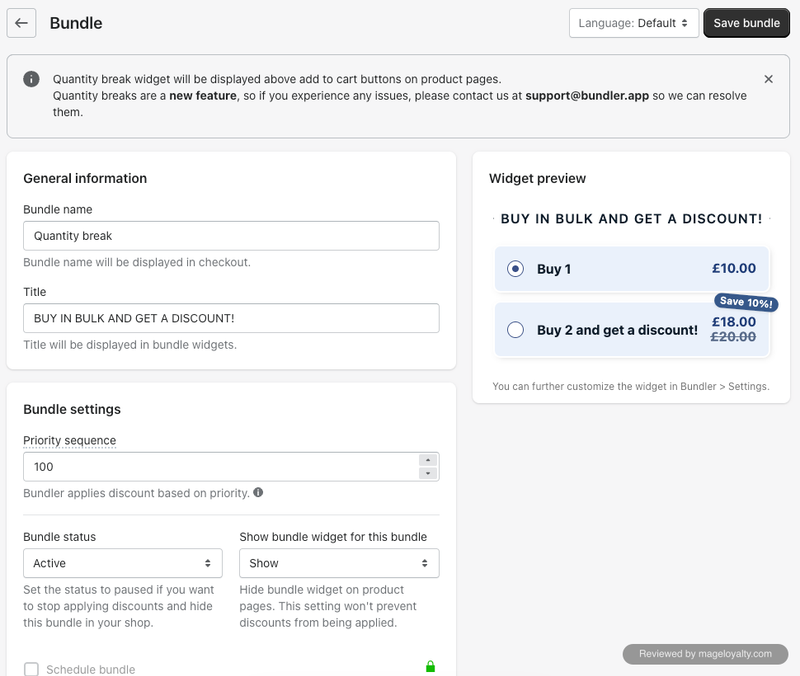
Each bundle has a short form: a name shown at checkout, a title shown in the widget, a priority for when several discounts could apply, and whether it is active and visible on product pages. Quantity breaks are set tier by tier, with a discount for each and savings text that fills itself in, such as "Save 10%". A few extras, such as scheduling a bundle, free shipping on the whole order and letting customers enter their own quantity, sit on the paid plans.
What shoppers see
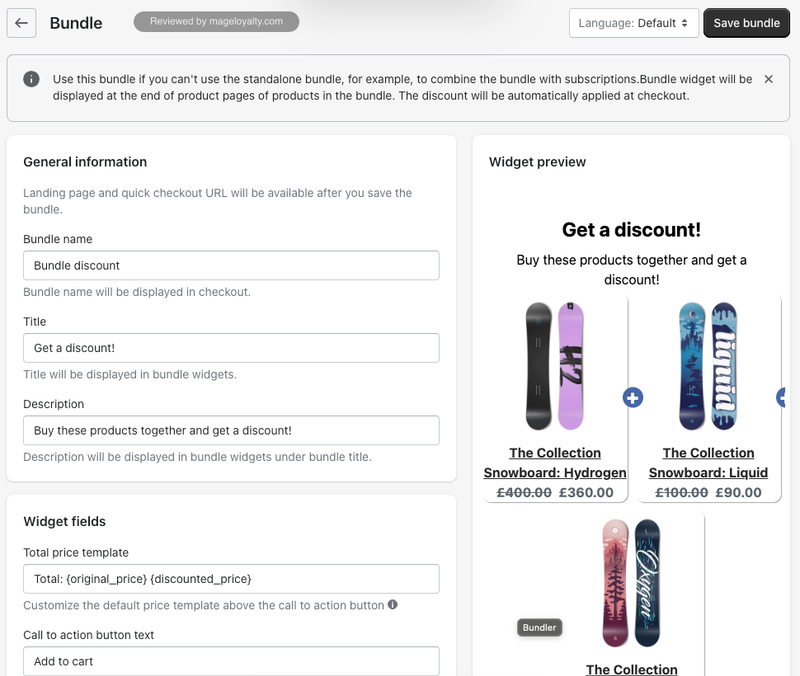
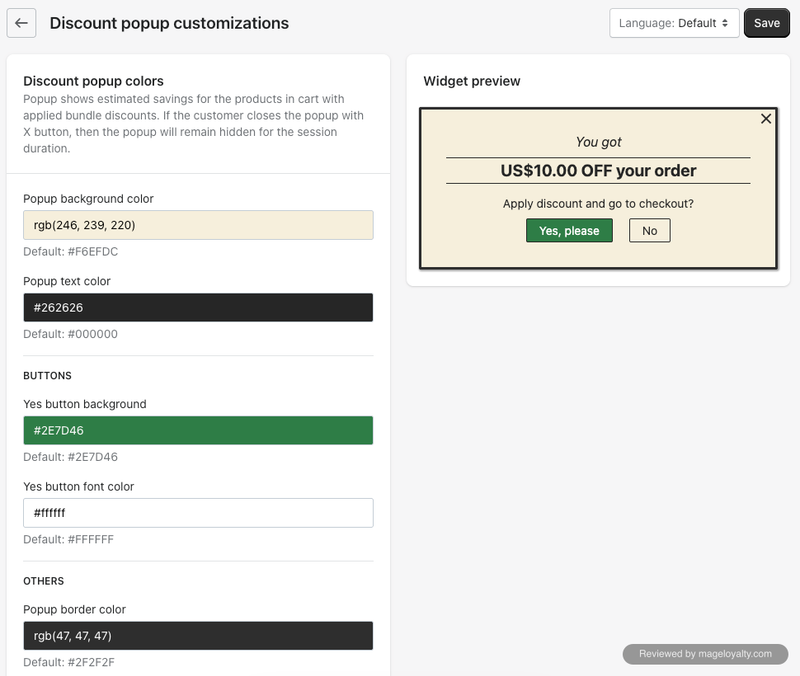
Design is handled with colour settings for the add-to-cart button, product titles and prices, plus options for where bundles appear, with a live widget preview. Every bundle can be set up in more than one language. A discount popup can show shoppers what they've saved in the cart, such as "You got $10.00 off your order", and offer to apply the discount and go to checkout.
Drawbacks
- It is basic. The design options are mostly colours, and there is less control over layout than in Easy Bundles or Kaching Bundles.
- Analytics are only on the $19.99 Executive plan.
- Some App Store reviewers report problems with multiple languages through Shopify Translate & Adapt and with different prices per market, so test both if you sell internationally.
If you want a more modern builder and build-your-own bundles, Easy Bundles is the step up.
Bundler on the Shopify App Store
5. BOGOS: best if you also want free gifts and upsells
Best for: stores that want free gifts with purchase, discounts and upsells first, and simple bundles in the same app.
Pricing: free for your first 30 orders; paid plans from $29.99 to $109.99 a month, with the plans you can choose tied to your Shopify plan and a monthly order limit on each (as of 17 October 2026).
App Store rating: 5.0 from 4,506 reviews (as of 17 October 2026).
BOGOS is not a dedicated bundle app, and you can tell. Bundles are one feature alongside the free gifts, discounts and upsells it is best known for, rather than the thing it is built around. The bundles it offers are basic, and they don't do anything the other apps here don't already do well. I've used it on a Mage merchant's store, and the screenshots here come from my own.
Setting it up
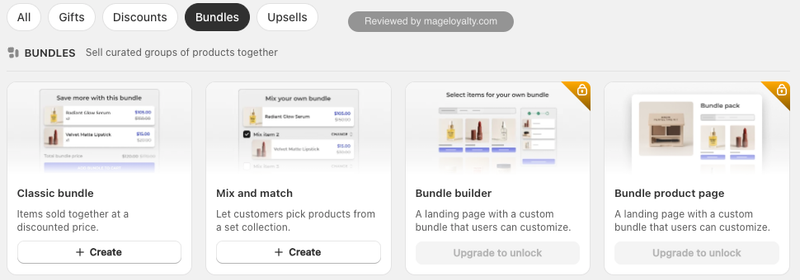
Getting a bundle onto the storefront took me about 10 minutes. Bundles sit in their own tab next to gifts, discounts and upsells, and a help panel beside every editor offers a chat with the BOGOS team.
Bundle types and offers
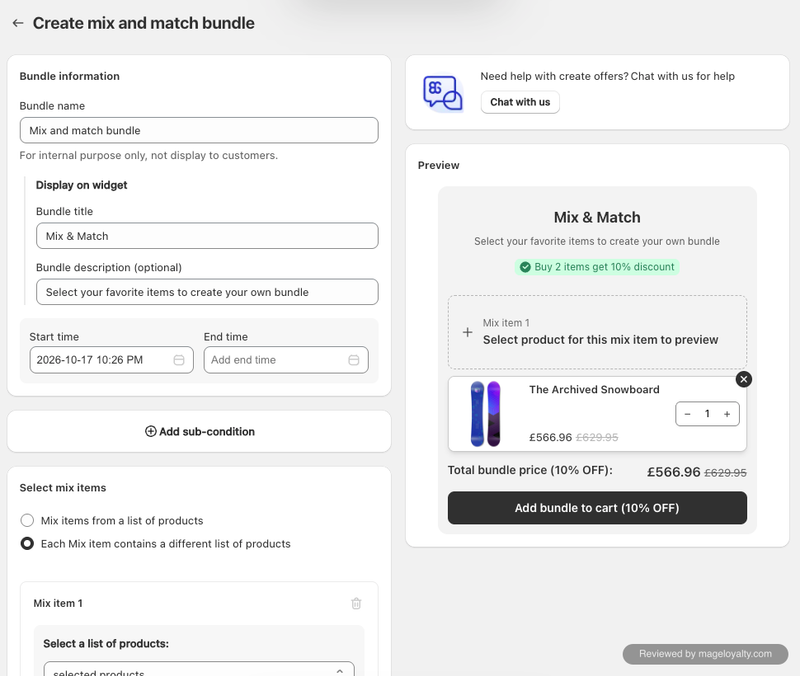
Two bundle types are available on the free plan: a classic bundle, where set products sell together at a discount, and mix and match, where customers pick products from a collection, such as "buy 2 items, get 10% off". A bundle builder page and a bundle product page need an upgrade.
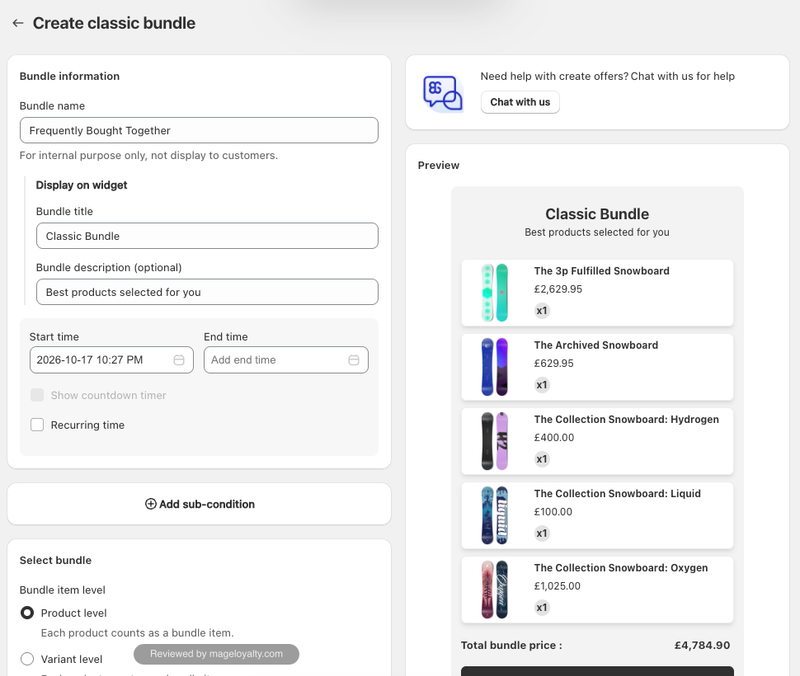
The classic bundle editor has the usual name, title and description, plus a start and end time, a recurring schedule and sub-conditions. Bundle items can count at product level or variant level.
What shoppers see
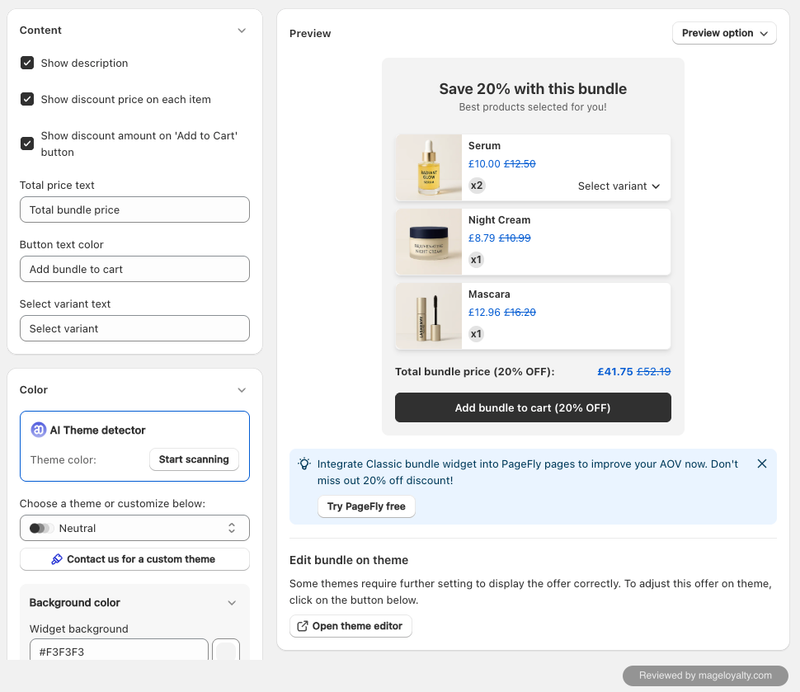
Customisation is basic: toggles for the description, the discount price on each item and the discount amount on the add-to-cart button, editable text, and colour settings with a few preset themes. The AI Theme detector was the most useful part. It was okay, and it picked up my store's colours correctly.
Drawbacks
- Bundles feel like a feature rather than a focus, with basic options and basic customisation compared with the dedicated apps here.
- Nothing about its bundles stands out against the other four.
- The free plan ends after 30 orders, and the paid plans you can choose depend on your Shopify plan.
BOGOS is only worth choosing for bundles if you'll also use its free gifts, discounts and upsells. If bundles are the main goal, choose Kaching Bundles or Easy Bundles.
BOGOS on the Shopify App Store
Do you need a bundle app at all?
Shopify has its own free app, Shopify Bundles. It creates fixed bundles and multipacks from the Shopify admin, and customers can choose variants for each product in the bundle. If that is all you need, it costs nothing. It doesn't do quantity breaks, mix and match, free gifts or A/B testing, and it is rated 2.8 from 568 reviews on the App Store (as of 17 October 2026). For anything beyond a simple fixed bundle, one of the apps above is worth it.
How to reward bundle purchases with loyalty
A bundle discount rewards one order. A loyalty program can reward the customer for coming back after it, and bundles are a good place to start, because they bring in bigger first orders.
Here is how it works with a loyalty platform such as Mage:
- Earn on every order. Bundle purchases earn points or store credit like any other order, so a bigger bundle order builds a bigger balance.
- Boost the products you want to move. Earning rates can be set higher for chosen products or collections, so you can reward the bundles or ranges you most want to sell.
- Offer a free product as a reward. A free product reward is a natural fit for bundle stores: customers spend their points on an add-on that rounds out the set.
- Bring them back for the next one. The balance shows in the loyalty widget and in emails, giving customers a reason to return for their next bundle.
For more ways to raise order value, see our guides to increasing average order value on Shopify and the best Shopify cart upsell apps.
The Shopify loyalty program growing brands trust
See how Mage helps Shopify brands lift repeat purchase rate with loyalty, referrals and store credit.
Book a demo“We moved to Mage from the best-known platform and only regret not doing it sooner. It costs less, does more, and the support is unmatched.”

Frequently asked questions
What is the best free bundle app for Shopify? Bundler. Its free plan includes quantity breaks, volume discounts, buy X get Y and Shopify POS with no revenue cap. Easy Bundles is free up to $500 a month in bundle sales, BOGOS for your first 30 orders, and Shopify's own Bundles app is free for fixed bundles and multipacks.
What is the difference between quantity breaks and bundles? Quantity breaks discount more of the same product, such as buy two and save 10%. Bundles combine different products, either a fixed set you choose or a mix and match where customers pick. Most apps here offer both.
Do bundle apps charge based on sales? Most do. Kaching Bundles prices by the extra revenue its bundles bring in, Easy Bundles and Fast Bundle by monthly bundle sales, and BOGOS by orders. Bundler is the exception, with flat plans and no caps.
Can I A/B test bundle offers? Yes, with Kaching Bundles, which can test up to five versions of a bundle, and with Fast Bundle on volume discounts. Test one change at a time, such as the discount or the layout, so you know what made the difference.
Is Kaching Bundles the same company as Kaching Cart? Yes. Kaching also makes Kaching Cart, a cart drawer and upsell app, which features in our cart upsell app roundup.
Do bundle purchases earn loyalty points? With Mage, yes. A bundle order earns points or store credit like any other order, and you can set higher earning rates for chosen products or collections.
Our verdict
- If you want the best all-round bundle app, choose Kaching Bundles. It does one job well, and its A/B testing helps you find the offer that sells.
- If you want shoppers to build their own bundles, or fully designed bundle pages, choose Easy Bundles.
- If you want every bundle type in one app, choose Fast Bundle, and budget for a paid plan to unlock its design options.
- If you want bundles for free with no cap, choose Bundler.
- If free gifts and upsells matter more than bundles, choose BOGOS.
Whichever you choose, reward the customer after the bundle too, so a bigger first order becomes a second one.

Graeme is the co-founder at Mage Loyalty. He heads product development, from complex loyalty migrations and large-scale data handling to building the features shaping the future of loyalty on Shopify.