The cart is the last place a shopper decides whether to add one more thing, and a good cart drawer turns that moment into extra revenue with upsells, free-shipping goals and gifts. I've used all five apps in this guide on live Mage merchant stores or my own store, and they fall into two groups: one enterprise platform that does far more than the cart, and four focused cart apps that do one job well at a low price.
This guide is written by Graeme, co-founder of Mage. Mage is a loyalty and customer accounts platform for Shopify. We don't sell a cart app.
Our quick picks
- Best overall: Rebuy. The most sophisticated cart and upsell platform on Shopify, with personalised recommendations built from your store's data. It costs more, so it sits apart from the ranking.
- Best for getting started on a small budget: Essent. Every feature on every plan, free up to 30 orders a month, and a team that will make customisations for you.
- Best for the most widgets in a simple editor: iCart. A full-screen editor that feels more premium than its price, with surveys, a birthday collector and a choice of cart styles.
- Best for flat pricing and polished designs: Amp Slide Cart. The only app here whose price doesn't rise with orders, with five starting designs on its Pro plan.
- Best for free-gift rules and A/B testing on a budget: Kaching Cart. Quick to set up, with gift rules and A/B testing for lower-cost shops.
The five apps compared
| App | Free option | Price at about 500 orders a month | Pricing model | Runs in | My setup time | App Store rating |
|---|---|---|---|---|---|---|
| Rebuy | 14-day trial | $45/month (Cart & Merchandising) | By orders, per package | Its own app | n/a | Listing unavailable |
| Essent | Free up to 30 orders | $23.99/month | By orders | Shopify admin | About 5 minutes | 5.0 (1,098) |
| iCart | First 100 orders free | $29/month | By orders | Shopify admin | About 15 minutes | 4.7 (452) |
| Amp Slide Cart | Free plan, no upsells | $29.99/month (Growth) | Flat | Shopify admin | 10 to 15 minutes | 5.0 (775) |
| Kaching Cart | Development stores only | $24.99/month | By orders | Shopify admin | 5 to 10 minutes | 5.0 (1,515) |
Pricing and App Store ratings as listed on 17 October 2026. Rebuy's App Store listing was unavailable that day, so its pricing comes from Rebuy's website.
How I used these apps
Rebuy is the cart platform I've used most, on live Mage merchant stores. I've used Essent and Kaching to set up carts for smaller Mage clients on free and paid plans, Amp's paid plan with a Mage merchant, and iCart on its free plan. The screenshots for the four ranked apps come from my own store, captured in October 2026, so no merchant data is shown. Rebuy's dashboards only show real merchant data, so its section shows Smart Cart live on two Mage merchants' stores instead.
These are the factors I weighed most:
- How upsells are chosen. AI built on your store's data, rules you set, or products you pick by hand.
- Design control. How close you can get the drawer to your brand, and whether custom code is allowed.
- What the free or entry plan includes. Some free plans cover every feature, others leave out upsells.
- Cost as you grow. Most cart apps price by orders, so the bill rises with your store.
- Where you work. Inside the Shopify admin or in a separate app.
The best overall: Rebuy
Best for: brands that can invest in the most capable cart and upsell platform on Shopify, with personalised offers across the whole store, not just the cart.
Pricing: sold as packages priced by monthly orders. Cart & Merchandising, which includes Smart Cart, starts at $45 a month for up to 500 orders, with a per-order charge above that; Platform One, with every package, starts at $534 a month. Every package has a 14-day free trial (as of 17 October 2026, from Rebuy's pricing page).
Rebuy is the best cart upsell platform on this list, and it isn't close. It is also the one I have used most, on live Mage merchant stores. I haven't ranked it alongside the four apps below, because that wouldn't be a fair comparison: they are purpose-built to do one job well, a cart drawer at a low price, while Rebuy is an enterprise-grade personalisation platform, priced to match. If your store can justify the cost, choose Rebuy. If it can't yet, the ranked list below is where to start. Rebuy's dashboards only show real merchant data, so instead of the admin, the screenshots in this section show Smart Cart live on two Mage merchants' stores.
How it decides what to show
What sets Rebuy apart is how well it knows which product to offer each shopper. Its recommendations come from the store's own data: what customers buy together, product attributes, what is already in the cart, what the shopper has viewed and, for logged-in customers, what they bought before. When I set up a cart widget, it starts with AI recommendations based on what is in the cart, and it automatically leaves out products that are out of stock or already in the cart, so the offers are relevant from day one.
Where Rebuy really pulls ahead is the rules engine on top of the AI. Each rule says: if these conditions are true, show these products. I can build conditions from almost anything about the shopper or the cart, from the products, collections and tags in it to the cart value, discount code, location, customer tags, order count, total spent and even a Klaviyo segment. Rules stack in the order you set and can stop once one matches, and they mix with ready-made algorithms such as frequently bought together, similar products, trending, top sellers, recently viewed and buy it again. On the merchant stores I've worked on, that is what lets the cart show a first-time visitor, a returning customer and a subscriber three different, sensible offers.
What you can customise
Rebuy is widely customisable, and the level of variation, flexibility and detail I get from it is unmatched by the cheaper apps on this list. Smart Cart alone supports tiered progress bars, buy more save more offers, a one-click switch to subscription, gifts with purchase and discount codes, and the same engine powers widgets on product and home pages, bundles, Shopify checkout extensions for Plus stores, post-purchase offers, thank-you pages, search, collections and reorder pages. A/B testing covers recommendations and merchandising.
Drawbacks
- It runs off-platform, in Rebuy's own app rather than inside the Shopify admin.
- Cost and complexity grow with you. Pricing rises with order volume, and getting the most from the rules engine takes time and expertise.
- When I checked on 17 October 2026, Rebuy's Shopify App Store listing was marked as not currently available, so new stores sign up through Rebuy's website.
Using Rebuy with Mage
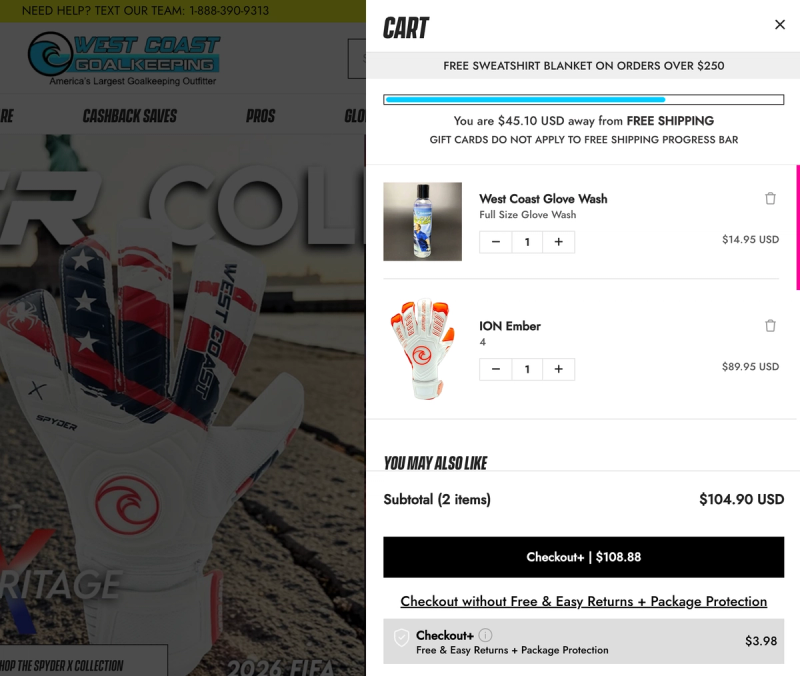
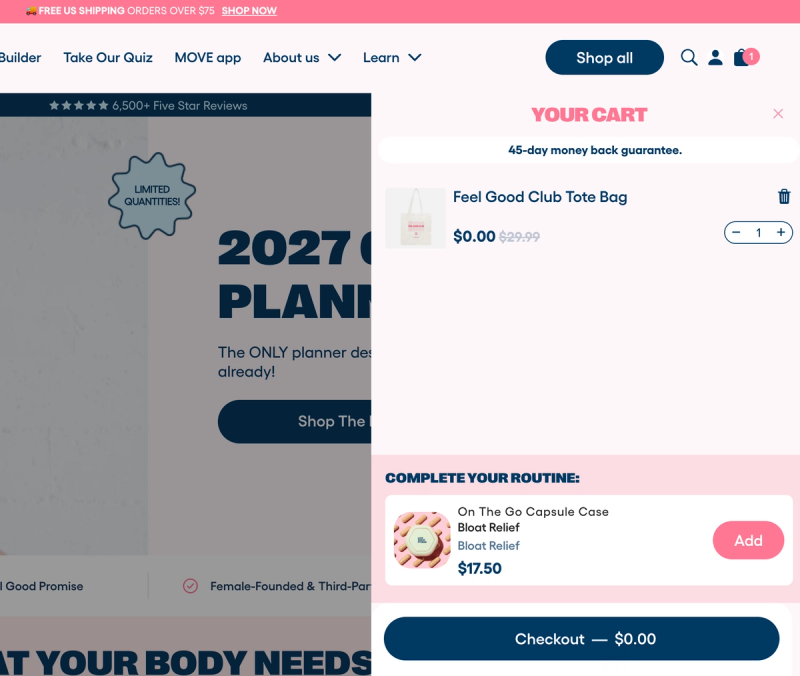
West Coast Goalkeeping, Love Sweat Fitness and Gelato Pique all run Rebuy alongside their Mage loyalty programs, and Rebuy is the cart platform I find easiest to connect to Mage. At West Coast Goalkeeping, the cart combines a free shipping progress bar, a free gift threshold and upsells. At Love Sweat Fitness, a free product reward redeemed through Mage lands in the cart at $0.00, right above a "Complete your routine" upsell. The Mage integration shows a customer's points or store credit balance inside Smart Cart, and logged-out visitors see a prompt to log in or join your rewards program without leaving the cart. For custom placements, the Mage SDK can show the points a single item or the whole cart will earn. See the Mage and Rebuy integration.
The best lower-cost cart apps, ranked
The four apps below are focused cart drawer apps. Each runs inside the Shopify admin, costs a fraction of Rebuy, and is quick to set up.
1. Essent Cart Drawer: best for getting started on a small budget
Best for: newer or smaller stores that want a clean cart drawer with upsells and a sticky add to cart bar, without paying for features they won't use.
Pricing: free up to 30 orders a month; then $8.99 (99 orders), $13.99 (199 orders) and $23.99 (499 orders) a month, with higher tiers for bigger stores. Every feature is on every plan (as of 17 October 2026).
App Store rating: 5.0 from 1,098 reviews (as of 17 October 2026).
Essent is a small, simple app, and it does exactly what it says on the tin. For an app called "Essential", that is all you need: a cart drawer, a sticky add to cart bar and the upsells that go with them, all easy to set up and easy to get right. I've used Essent on both the free and paid plans to manage carts for smaller Mage clients, and the screenshots here are from my own store.
Setting it up
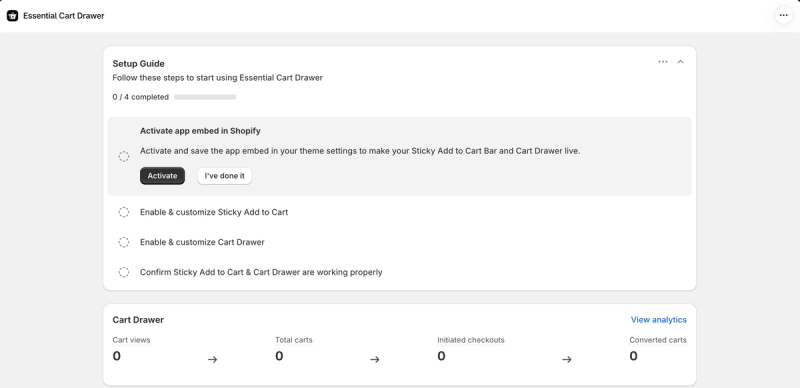
A four-step setup guide covers everything: turn on the app embed in your theme, set up the sticky add to cart bar, set up the cart drawer, then check both are working. It is quick: I had a basic drawer live in about five minutes. Making it look like a natural part of your store takes longer, simply because there is so much you can adjust.
What shoppers see
The builder is intuitive and very visual: the live preview updates as you go, so you see exactly what shoppers will get, on desktop or mobile. It is close to foolproof, with toggles for each section of the drawer, colour pickers and editable text throughout. You choose which side the drawer slides in from, its width and corner radius, and whether it sits attached to the edge of the screen or floats. Custom HTML and CSS are there when you need more control.
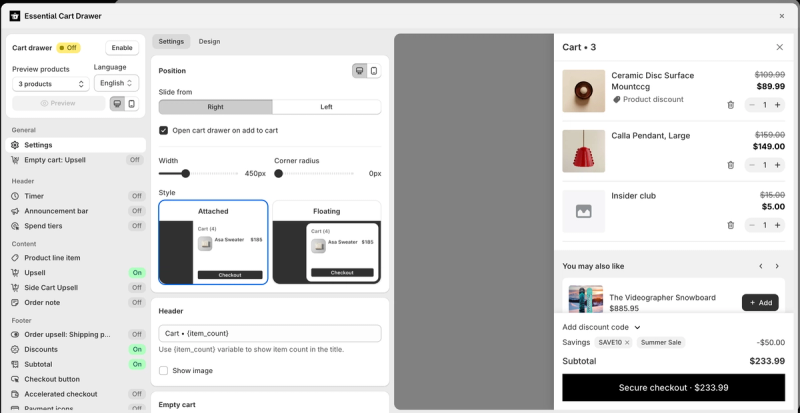
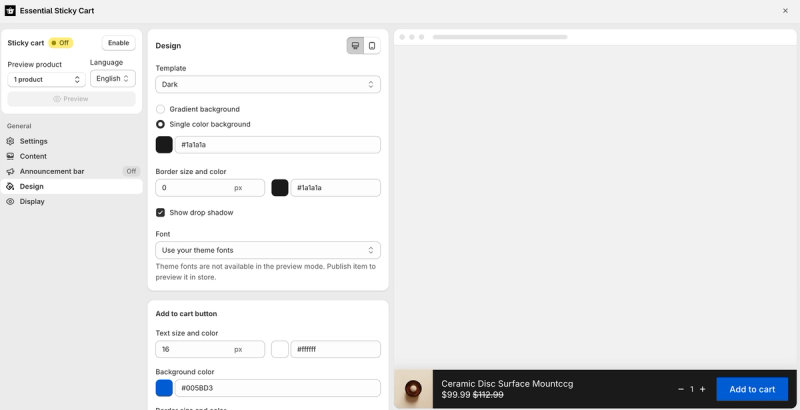
The sticky add to cart bar has its own editor, with dark or light templates, gradient or solid backgrounds, borders, a drop shadow, your theme's fonts and button colours.
Upsells and offers
Upsells appear as a "You may also like" slider inside the drawer, with a one-click add button, and there is a separate upsell for an empty cart. The drawer can also carry a countdown timer, an announcement bar, spend tiers that unlock free shipping or a gift at a set cart value, an order note, a shipping protection upsell, discount codes and accelerated checkout buttons. Each one is a single toggle.
The support offer stands out for a free or $8.99 app. In Essent's own words: "Any customisation missing? Reach out to our team and we'll make the adjustments to your store." Its App Store reviews back this up, with merchants describing the team making custom CSS changes for them.
Measuring results
The dashboard shows a simple cart funnel: cart views, total carts, initiated checkouts and converted carts, with a link to more detailed analytics.
Drawbacks
- The admin hasn't moved to Shopify's latest Polaris design yet.
- It is more limited than the other cart apps here. According to Essent's own help docs, there is no A/B testing, for example. For the price, though, it is hard to complain.
If you need AI recommendations across the cart, checkout and post-purchase pages, or A/B testing, Rebuy is the step up.
Essent Cart Drawer on the Shopify App Store
2. iCart: best for the most widgets in a simple editor
Best for: stores that want lots of cart widgets and a choice of cart styles in one simple app, at a low price.
Pricing: your first 100 orders are free; then $9 a month up to 100 orders, $19 up to 200 and $29 up to 500, rising to $129 for 5,000 or more. Every feature is on every plan (as of 17 October 2026).
App Store rating: 4.7 from 452 reviews (as of 17 October 2026).
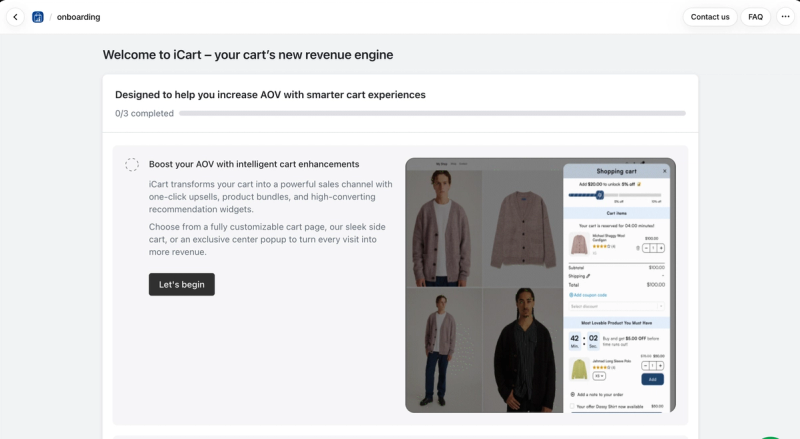
What lifts iCart above the other budget apps is its editor. It opens full screen, and clicking any section of the cart opens its settings, which made it feel grander, more intuitive and less cheap than I expected. Around the editor sits a fuller suite than the price suggests, with analytics, cart surveys and a birthday collector. I've used iCart on its free plan, and the screenshots here come from my own store.
Setting it up
A three-step onboarding starts by asking which kind of cart you want: a full cart page, a side cart drawer or a popup in the centre of the screen. You can switch between them later, or use a full cart page and a drawer together, and right-to-left languages are supported. Getting my cart set up took about 15 minutes.
What shoppers see
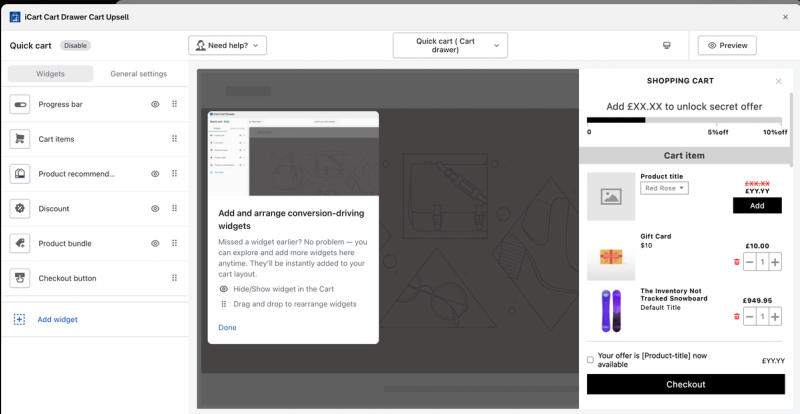
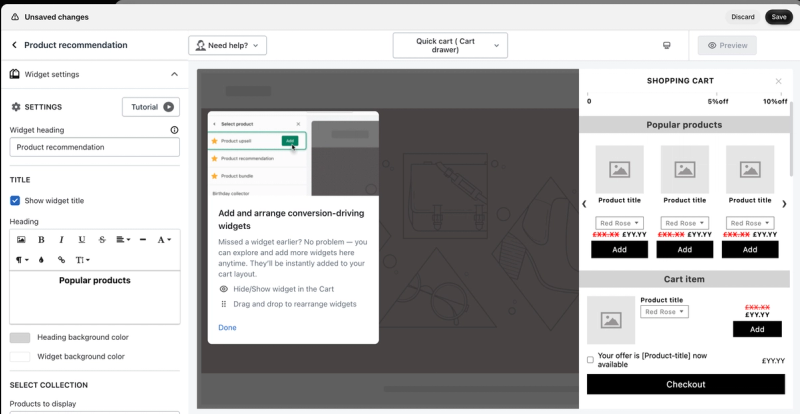
The cart is built from widgets you show, hide and drag into order: a progress bar, the cart items, product recommendations, a discount box, a product bundle and the checkout button. Click a widget in the preview and its settings open, with a rich text editor for headings, background colours and the collection it should draw products from. There is a good level of customisation throughout.
Upsells and offers
The widget library is the largest of the budget apps here. Alongside product upsells, recommendations, bundles and discounts, you can add a birthday collector, a survey, an image with text, custom HTML and a delivery date and pickup picker. The progress bar can unlock tiered discounts, such as 5% and then 10% off.
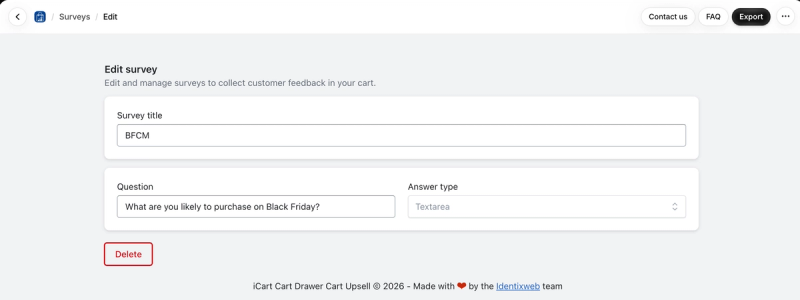
Surveys let you collect customer feedback inside the cart. You set a question and an answer type, such as asking what shoppers are planning to buy on Black Friday, then export the answers.
Measuring results
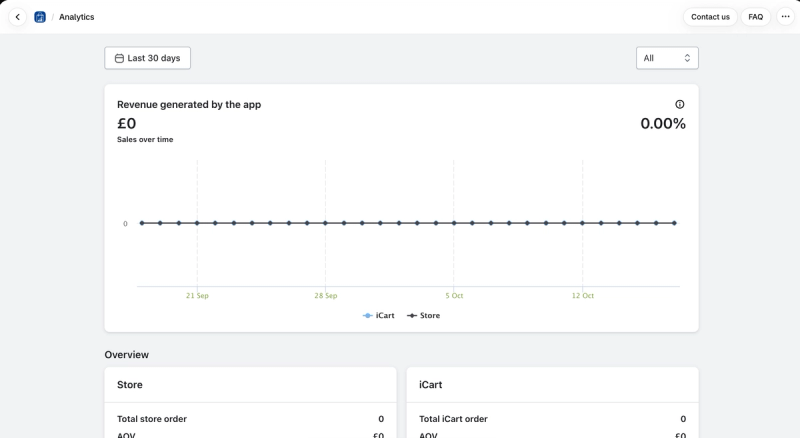
The analytics are fine and do the job. They chart the revenue generated through iCart against your store's total over a chosen period, and compare orders, average order value and revenue for the store overall and for orders that went through iCart.
Drawbacks
- The tutorial video is a basic one-minute walkthrough that sounded AI generated. It explains the buttons, but not how to use the cart to drive revenue.
- Unlike Essent, Kaching and Amp, iCart doesn't carry Shopify's Built for Shopify badge.
- Several App Store reviewers, most recently in early 2026, reported theme code left behind after uninstalling. iCart now installs through an app embed and offers a manual removal guide, so check both if you switch away.
If you want a cleaner drawer with Built for Shopify status at a similar price, Essent is the alternative.
iCart on the Shopify App Store
3. Amp Slide Cart: best for flat pricing and polished cart designs
Best for: growing stores that want a highly customisable cart drawer with a price that doesn't rise as their order volume grows.
Pricing: free plan with a basic cart; Growth $29.99 a month adds upsells and the progress bar; Pro $49.99 a month adds the premium cart designs and free gifts. Prices are flat and don't increase with orders, and both paid plans have a 7-day free trial (as of 17 October 2026).
App Store rating: 5.0 from 775 reviews (as of 17 October 2026).
Amp's customisation is plentiful, and it is the only app here whose price stays the same however many orders you take. The live preview is good and responsive, and you can preview the cart with one of your own products rather than a placeholder. The screenshots here are from my own store on the free plan, and I've used Amp's paid plan with a Mage merchant in the past.
Setting it up
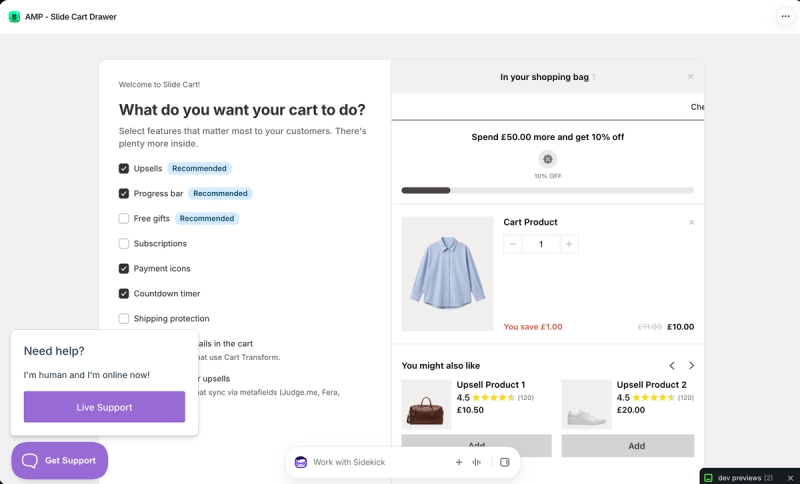
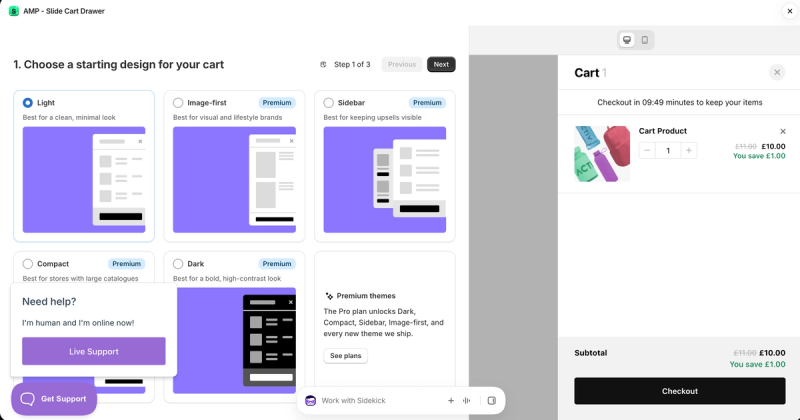
Onboarding starts with a simple question: what do you want your cart to do? You tick the features you want, such as upsells, a progress bar, free gifts, subscriptions, a countdown timer or shipping protection, then choose a starting design. Light is free, and the Pro plan unlocks four more: Image-first for visual brands, Sidebar to keep upsells visible, Compact for large catalogues and Dark for a bold, high-contrast look. It took me 10 to 15 minutes to get a cart set up.
What shoppers see
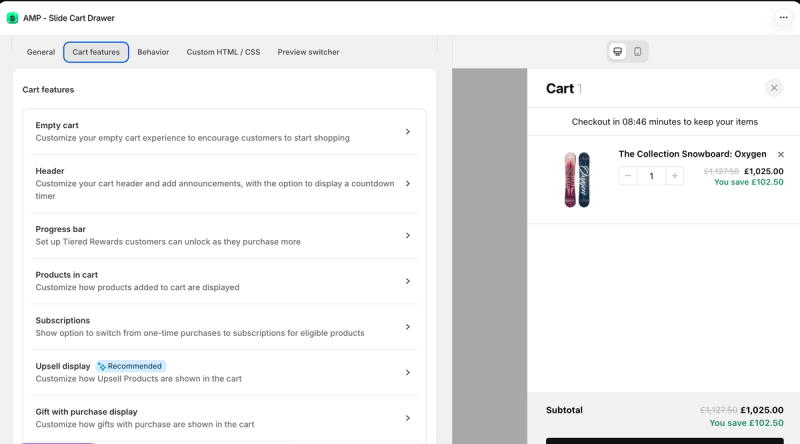
The editor is split into tabs for general settings, cart features, behaviour, custom HTML and CSS, and a preview switcher. Cart features cover the empty cart, a header with announcements and a countdown timer, the progress bar, how products in the cart are displayed, a switch from one-time purchase to subscription, and how upsells and gifts with purchase appear. Custom HTML and CSS can be added to different parts of the cart, such as below the checkout button or in the empty cart.
Upsells and offers
Upsells, the progress bar for free shipping, discounts or gifts, and gifts with purchase sit on the paid plans. When I used the paid plan with a Mage merchant, the cart upsells were very effective at showing customers the right products based on their data. During onboarding you can also show review stars inside upsells, pulled from review apps that sync through metafields, and show bundle details in the cart for apps that use Shopify's Cart Transform.
Measuring results
Analytics, like upsells, are on the paid plans. On the free plan you get very basic access to the cart, with few options for its blocks, which is fair for a free tier.
Drawbacks
- The free plan is quite restricted. Upsells, the progress bar and analytics all need a paid plan.
- I couldn't find a way to reorder sections by drag and drop. It may be possible with custom CSS.
- The preview uses one product at a time. Previewing several at once would make edge cases easier to check.
- The support chat button and Shopify's Sidekick bar sit on top of the editor and cover important parts of it, which makes it annoying to use.
If you only need a basic cart for free, Essent's free plan includes every feature up to 30 orders a month.
Amp Slide Cart on the Shopify App Store
4. Kaching Cart: best for free-gift rules and A/B testing on a budget
Best for: lower-cost stores that want a cart drawer with upsells, free-gift rules and A/B testing, set up quickly.
Pricing: free on development stores; $9.99 a month up to 99 orders, $14.99 up to 199 and $24.99 up to 499, with higher tiers for bigger stores (as of 17 October 2026).
App Store rating: 5.0 from 1,515 reviews (as of 17 October 2026).
Kaching Cart is another compact, simple cart upsell app. It isn't as cleanly designed as Essent, but if you need a cart that upsells and you need it quickly, it does a decent job. It does feel like a cheaper app, and you get what you pay for. I've used Kaching on free and paid plans when setting up carts for smaller Mage clients, and the screenshots here come from my own store.
Setting it up
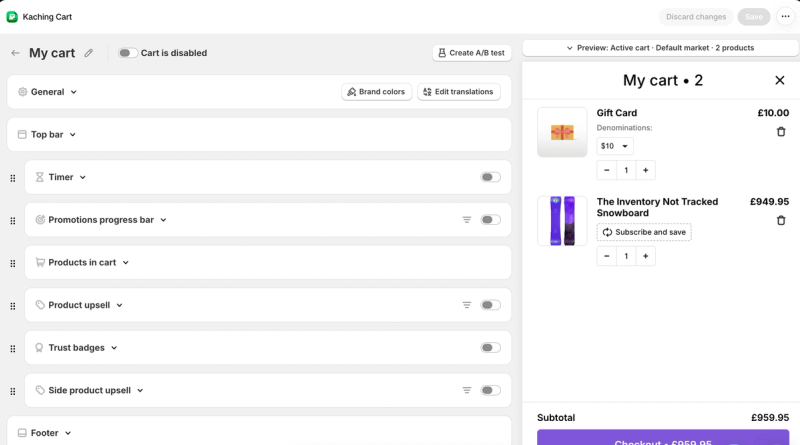
The editor is a live preview with drag-and-drop modules down the side, which makes it feel easy to use, although the interface looks a little dated. You can preview the cart by state, such as a full or an empty cart, and by market, set your brand colours once and edit the translations. A working cart took me five to ten minutes.
What stood out was the founder-led video inside the app. It walks through ways to make cart upsells convert, and it feels personal: rather than just explaining the buttons, he teaches you what your cart should be doing and then shows you how to do it in the app.
What shoppers see
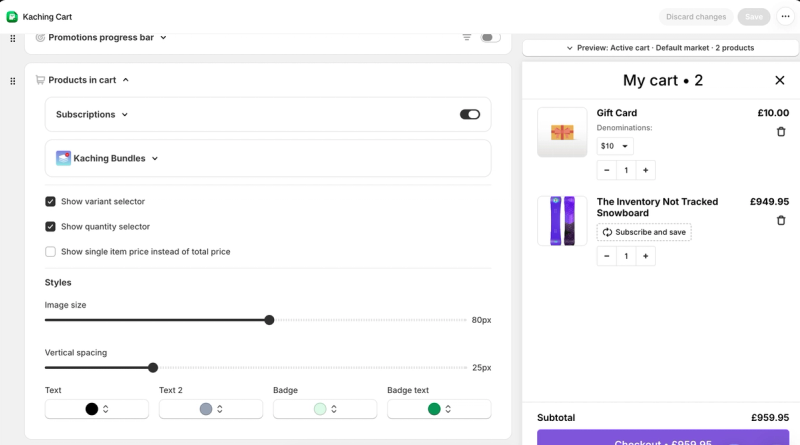
Each part of the cart is a module you switch on and reorder: a countdown timer, a promotions progress bar, the products in the cart, a product upsell, trust badges, a side upsell and the footer. The products in the cart can show variant and quantity selectors, and there are settings for image size, spacing and colours. It also connects to Kaching's own subscriptions and bundles apps, so shoppers can switch to subscribe and save inside the cart.
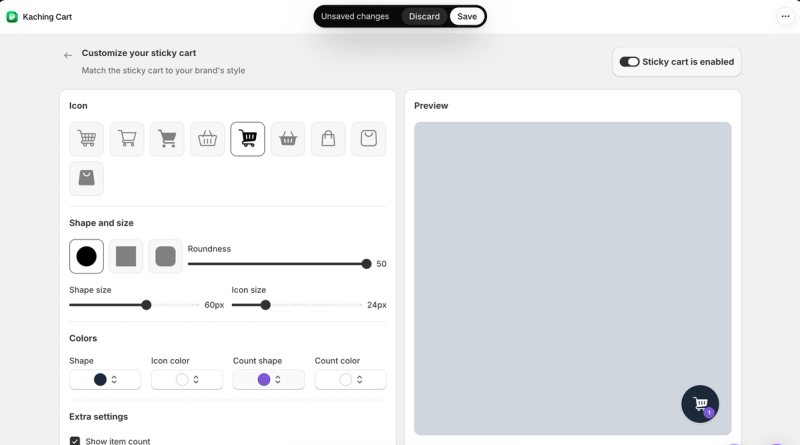
A floating sticky cart button has its own settings for the icon, shape, size, colours and item count.
Upsells and offers
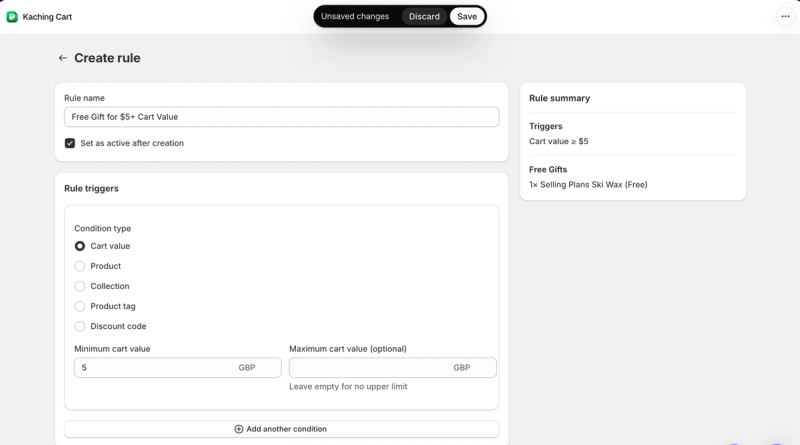
Auto-add to cart rules handle free gifts. You set a trigger, such as a cart value, a product, a collection, a product tag or a discount code, and choose the gift that gets added. The empty cart has its own upsells, so even a shopper with nothing in the cart sees products.
Measuring results
Every cart can be A/B tested against another version from the editor. The analytics suite feels like a data dump, but it does the job.
Drawbacks
- The interface feels dated and less polished than Essent's.
- I could find a custom HTML option but not a custom CSS one, which could be a problem for shops that want extra customisation.
I'd recommend Kaching for lower-cost shops. If you want a more polished drawer or recommendations across checkout and post-purchase too, Rebuy is the step up.
Kaching Cart on the Shopify App Store
Rewards bar or loyalty rewards: what's the difference?
Almost every cart app here has a "rewards bar". It is a progress bar for this order only: spend a set amount to unlock free shipping, a gift or a discount. It resets every time. Loyalty rewards build across orders: customers earn points or store credit each time they buy and spend them later. The two work well together, and the cart is a good place to show both.
How to show loyalty rewards in the cart
The cart is the moment a customer is closest to spending, which makes it the best place to remind them what their loyalty balance is worth. Here is how it works with Rebuy and Mage:
- Connect Mage to Rebuy. Mage integrates with Rebuy's Smart Cart.
- Show the balance. Logged-in customers see their points or store credit balance inside the cart.
- Invite everyone else. Logged-out and first-time visitors see a prompt to log in or join your rewards program, without leaving the cart.
- Show what they'll earn. For custom placements, the Mage SDK can show the points a single item or the whole cart will earn.
For the full setup, see the Mage and Rebuy integration and our Rebuy setup guide.
The Shopify loyalty program growing brands trust
See how Mage helps Shopify brands lift repeat purchase rate with loyalty, referrals and store credit.
Book a demo“We moved to Mage from the best-known platform and only regret not doing it sooner. It costs less, does more, and the support is unmatched.”

Frequently asked questions
What is the best cart upsell app for Shopify? Rebuy is the most capable, with personalised recommendations built from your store's data across the cart, product pages, checkout and post-purchase. It also costs more. For a lower-cost cart drawer, Essent is the best place to start, with every feature on every plan.
What is the best free cart drawer app for Shopify? Essent's free plan includes every feature for up to 30 orders a month. iCart's first 100 orders are free, and Amp has a free plan with a basic cart but no upsells or progress bar. Kaching is free on development stores only.
Should I use a cart drawer or a cart page? A drawer keeps shoppers on the page they were browsing and shows upsells as soon as they add a product, while a full cart page gives you more room. Some apps let you choose: iCart supports a full cart page, a drawer, a centre popup or a page and drawer together.
Is Rebuy still on the Shopify App Store? When I checked on 17 October 2026, Rebuy's App Store listing was marked as not currently available, and new stores could sign up through Rebuy's website. It had been briefly available again earlier in October, so check the listing for its current status.
Do these apps sell loyalty programs? No. None of the four ranked apps sells points, store credit or referrals. Their "rewards bar" is a per-order progress bar for free shipping, gifts or discounts.
Can I show loyalty points in my Shopify cart? Yes. With Mage and Rebuy, logged-in customers see their points or store credit balance inside Smart Cart, and visitors who aren't logged in see a prompt to join your rewards program.
Our verdict
- If you can invest in the best, choose Rebuy. Nothing else on this list comes close for personalised upsells and customisation.
- If you're starting out or on a small budget, choose Essent. It does what it says on the tin, and every feature is on every plan.
- If you want lots of widgets and a choice of cart styles, choose iCart.
- If you want flat pricing that won't rise with your orders, choose Amp Slide Cart, and budget for a paid plan to get upsells.
- If you want free-gift rules and A/B testing at a low price, choose Kaching Cart.
Whichever you choose, show customers their rewards in the cart, so every order brings them closer to the next one.

Graeme is the co-founder at Mage Loyalty. He heads product development, from complex loyalty migrations and large-scale data handling to building the features shaping the future of loyalty on Shopify.