The order of products on a collection page decides what most shoppers see first, and Shopify's own sort options only go so far. Collection sort and merchandising apps move best sellers up, push sold-out products down and keep collections in order without anyone dragging products around every week. I compared four of them on my own Shopify store to see how each one decides the order, how long it takes to set up, and what it costs.
This guide is written by Graeme, co-founder of Mage. Mage is a loyalty and customer accounts platform for Shopify. We don't sell a merchandising app. Our quick picks
- Best overall: Kimonix. Sorts collections on sales, conversion, stock and margin automatically, with an AI agent that builds collections, schedules and banners for you.
- Best free plan: Sort'd. Unlimited drag and drop merchandising for free, with simple automations and a founder who has recorded a video for every part of the app.
- Best for visual collection pages: Depict. Images, video and text placed between products, with the most guided setup of the four.
- Best for detailed rules inside Shopify: Dynasort. Weighted sorting recipes built from more than 50 attributes, plus search and recommendations in the same app.
The four apps compared
| App | Free plan | Paid from | How it sorts | Runs in | Setup time (my store) | App Store rating |
|---|---|---|---|---|---|---|
| Kimonix | No (free trial) | $19/month plus usage | AI on sales, conversion, stock and margin | Its own app | Under a minute to onboard | 5.0 (236) |
| Sort'd | Yes, unlimited drag and drop | $29/month | Drag and drop plus rule-based automations | Shopify admin | About 15 minutes | 5.0 (148) |
| Depict | 7-day trial | $190/month for collection sorting | Manual or automated, plus content cards | Shopify admin | About 10 minutes | 4.5 (45) |
| Dynasort | Yes, 2 collections | $99/month | Weighted rule recipes | Shopify admin | About 15 minutes | 4.6 (15) |
App Store ratings and pricing as listed on the Shopify App Store on 17 October 2026.
How I used these apps
I've used Kimonix for about a year on my own store, and live Mage clients use it alongside their loyalty programs. I set up Sort'd, Depict and Dynasort on the same store, working on the same collections in each so I could compare how they handle them. Screenshots come from my own store, captured in October 2026, so no merchant data is shown. Where an app needed real traffic to show results, I've said so.
These are the factors I weighed most:
- How it decides the order. AI that weighs several signals, rules you write, or your own hands.
- Sold-out products. Whether they move down, and back up on restock, without you touching them.
- Time to manage. How much of the work the app does for you once it is set up.
- Where you work. Inside the Shopify admin or in a separate app.
- Cost as you grow. Some apps price by sessions, views or collections, so the entry price can mislead.
1. Kimonix: best overall, with an AI agent that runs the app for you
Best for: brands that want collections sorted on sales, conversion, stock and margin automatically, and an AI agent that sets it up for them.
Pricing: $19 a month, returned as usage credits, then charged by collection views and recommendation impressions; Enterprise by quote (as of 17 October 2026).
App Store rating: 5.0 from 236 reviews (as of 17 October 2026).
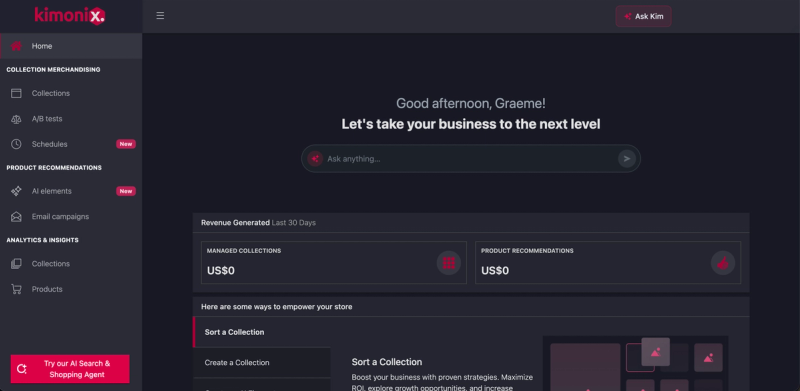
Kimonix has AI built into everything it does. Its agent, Kim, sits at the top of every screen, and it is so well integrated that I felt I could run the whole app by talking to it. Watching Kim plan a collection, a campaign or a banner and then build it in seconds makes the app feel premium. I've used Kimonix for about a year on my own store, on the $19 a month plan with pay-as-you-go usage on top. Kimonix is a Mage partner.
Setting it up
Onboarding took me under a minute, and getting Kimonix onto the store was easy. The interface is simple and not overwhelming, and as a fan of dark mode I found it very readable.
You can create an AI-sorted collection two ways. Ask Kim, and it builds the collection after showing you a preview, or build it yourself: create a collection, add filters for the products it should include, pick the AI sort template and add any rules, such as sold-out products to the bottom. An existing collection can also be switched to AI sort without changing its web address, so menus and links keep working.
How it sorts
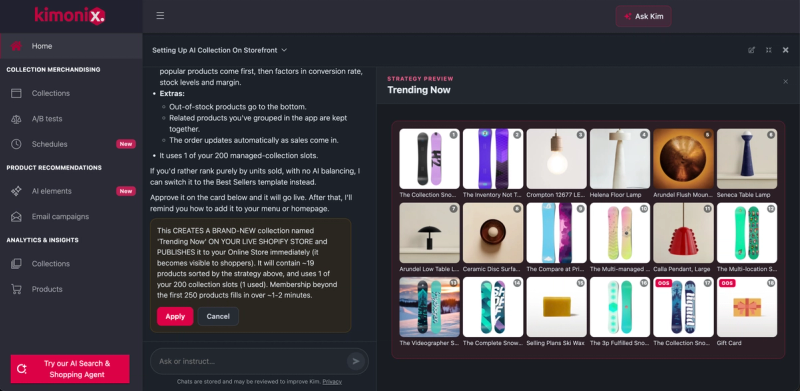
When I asked Kim for a "Trending Now" collection, it explained the strategy before building anything: popular products first, then conversion rate, stock levels and margin, with sold-out products pushed to the bottom and related products kept together. The order keeps updating as sales come in. The preview showed exactly where each product would land, and nothing went live until I approved it.
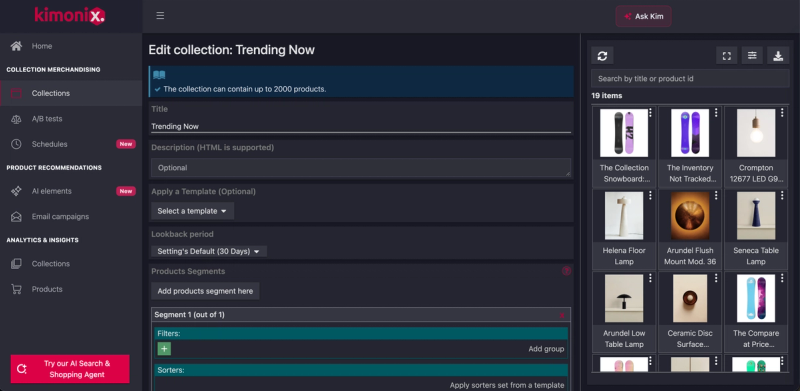
Each collection also has its own settings: a lookback period for the sales data (30 days by default), product segments, filters and sorters, for up to 2,000 products.
Merchandising controls
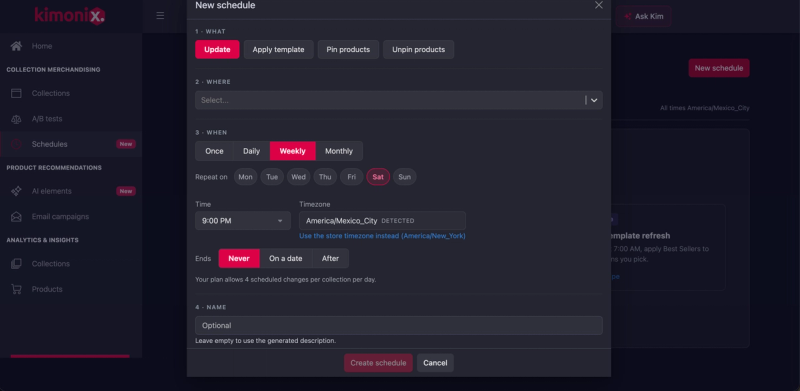
Schedules handle the jobs you would otherwise do by hand: update collections, apply a sort template, or pin and unpin products at a set time, once or on repeat. Ready-made recipes cover a weekly update of all collections, a weekend pin campaign for sale items and a monthly template refresh. My plan allowed four scheduled changes per collection per day.
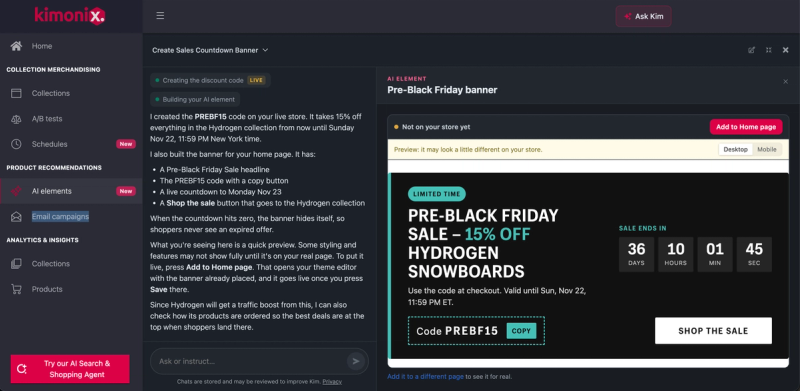
The AI elements are where Kim shines. I asked for a pre-Black Friday sale counting down to Black Friday week, 15% off one collection. Kim created the discount code on the store, then built a homepage banner with a live countdown, a copy button for the code and a "Shop the sale" button, matched to my theme. It took seconds, and the banner hides itself when the countdown ends.
Measuring results
A/B tests let you compare sort strategies, and the analytics show performance for each collection and product, with the revenue generated by managed collections and recommendations on the home screen.
Drawbacks
- Pricing is usage-based, so the monthly bill depends on your traffic, which makes it harder to predict than a flat plan.
- It runs off-platform, in its own app rather than inside the Shopify admin.
Honestly, Kimonix is hard to fault. If you want a free, hands-on tool for sorting a few collections by hand, Sort'd is the simpler choice.
Using Kimonix with Mage
Live Mage clients use Kimonix to show real product recommendations inside the Mage account sidebar. Setting it up means pasting a Kimonix collection ID into Mage's Kimonix block, so returning customers see AI-picked products every time they open their account. See the Mage and Kimonix integration.
Kimonix on the Shopify App Store
2. Sort'd: best free plan for hands-on merchandising
Best for: stores that want to arrange collections by hand with real data in front of them, plus simple automations, without paying anything to start.
Pricing: free plan with unlimited drag and drop and limited automations; Premium $29 a month; Premium Pro from $70 a month, priced by monthly sessions, adds A/B testing (as of 17 October 2026).
App Store rating: 5.0 from 148 reviews (as of 17 October 2026).
Sort'd runs inside the Shopify admin, and its drag and drop merchandiser is the most hands-on tool on this list. What stood out most was the help: the founder has recorded a short video for each part of the app, showing how it works and how to use it. In a time when every app points you to an AI agent, that feels personal, and it is far better than being handed a help doc. I set it up on my own store on the free plan.
Setting it up
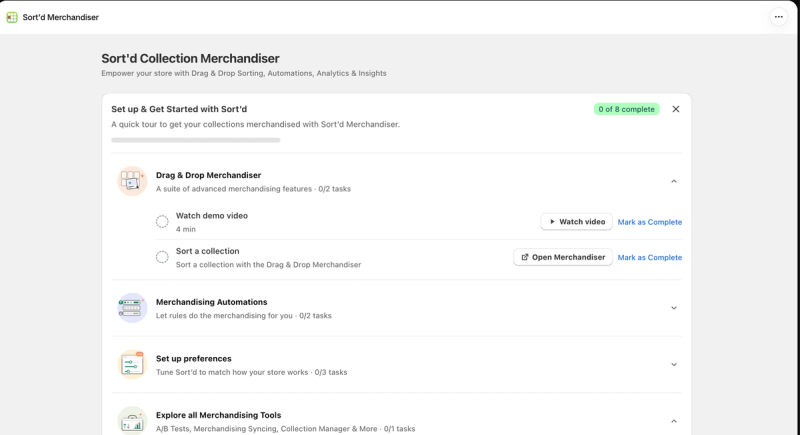
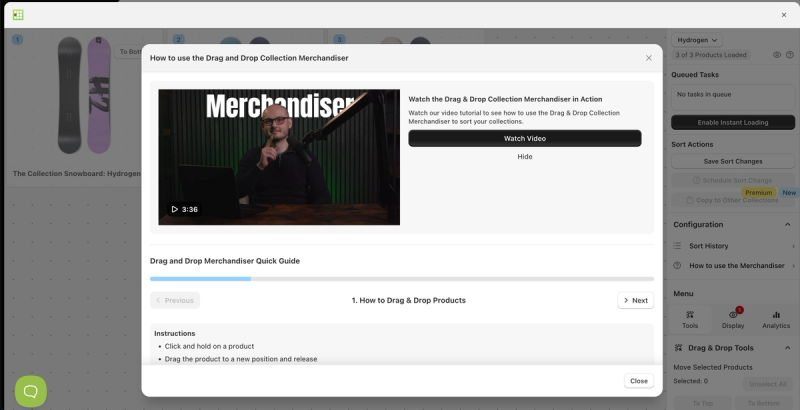
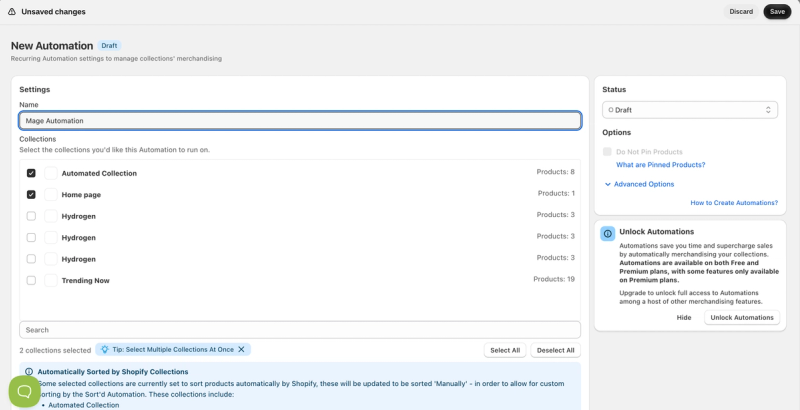
A setup guide walks through eight tasks across four areas: the drag and drop merchandiser, automations, your preferences and the wider toolset. Each area opens with its own video and a step-by-step quick guide. Setup took me about 15 minutes.
How it sorts
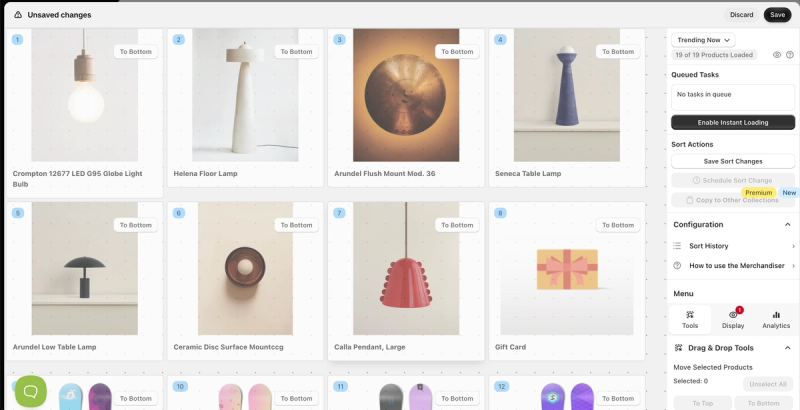
You have two ways to sort. The drag and drop merchandiser lays a collection out as a grid that you rearrange by hand, with a "To Bottom" button on every product and tools to move several products at once. It is smooth and quick to use. You can save straight away or schedule a sort change for later, and every change is kept in a sort history.
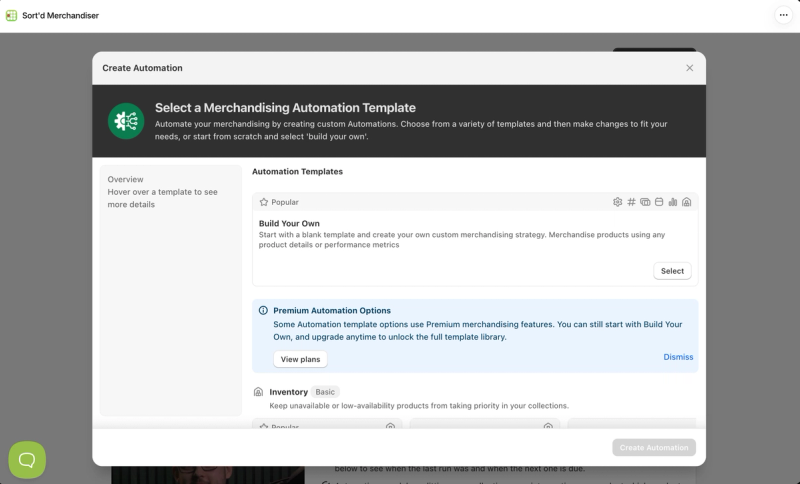
Automations do it for you. Start from a template, such as keeping unavailable or low-stock products from taking priority, or build your own from product details and performance metrics. According to Sort'd's help docs, an automation splits a collection into sections at the top, the middle and the bottom, each with its own rules, such as new arrivals up and sold-out or broken-size products down, and runs up to six times a day depending on your plan. Collections set to sort automatically in Shopify are switched to manual so the automation can take over.
Merchandising controls
Pins, scheduled sort changes and sort history are on the free plan. Premium adds copying a sort order to other collections, and syncing collections between stores, for example from a US store to a UK store, which merchants running several storefronts rate highly in reviews.
Measuring results
Analytics, insights and 0 to 100 performance scores for every product and collection are on Premium, so they were locked on the free plan. According to Sort'd, Premium Pro adds A/B testing that compares two versions of a collection and only declares a winner once the result is statistically significant. Sort'd's App Store reviewers rarely mention the analytics: they mostly praise the support and how much time the merchandiser saves.
Drawbacks
- Next to Kimonix, some screens feel dated, even though the drag and drop builder itself is sleek and smooth.
- The sidebar in the merchandiser is narrow for everything it holds, so the controls feel cramped.
- Analytics, performance scores and copying sort orders need Premium, so the free plan covers manual sorting and basic automations.
If you want sorting that runs itself on sales, stock and margin data, choose Kimonix.
Sort'd on the Shopify App Store
3. Depict: best for editorial, visual collection pages
Best for: brand-led stores that want their collection pages to look like a curated lookbook, with images, video and content placed between products.
Pricing: collection sorting is on the Merchandising plan, from $190 a month for up to 50,000 sessions, with a 7-day free trial; recommendations from $110, search from $190, or all three from $440 (as of 17 October 2026).
App Store rating: 4.5 from 45 reviews (as of 17 October 2026).
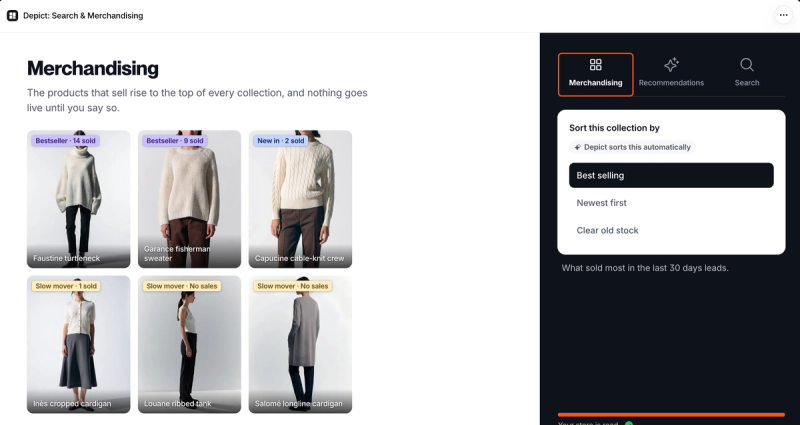
Depict feels premium from the first screen. While it reads your products and collections, it opens an example store so you can try merchandising, recommendations and search straight away, and the smooth animations, fades and transitions make it clear the experience has been designed with care. I set it up on my own store.
Setting it up
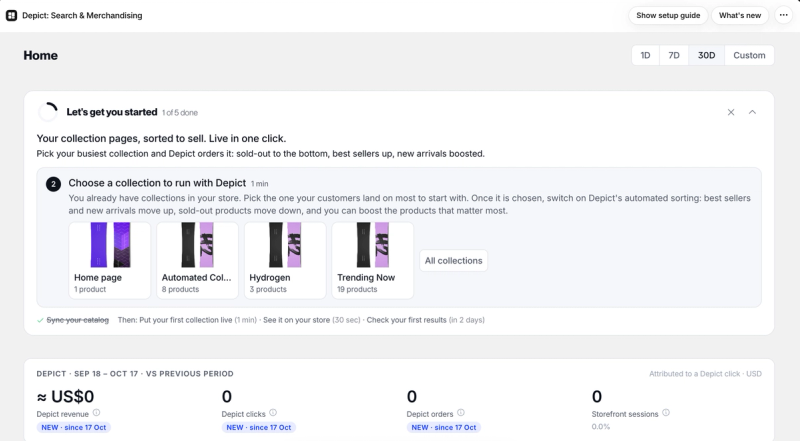
The setup is the most guided on this list. A step-by-step tour shows exactly which button to press next and explains how setting up a collection works, and each step carries a time estimate: choose a collection (one minute), put it live (one minute), see it on your store (30 seconds) and check the first results (two days). It took me about 10 minutes. The interface is easy to navigate throughout.
How it sorts
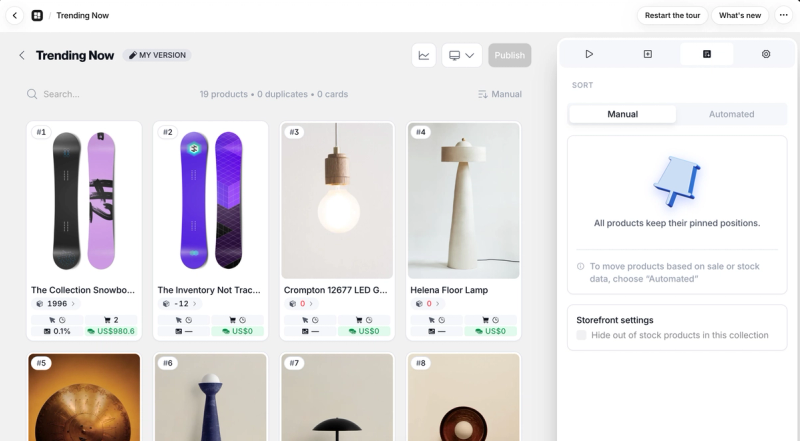
Each collection can be sorted manually, where every product keeps the position you pin it to, or automatically. According to Depict, automated collections move sold-out products down and best sellers and new arrivals up, and pins stay put. A storefront setting can hide out-of-stock products from the collection altogether.
Merchandising controls
The collection editor is where Depict stands apart. Every product tile shows its stock, clicks, add-to-carts and revenue, and a get-started panel walks through adding a card, sorting, highlighting a key product, previewing on mobile and desktop, and publishing. Changes are saved as your own version until you publish them.
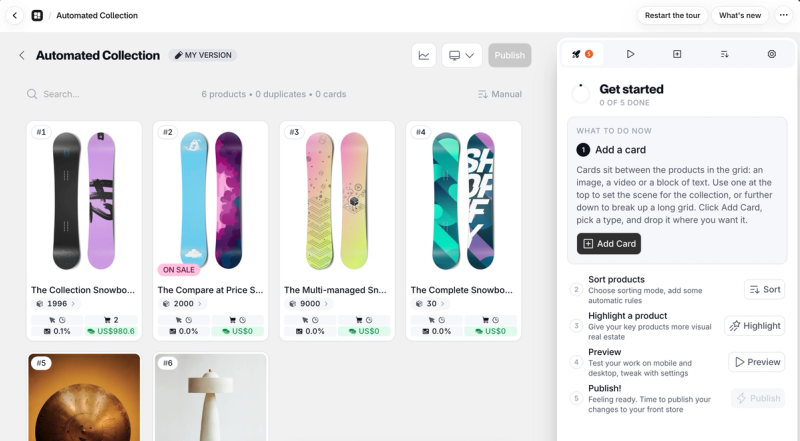
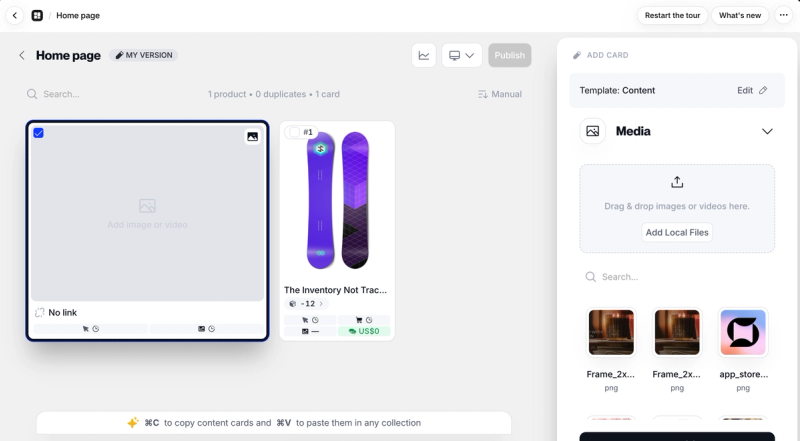
Cards are content blocks that sit between products in the grid: an image, a video or a block of text. Use one at the top of a collection to set the scene, or further down to break up a long grid, and copy a card from one collection to another with a keyboard shortcut. Depict's App Store reviewers mention these visual cards more than any other feature.
Measuring results
The home screen tracks revenue, clicks and orders attributed to Depict, and each product has its own page with revenue, its revenue rank, clicks, add-to-carts, a shopper funnel and a daily trend. Depict's search and recommendations now sit in the same app as merchandising.
Drawbacks
- It is one of the more expensive options here: collection sorting starts at $190 a month, and all three products together from $440.
- It doesn't seem to support Shopify's Sidekick assistant yet, so I couldn't ask it any questions.
- A few App Store reviewers say live chat and onboarding help were hard to reach, although most praise the support.
If you want sorting driven by sales, stock and margin data rather than a visual page builder, choose Kimonix.
Depict on the Shopify App Store
4. Dynasort: best for detailed sorting rules inside Shopify
Best for: larger catalogues that want precise control over how every collection is ranked, without leaving the Shopify admin.
Pricing: free Demo plan for 2 sorted collections; Basic $99 a month (25 collections), Pro $249 (100) and Enterprise $499 (1,000), each with a 30-day free trial (as of 17 October 2026).
App Store rating: 4.6 from 15 reviews (as of 17 October 2026).
Dynasort runs inside the Shopify admin, which I liked. It sorts collections with "recipes": weighted rules you build from store data, such as sales, margin, stock and review ratings, so you decide exactly what pushes a product up the page. It goes further than collection sorting, with search re-ranking, product recommendations and post-purchase offers in the same app. I set it up on my own store on the free plan.
Setting it up
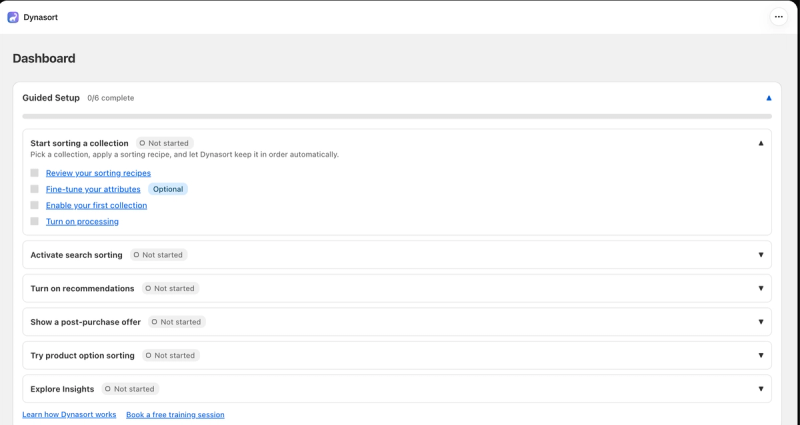
A welcome screen asks what you want to improve first: collections, in-stock product options and swatches, conversion tracking, search, or upsells and post-purchase offers. It then builds a Guided Setup plan of six steps. The first, sorting a collection, has its own checklist: review your recipes, fine-tune the attributes, enable your first collection and turn on processing. There is also a free training session to book, and a "talk to a human" option. It took me about 15 minutes to work through the first steps.
How it sorts
Each collection gets one recipe. Dynasort's documentation describes recipes as weighted combinations of more than 50 attributes, from sales and margin to inventory, add-to-cart rate, review counts, tags and metafields, with tie-breakers and rules for sold-out products. On top of a recipe you can boost or pin individual products. It is rule-based rather than personalised: every shopper sees the same order.
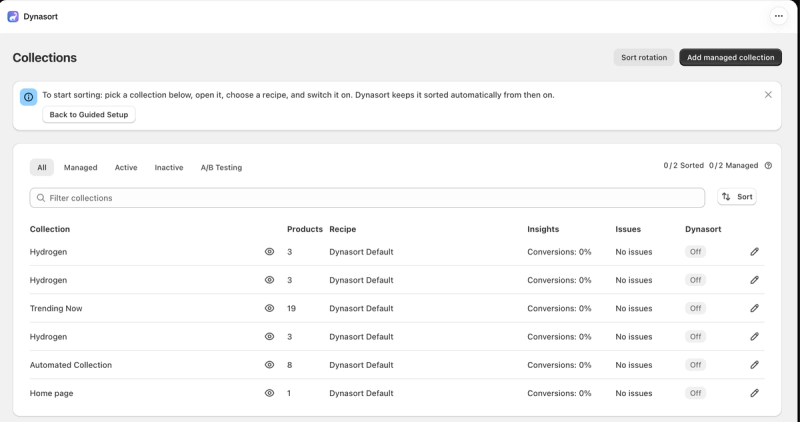
The collections list shows each collection's recipe, its conversion rate, any issues and whether Dynasort is switched on, with tabs for managed collections and A/B tests. How often collections re-sort depends on your plan, from every 60 minutes on the free plan to every 10 minutes on Enterprise. According to Dynasort, the new order is written straight to Shopify, so there is no script slowing the storefront.
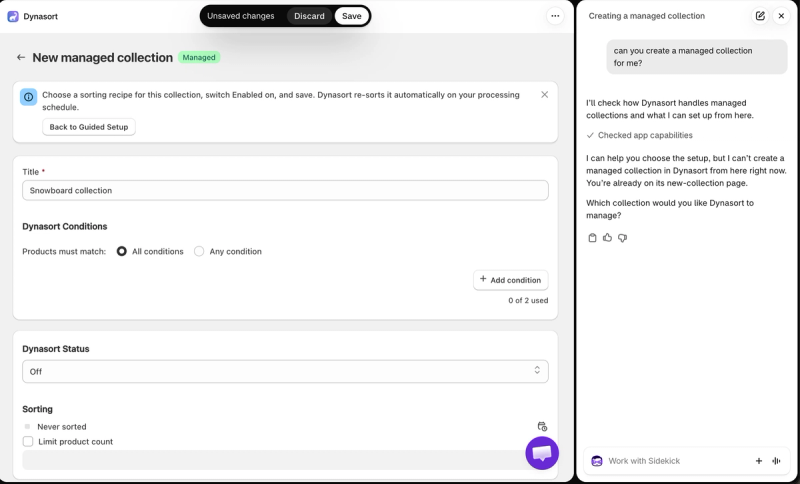
Managed collections go a step further: Dynasort builds the collection from conditions you set, such as tags or stock status, and keeps it sorted.
Recommendations and search
Recommendations are set per placement: the product page, cart, collection page, home page and post-purchase, plus custom placements, each with its own recipe, such as "Bestsellers You May Like" or "Customers Also Bought". You add the matching block in your theme editor to put each row live.
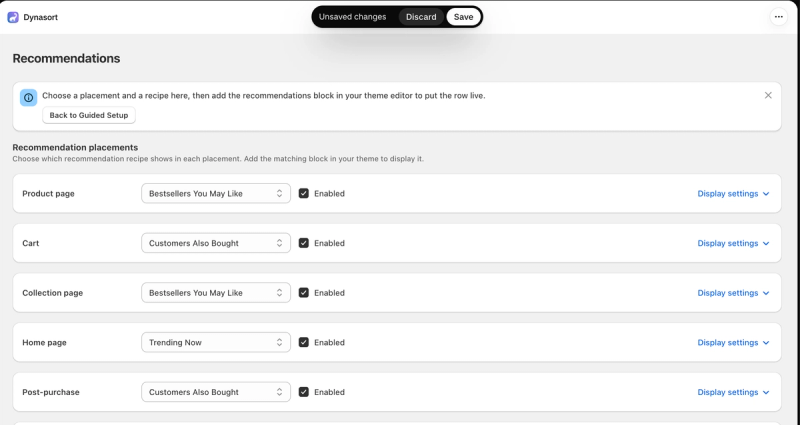
Search works the same way: Shopify decides which products match a search, and one active Dynasort recipe decides their order. On my store, A/B testing for search showed as a beta feature on the Pro and Enterprise plans.
Measuring results
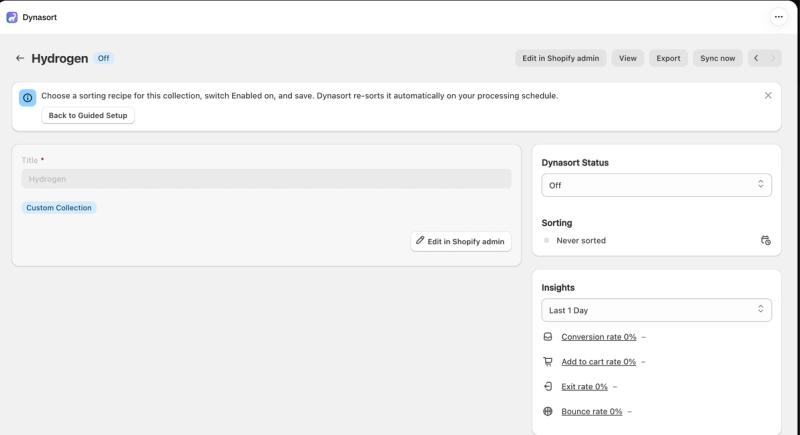
Every collection has its own insights: conversion rate, add-to-cart rate, exit rate and bounce rate, over a period you choose, with options to export or sync on demand. Dynasort's customers on the App Store say the clearest benefit is time: collections stay sorted on margin and stock without anyone touching them, and several single out the founder-led support.
Drawbacks
- The admin feels dated, and it hasn't moved to Shopify's latest Polaris design yet.
- It was more confusing to use than Kimonix, and can feel overwhelming if you are new to merchandising apps. Recipes and weights take some learning, which two of its own reviewers also mention.
- Shopify's Sidekick assistant could only read Dynasort's data. When I asked it to create a managed collection, it said it couldn't, whereas Kimonix's agent builds things for you.
If you want an AI agent to do the setup for you, choose Kimonix. If you only need simple sorting for a few collections, Sort'd's free plan is easier to learn.
Dynasort on the Shopify App Store
How to carry merchandising into the customer account
Collection sorting decides what every visitor sees on a collection page. Returning customers often go somewhere else first: their account, to check an order, their points or what they saved. That is a second place to merchandise, and most stores leave it empty.
Here is how it works with Kimonix and Mage:
- Sort your key collections first. Best sellers up, sold-out products down. Any app on this list can do this.
- Build a Kimonix collection for returning customers, such as a trending or best-sellers collection that keeps itself in order.
- Add it to the Mage account sidebar. Paste the Kimonix collection ID into Mage's Kimonix block in the sidebar editor.
- Place it next to their rewards. Customers see AI-picked products beside their points balance and recently viewed items each time they open their account.
Live Mage clients use exactly this setup to show real product recommendations to logged-in customers. See the Mage and Kimonix integration, the Kimonix setup guide or Mage customer accounts.
The Shopify loyalty program growing brands trust
See how Mage helps Shopify brands lift repeat purchase rate with loyalty, referrals and store credit.
Book a demo“Cannot say enough good things about the team at Mage Loyalty, one of the absolute best organizations we have ever worked with, full stop! So glad we connected with them, completely redid our loyalty program, new concepts, use of loyalty, increasing user engagement, showing us where we were not valuing our best customers, just WOW, amazing team!”


Read the West Coast Goalkeeping case study →
Frequently asked questions
What is the best free collection sort app for Shopify? Sort'd. Its free plan includes unlimited drag and drop merchandising and a limited number of automations, and several merchants say they have stayed on it for years. Dynasort's free plan covers two collections, and Kimonix starts at $19 a month with a free trial.
Can Shopify sort collections on its own? Partly. Shopify can sort a collection by best selling, alphabetically, by price, by date or manually. None of these weigh stock, margin or conversion together, and none move sold-out products to the bottom automatically, which is what these apps add.
How do I push out-of-stock products to the bottom of a collection? All four apps on this list can do it automatically. In Kimonix it is a rule on any AI collection, in Sort'd it is an automation template, in Depict it is part of automated sorting, and in Dynasort it is a setting inside each sorting recipe.
What is the difference between AI sorting and rule-based sorting? Rule-based sorting follows the rules you write, such as "new arrivals first, sold-out last", and every shopper sees the same order. AI sorting, as in Kimonix, weighs several signals at once, such as sales, conversion, stock and margin, and keeps adjusting the order as new data comes in.
Will a sort app change my collection URLs? No. These apps change the order of products inside a collection, so web addresses, menus and links stay the same. Kimonix, for example, can switch an existing collection to AI sorting without changing its address.
Can I show personalised product recommendations in the customer account? Yes, with Kimonix and Mage. Mage's account sidebar has a Kimonix block that shows AI product recommendations to logged-in customers, alongside their points, orders and recently viewed items.
Our verdict
- If you want collections that sort themselves on real data, choose Kimonix. It weighs sales, conversion, stock and margin, and Kim can set up collections, schedules and sale banners for you in seconds.
- If you want to arrange collections by hand without paying, choose Sort'd. Its drag and drop merchandiser is smooth, and the free plan goes a long way.
- If your collection pages need to look like a lookbook, choose Depict, and budget from $190 a month.
- If you want detailed rules inside the Shopify admin and don't mind a learning curve, choose Dynasort.
Whichever you choose, carry it through to the customer account, so returning customers see the right products too.

Graeme is the co-founder at Mage Loyalty. He heads product development, from complex loyalty migrations and large-scale data handling to building the features shaping the future of loyalty on Shopify.