Subscriptions turn one-off buyers into predictable revenue, and the app you choose decides what subscribers can do for themselves, how many cancellations you save, and how much of every renewal goes to fees. I've used the five most established subscription apps on Shopify, and four of them run alongside Mage on live merchant stores, where I've set up and supported the loyalty integrations myself.
This guide is written by Graeme, co-founder of Mage. Mage is a loyalty and store credit platform for Shopify. We don't sell a subscription app, and Mage integrates with Loop Subscriptions, Skio, Recharge and Stay AI.
Our quick picks
- Best all-round subscription app: Loop Subscriptions. Cancellation flows, payment recovery, campaigns and a deep portal builder, with a free plan to start.
- Best for visual, flow-based retention: Skio. The most modern admin here, flow-chart cancellation flows and built-in SMS subscription management.
- Best for reporting and benchmarks: Recharge. The deepest reporting on the list, including benchmarks against other stores in your vertical.
- Best for product-level analytics: Stay AI. Shows which products drive subscription revenue and churn, with an AI analyst you can question.
- Best for a small budget: Seal Subscriptions. Free for up to 50 subscriptions and no transaction fees on any plan.
The five apps compared
| App | Free plan | Paid from | Transaction fee | Time to a live widget (my setup) | How long I've used it | App Store rating |
|---|---|---|---|---|---|---|
| Loop Subscriptions | Up to 50 active subscriptions | $99/month | 1% (Starter), 0.75% (Pro) | About 15 minutes | Over a year | 5.0 (788) |
| Skio | No | $599/month | 1% + 20¢ | About 10 minutes | Three months | 5.0 (243) |
| Recharge | No | $25/month (first 50 subscribers, no fees) | 1.49% + 19¢ (Starter), 1.34% + 19¢ (Plus) | About 15 minutes | A year | 4.8 (3,137) |
| Stay AI | No (30-day trial) | $499/month | 1% + 19¢ | About 10 minutes | Just under a year | 4.9 (148) |
| Seal Subscriptions | Up to 50 subscriptions | $5.95/month | 0% | About 15 minutes | A couple of weeks | 4.9 (3,146) |
App Store ratings and pricing as listed on the Shopify App Store on 15 October 2026. Setup times run from onboarding to a selling plan live on a product page; for Loop that also included the customer portal.
How I used these apps
Loop, Skio, Recharge and Stay AI all run alongside Mage on live merchant stores, and I've set up and supported those integrations myself, so this guide reflects how the apps work with real subscribers. I've used Loop on its Pro plan, Skio on Scale, Recharge on Plus and Stay AI on its $499 plan. For each one I set up selling plans and the product page widget, styled the customer portal, and worked through the retention tools and reporting. Seal is the exception: I used it for a couple of weeks, and say so in its section.
The screenshots come from my own Shopify store rather than a merchant's, so no customer or merchant data is shown. Where a report needs real volume, the app shows its sample data instead, and I note it. Screenshots were captured in October 2026.
One ownership note: Recharge bought Skio in April 2026. The two still run as separate apps with their own pricing, and I've reviewed them separately.
These are the factors I weighed most, because they decide the choice for most stores:
- Cost as you grow. Most subscription apps charge a percentage of every renewal on top of the monthly fee, so the entry price can be misleading.
- Keeping subscribers. How much the cancellation flow and failed payment recovery can save before a subscriber is lost.
- The subscriber experience. What subscribers can change for themselves in the customer portal, and how far you can brand it.
- Reporting. Whether you can see what drives churn and revenue, not just totals.
- Loyalty fit. Whether rewards can be spent on subscription orders, and how cleanly the app connects to a loyalty program.
1. Loop Subscriptions: best all-round subscription app
Best for: growing brands that want every retention tool in one place, from cancellation flows and payment recovery to subscriber campaigns.
Pricing: free for up to 50 active subscriptions; Starter $99 a month plus 1% per transaction; Pro $399 a month plus 0.75% per transaction (as of 15 October 2026).
App Store rating: 5.0 from 788 reviews (as of 15 October 2026).
Loop is the most complete app on this list, and it seems to have thought of everything. The admin is clean, easy to navigate and logically laid out, a bit like a standalone SaaS version of Shopify's own admin. I've used Loop for over a year, on my own store on the Pro plan and alongside the Mage team supporting Love Sweat Fitness and Reelie.
Setting it up
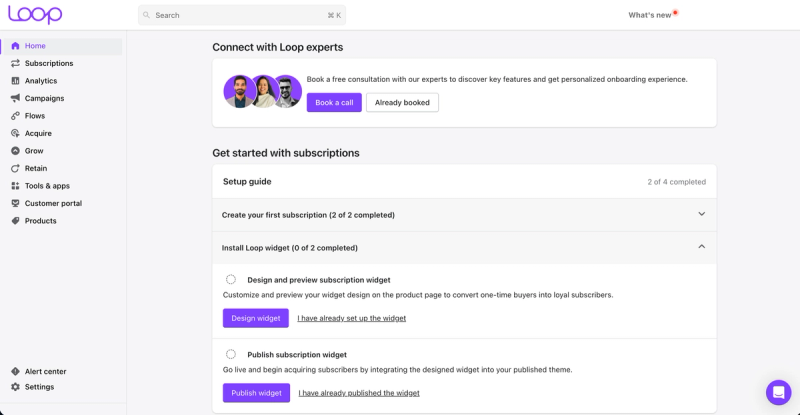
Creating a selling plan, adding the product page widget and setting up the customer portal took me about 15 minutes on my own store. A setup score tracks your progress and splits the app into four areas: Acquire, Retain, Grow and Manage. It works as a checklist and a map of the product at the same time, so I could see bundles, checkout links and gift subscriptions waiting under Acquire without digging through menus. The home screen also offers a free call with Loop's onboarding team.
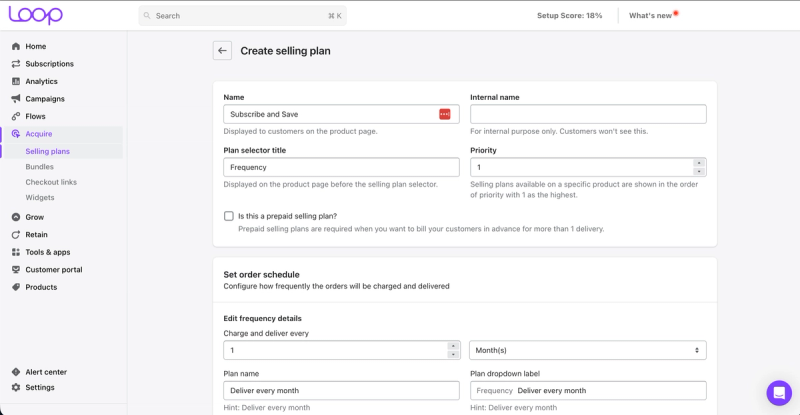
Selling plans are straightforward: name the plan, set how often it charges and delivers, choose the order it appears in on the product page, and tick a box to make it prepaid if you want to bill several deliveries up front.
What your subscribers see
The product page widget is standard and works well out of the box. Subscribers log in to the portal with their normal store account, then skip, swap or cancel deliveries and check what is coming next.
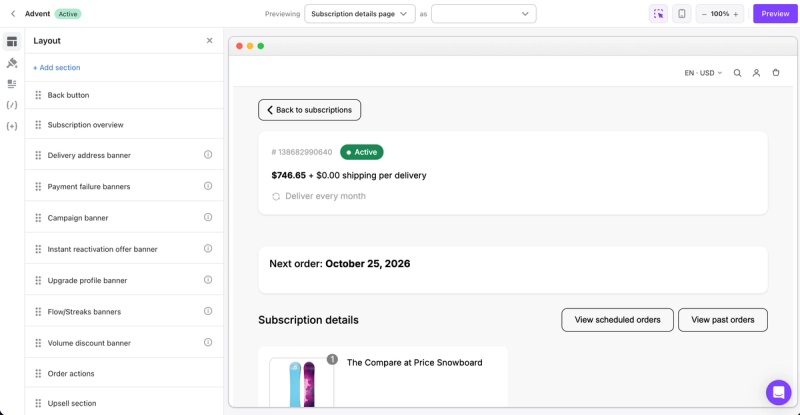
The portal builder is where Loop pulls ahead. You drag sections into place and the preview updates as you go, with ready-made blocks for payment failure banners, an instant reactivation offer, upsells and volume discounts. There are colour pickers for text, buttons and backgrounds, every line of copy is editable (useful if you sell in more than one language), and custom CSS and JavaScript cover anything the pickers can't. You can even preview the portal as a specific customer, page by page, so you see exactly what they see.
Keeping subscribers
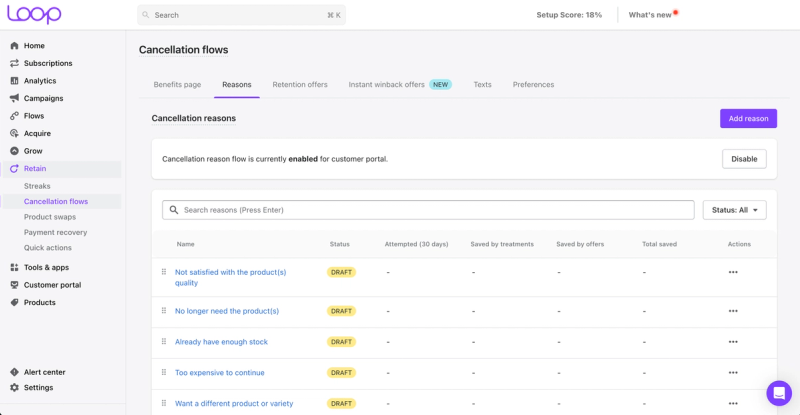
Cancellation flows are covered in depth. Loop starts you with common reasons to edit, such as "too expensive to continue" or "already have enough stock", and reports how many subscribers tried to cancel for each reason and how many were saved. Separate tabs handle retention offers, the new instant winback offers, a benefits page and the wording, and product swaps sit in the same Retain menu.
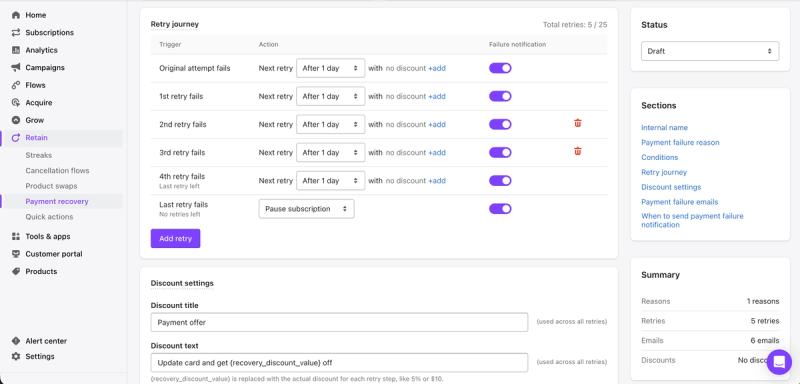
Payment recovery goes beyond a fixed retry schedule. You build a strategy for a specific decline reason, such as "amount too large", and a subscription value range, then set the timing of each retry, an optional "update your card and get money off" discount and whether to email the customer. The Pro plan allowed up to 25 retries (the listing gives Starter 15), and you decide what happens when the last one fails, such as pausing the subscription.
Streaks add a game to staying subscribed: you choose a free gift or a discount for reaching set orders, add a grace period, and warn subscribers in skip and pause emails that their streak is at risk.
Running it day to day
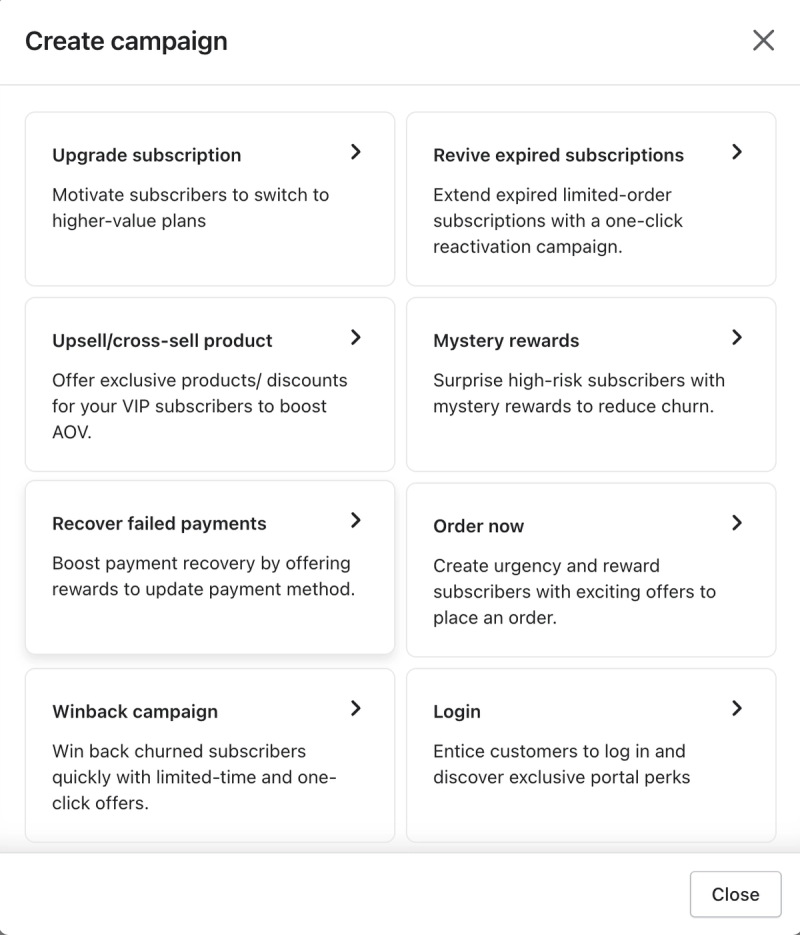
Analytics covers practically anything you could ask for: payments, failed and upcoming payments, products sold, upsells, cancellations and forecasts, in tables and charts. Campaigns were one of my favourite parts. Templates nudge subscribers to upgrade, revive expired subscriptions, try a mystery reward, update a failed card, order now or come back after cancelling. Loop also offers an MCP connection that links your subscription data to an AI assistant such as Claude, so you can ask about subscribers, churn, MRR or save rate in plain language and turn the answer into a Slack update or spreadsheet in the same conversation. When I needed help, I worked directly with Loop's team over Intercom chat.
Drawbacks
- The interface is clean, but some screens look slightly dated, and the portal builder feels clunkier than the drag-and-drop builders I use outside subscription apps.
- Several standout features are Pro-only on the listing: portal themes and custom sections, streaks and rewards, and prepaid and gift subscriptions. That is $399 a month plus 0.75% a transaction.
- Starter's 1% transaction fee grows with your subscription revenue.
Honestly, Loop is hard to fault. If you want something simpler with no transaction fees, Seal is the lower-cost route.
Using Loop Subscriptions with Mage
Two Mage brands run Loop alongside their loyalty program. Love Sweat Fitness gives members 100 points for starting a subscription, and one tap on "Apply to subscription" puts a reward straight onto their active Loop subscription from inside their Mage account, with no discount code to copy. Reelie rewards subscribers when they reach renewal milestones and lets them spend points on a discount for their next Loop order. Read the Love Sweat Fitness case study or see the Mage and Loop Subscriptions integration.
Loop Subscriptions on the Shopify App Store
2. Skio: best for visual, flow-based retention
Best for: brands that want a modern admin, flow-chart cancellation flows and SMS subscription management without adding a separate SMS app.
Pricing: one plan, Scale, at $599 a month (or $5,988 a year) plus 1% and 20¢ per transaction (as of 15 October 2026).
App Store rating: 5.0 from 243 reviews (as of 15 October 2026).
Skio has the most modern-feeling admin on this list. It is bright, clean and snappy, and it looks like software designed this year. I've used Skio for three months on my own store on the Scale plan, alongside the Mage team supporting Marna. Recharge bought Skio in April 2026, and the App Store listing now reads "Skio, a Recharge Company", but the two still run as separate apps.
Setting it up
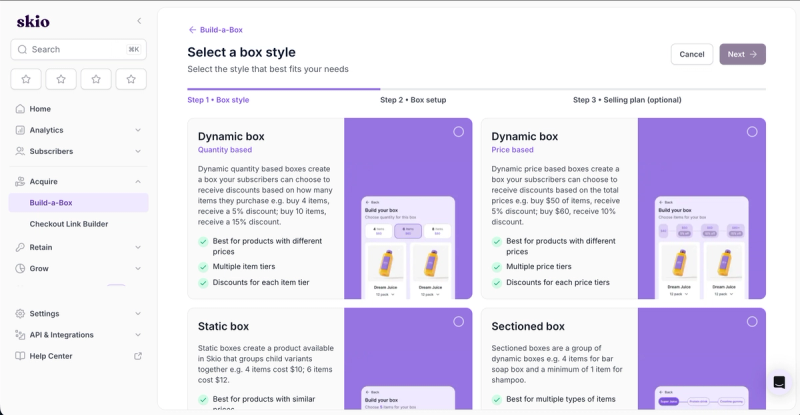
Setup is quick. I had Skio running in about 10 minutes. Build-a-Box is a good example of how it guides you: three steps (box style, box setup and an optional selling plan), and four box styles to start from. Dynamic boxes discount by quantity ("buy 4 items, get 5% off") or by order value, static boxes group variants at set prices, and sectioned boxes combine several boxes in one, such as a bar soap box with at least one shampoo.
What your subscribers see
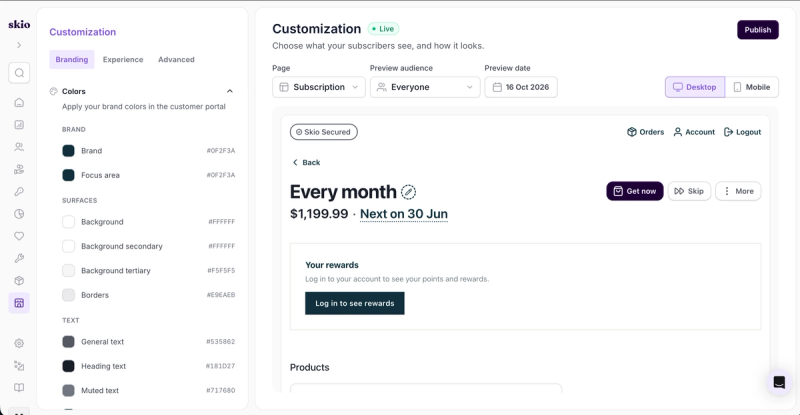
The customer portal is easy to customise. The Branding tab has colour pickers for everything from brand colours to borders and muted text, and the Experience tab is a long list of toggles, such as letting subscribers skip individual products, add products from the overview, swap products or receive a gift when they skip. Custom banners, drag-and-drop blocks, and custom CSS and JavaScript cover the rest. The preview switches between desktop and mobile, and you can preview by page, audience and date. Translation support is easy to use: add a language and edit each piece of customer-facing text side by side.
Keeping subscribers
Skio is far more flow-based than the other apps here, and the cancellation flow shows it best. Instead of a list of reasons, you build a flow chart. Each cancellation reason, and each sub reason such as "I don't feel the benefits", branches to its own treatment: skip the next order, change the date or frequency, swap a product or offer a discount. Conditions, such as the subscriber's order number, send people down different paths. It makes complex cancellation flows easy to follow at a glance.
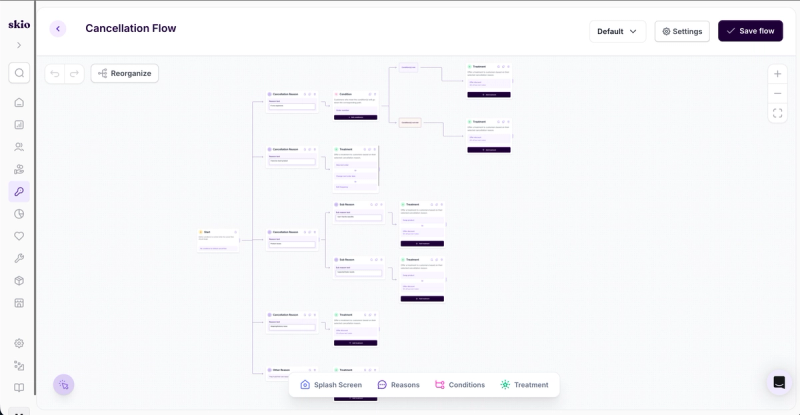
Winbacks use the same builder and start when someone cancels through the cancel flow. Payment recovery, surveys and Surprise & Delight sit in the same Retain menu.
Running it day to day
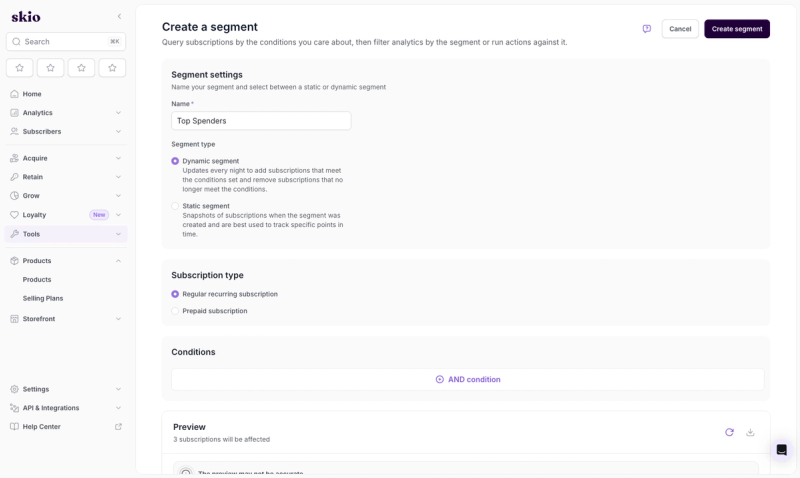
Analytics is a full suite, similar to Loop's. Segments take it further: you query subscriptions by the conditions you care about, as a dynamic segment that refreshes every night or a static snapshot, then filter your analytics by that segment or run actions against it. The segments dashboard compares the subscriptions that took an action with those that didn't, and an audit log tracks each action's effect on revenue and order value.
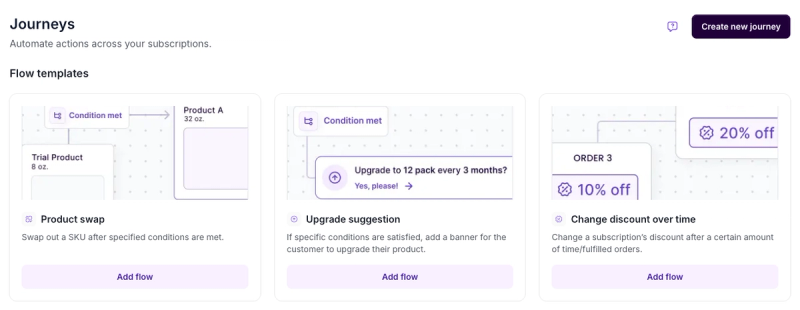
Journeys are flow charts too. Each starts from a trigger, such as after an order, after a product is added or after the billing date is changed by hand, then branches through conditions and actions. Templates get you started: swap a trial product for the full size once conditions are met, show an upgrade banner, or change a subscriber's discount after a set number of orders.
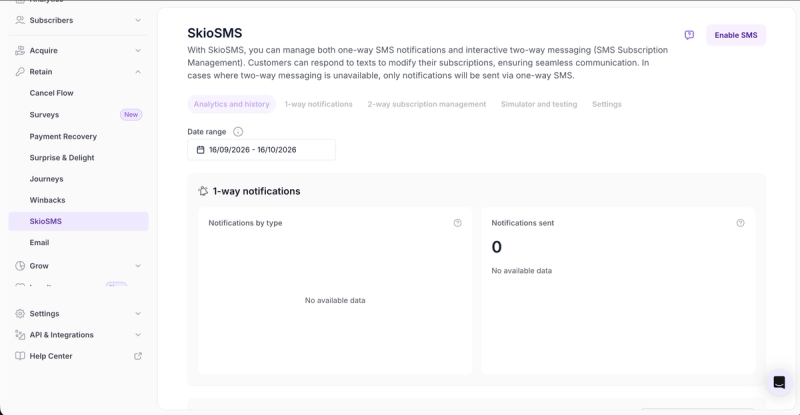
SkioSMS is built in, which many of the other platforms can't say; they usually need Postscript or Attentive for this. It sends one-way SMS notifications and handles two-way subscription management, so subscribers can text back to change their subscription, and there is a simulator to test messages before you switch it on.
Drawbacks
- It is costlier than the other platforms. There is one plan, at $599 a month plus transaction fees, and no cheaper way in.
- Everything is built as a flow. Some merchants may find that complex or overkill for a simple subscription program. Coming from a tech background, I liked it.
If you want most of the same retention tools for less, Loop's Starter plan starts at $99 a month, and Seal has a free plan.
Using Skio with Mage
Marna runs Skio alongside its Mage loyalty program. Subscribers can turn their points into a discount on their next Skio delivery, and reaching a set number of renewals earns them a bonus. The "Your rewards" block in the portal screenshot above is a custom Mage block: Mage can add it on request, or your developers can build it with the Mage SDK. See the Mage and Skio integration.
3. Recharge: best for reporting and benchmarks
Best for: brands that want the deepest reporting on this list, including industry benchmarks, from the most established app here.
Pricing: $25 a month with no transaction fees for your first 50 subscribers; Starter $99 a month plus 1.49% and 19¢ per transaction; Plus $499 a month plus 1.34% and 19¢ per transaction (as of 15 October 2026).
App Store rating: 4.8 from 3,137 reviews (as of 15 October 2026).
Recharge is an enterprise app that doesn't feel corporate. Instead of the usual SaaS look, it uses soft, warm colours that make the admin feel almost homely, and everything is logically separated, from the menus to each subscriber and their orders. It has been on the Shopify App Store since 2014, longer than any other app here, and it now also owns Skio. I've used Recharge for a year on the Plus plan, and helped a number of brands connect it to their Mage loyalty programs.
Setting it up
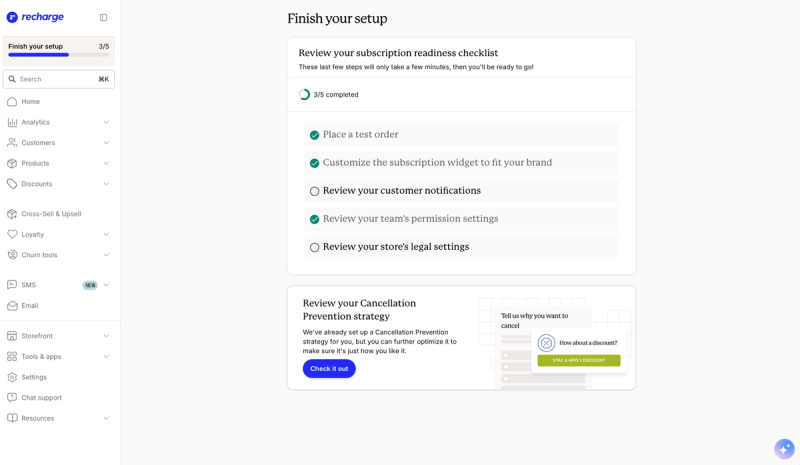
A "Finish your setup" checklist walks you through the essentials: place a test order, style the subscription widget, review customer notifications, team permissions and legal settings. Recharge also sets up a cancellation prevention strategy for you, which you can adjust later. From onboarding to a live selling plan on a product page took me about 15 minutes.
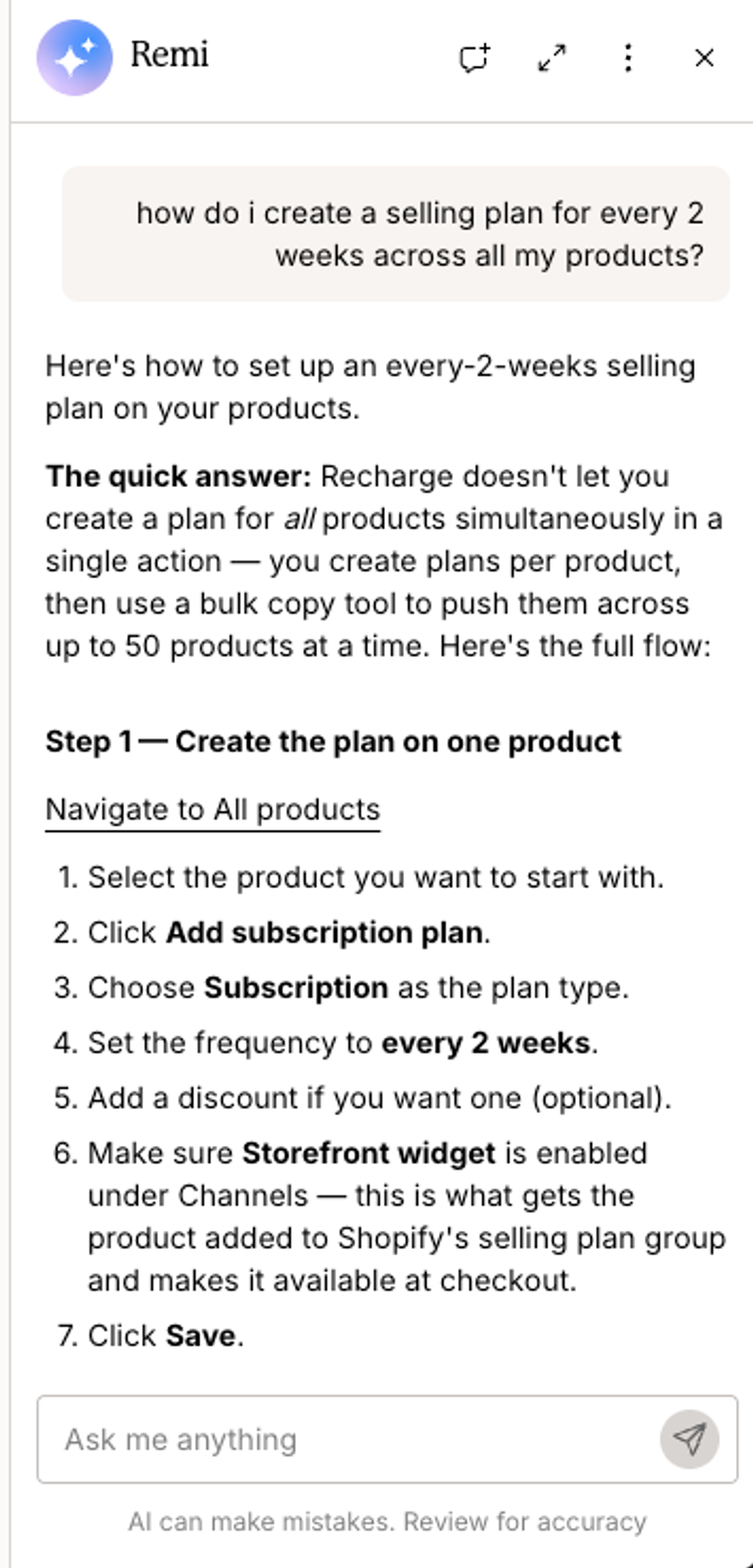
Selling plans are created per product. When I asked Remi, Recharge's built-in AI assistant, how to add an every-two-weeks plan to all my products, it gave me a clear, step-by-step answer: create the plan on one product, then use a bulk copy tool to push it to up to 50 products at a time.
What your subscribers see
Everything customer-facing sits under Cross-Sell & Upsell: the product page subscription widget, a cart drawer overlay that suggests switching a one-time purchase to a subscription, a slide-in cart, checkout upsells and post-purchase offers.
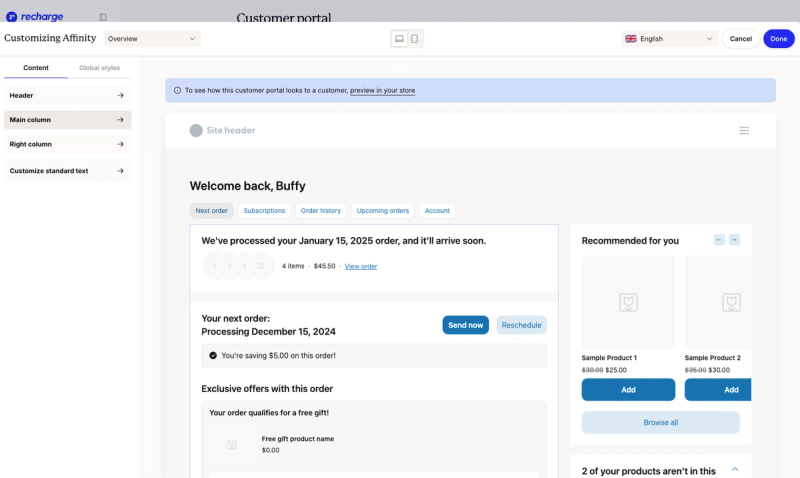
The customer portal editor works section by section. You reorder, hide or add blocks in the header and in each column, rewrite the standard text, set global styles, choose the language and preview on desktop or mobile. Subscribers land on their next order, with buttons to send it now or reschedule, and tabs for their subscriptions, order history, upcoming orders and account, plus product recommendations and offers such as a free gift.
Keeping subscribers
Cancellation prevention is on from day one, because Recharge builds a starting strategy during setup. The email templates do a lot of the retention work: a featured win-back email for lapsed customers, an upcoming order email that lets subscribers manage their subscription and add products, and standard notices for activation, cancellation, charge confirmations, an upcoming charge three days before renewal and a 30-day warning for annual subscriptions. SMS is a new addition to the menu.
Running it day to day
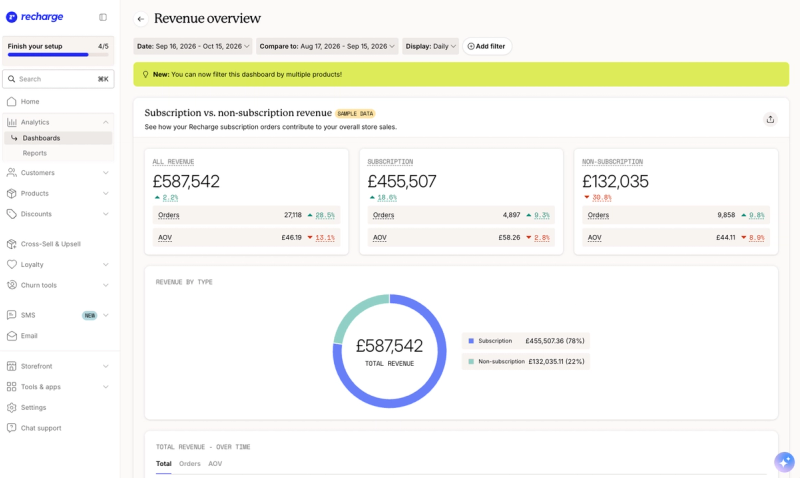
The reporting is extensive, and the charts are a pleasure to read. The revenue overview splits subscription and non-subscription revenue, orders and average order value against a comparison period, and you can now filter by several products at once. A checkout dashboard tracks the share of checkout orders that include a subscription over time.
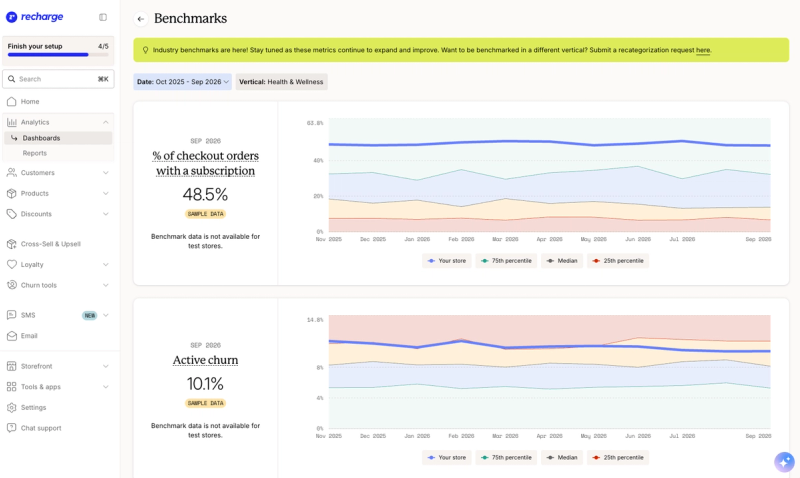
Benchmarks are the standout. You choose your vertical and see where your store sits against the 25th percentile, median and 75th percentile for metrics such as the share of checkout orders with a subscription and active churn. My screenshots show Recharge's sample data rather than a merchant's real figures.
Each subscriber's page opens with their subscription spend, subscription order count and a streak count, with their addresses, payment methods and communication preferences alongside.
Drawbacks
- Selling plans are set per product, so adding one plan across a large catalogue means bulk copying it 50 products at a time.
- It's expensive. Starter's 1.49% plus 19¢ per transaction is the highest percentage fee on this list, and bundles, tiered discounts and hands-on implementation need Plus, at $499 a month.
- It runs off-platform, in its own admin outside Shopify.
If fees are your main concern, Loop charges a lower percentage and Seal charges none.
Using Recharge with Mage
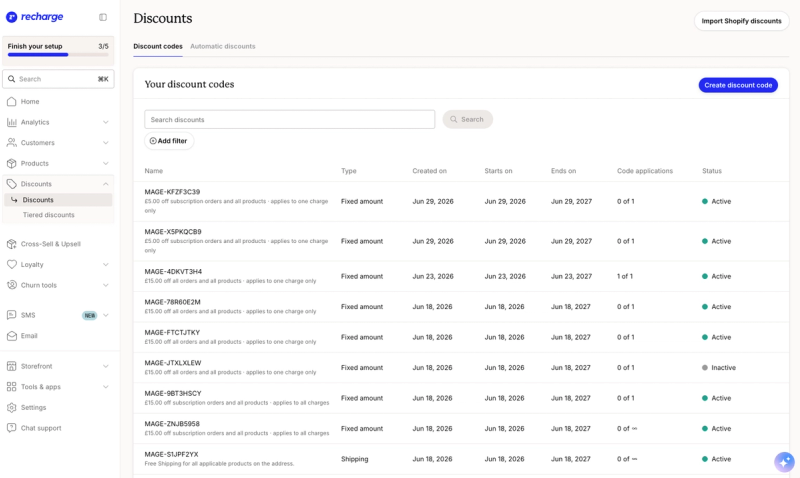
I've connected Recharge to Mage for a number of brands, and Tea Drops is a good example. Their members earn bonuses at subscription milestones, starting with signing up for a subscription, and they can spend points, or exchange Mage store credit, for a discount that lands on their next Recharge charge. On my own store, those redemptions appear in Recharge's discounts as MAGE codes, each a set amount off subscription orders and limited to one charge. Read the Tea Drops case study, see the Mage and Recharge integration, or follow our guide to connecting your loyalty program to Recharge.
Recharge on the Shopify App Store
4. Stay AI: best for product-level analytics
Best for: brands that want to see which products drive subscription revenue and churn, with an AI analyst they can ask about their numbers.
Pricing: one plan at $499 a month plus 1% and 19¢ per transaction, with a 30-day free trial (as of 15 October 2026).
App Store rating: 4.9 from 148 reviews (as of 15 October 2026).
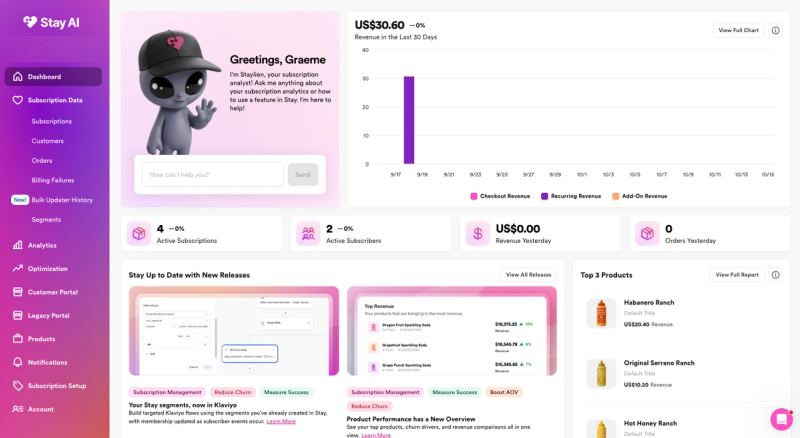
Stay AI has the most playful admin of the five, with a warm look and the simplest navigation on this list. The dashboard opens with Staylien, an AI subscription analyst you can ask about your numbers or how to use a feature, next to a 30-day revenue chart split into checkout, recurring and add-on revenue. I've used Stay AI for just under a year on its $499 plan, and connected it to Mage for a number of brands.
Setting it up
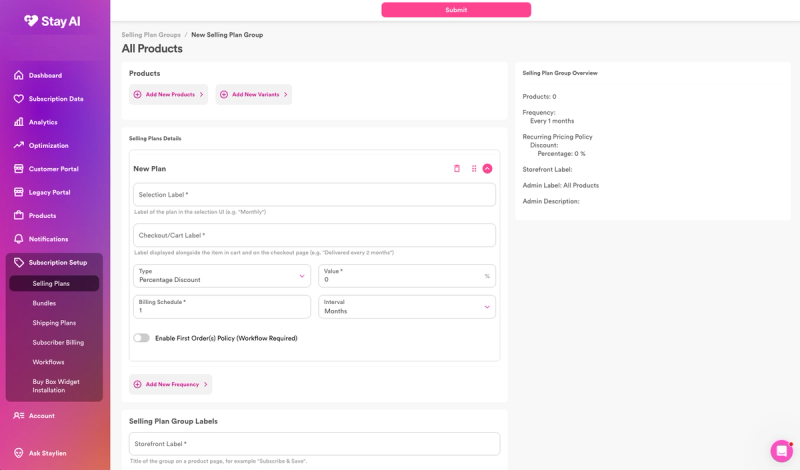
Selling plans live in groups. You add the products and variants to a group, then set each plan's label on the product page and at checkout, its discount, and how often it bills. More frequencies can be added to the same group, and there is an optional first-order policy for a different first order. The Subscription Setup menu also holds bundles, shipping plans and the buy box widget installation. It took me about 10 minutes from onboarding to my first selling plan and the widget embedded on a product page. Staylien helped here too: when I installed, it explained how to create selling plans and sync my products to Stay.
What your subscribers see
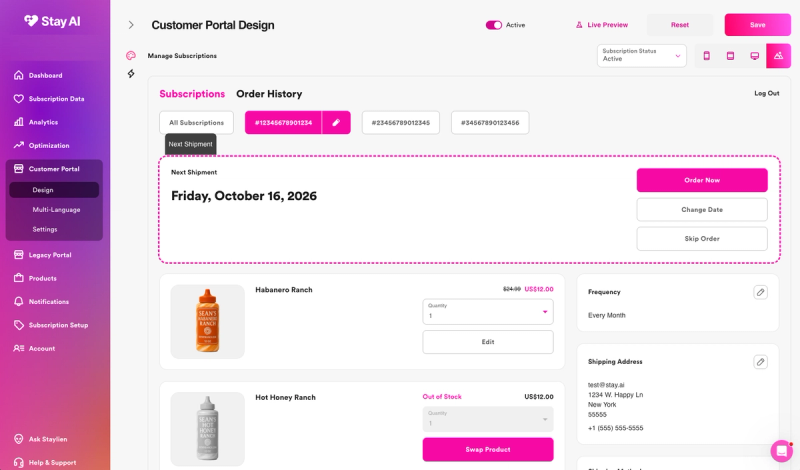
The customer portal designer previews the portal live on phone, tablet and desktop, and by subscription status. Subscribers see their next shipment with buttons to order now, change the date or skip, and can change quantities, swap a product, update their frequency and edit their address. Multi-language support has its own page.
Keeping subscribers
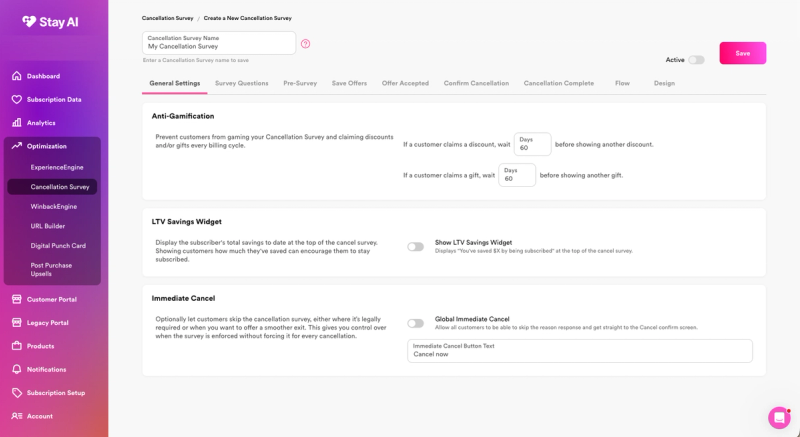
Retention tools sit under Optimization, alongside a winback engine, a URL builder and post-purchase upsells. The cancellation survey is built in stages, with tabs for the survey questions, a pre-survey, save offers, what happens when an offer is accepted, the confirmation and completion screens, the flow and the design.
Two settings are worth knowing about. Anti-gamification stops a subscriber from claiming another discount or gift for a set number of days (60 on a new survey), so nobody can game the survey every billing cycle. An LTV savings widget can show "You've saved $X by being subscribed" at the top of the survey. There is also an immediate cancel option, for markets where the law requires a quick exit or when you simply want a smoother one.
Dedicated reports then track the cancellation survey, churn and payment recovery, and billing failures have their own list under Subscription Data.
Running it day to day
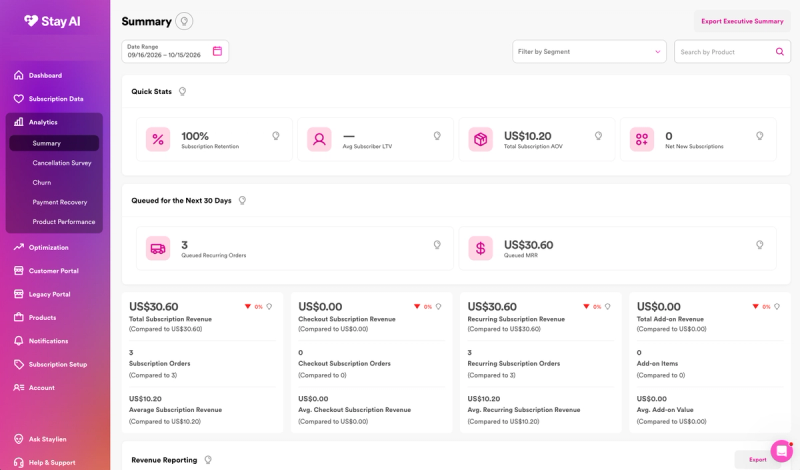
Analytics is the strongest part of Stay AI. The summary shows subscription retention, average subscriber lifetime value, average order value and net new subscriptions, plus the orders and MRR queued for the next 30 days. You can filter it all by segment or product and export an executive summary.
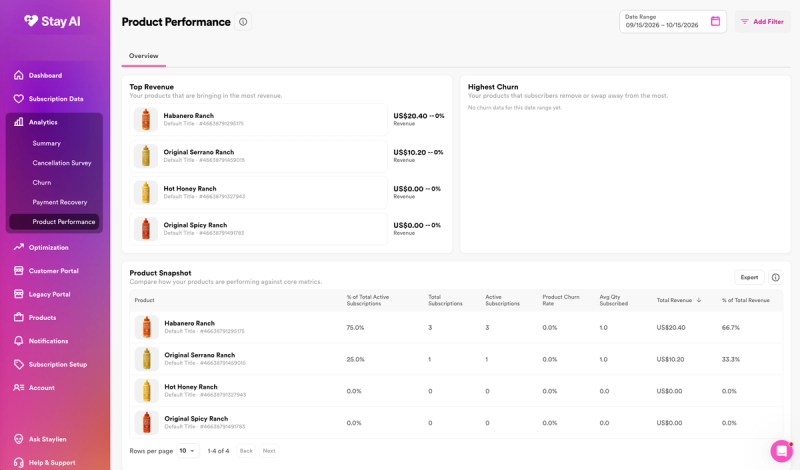
Product performance goes a level deeper. It ranks products by revenue, shows the ones subscribers remove or swap away from most, and compares every product's share of active subscriptions, churn rate and share of revenue in one table. Stay AI segments can also sync to Klaviyo, so you can build Klaviyo flows on the segments you created in Stay.
Drawbacks
- The playful feel has a flip side: the platform feels casual. It is simple to use, but next to the other apps here it doesn't feel as enterprise.
- There is one plan, at $499 a month plus transaction fees, so there is no cheaper way in for a smaller subscription program.
If you want a lower entry price, Loop and Recharge both start lower, and Seal has a free plan.
Using Stay AI with Mage
Mage connects to Stay AI with an API key. Subscribers can exchange their points for a discount of any value and apply it straight to one of their active Stay subscriptions from Mage's redemption block, instead of using it as a one-time code at checkout. You can also award bonus points when a subscriber reaches a renewal milestone you set. See the Mage and Stay AI integration.
Stay AI on the Shopify App Store
5. Seal Subscriptions: best for a small budget
Best for: new or small subscription programs that want to start for free and never pay a transaction fee.
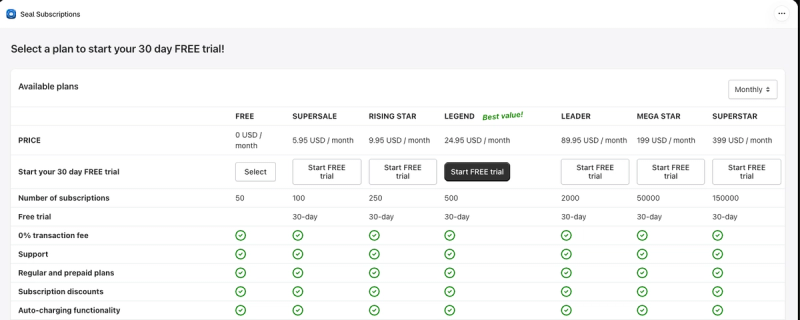
Pricing: free for up to 50 subscriptions; paid plans from $5.95 a month (100 subscriptions) to $399 a month (150,000 subscriptions); 0% transaction fees on every plan (as of 15 October 2026).
App Store rating: 4.9 from 3,146 reviews (as of 15 October 2026).
Seal is the cheapest way onto this list by a distance. It runs inside the Shopify admin rather than in a separate app, and it charges no transaction fees on any plan. The trade-off is polish: next to the other four, it looks and feels like an older app. I used Seal for a couple of weeks, so this is a shorter look than the others.
Setting it up
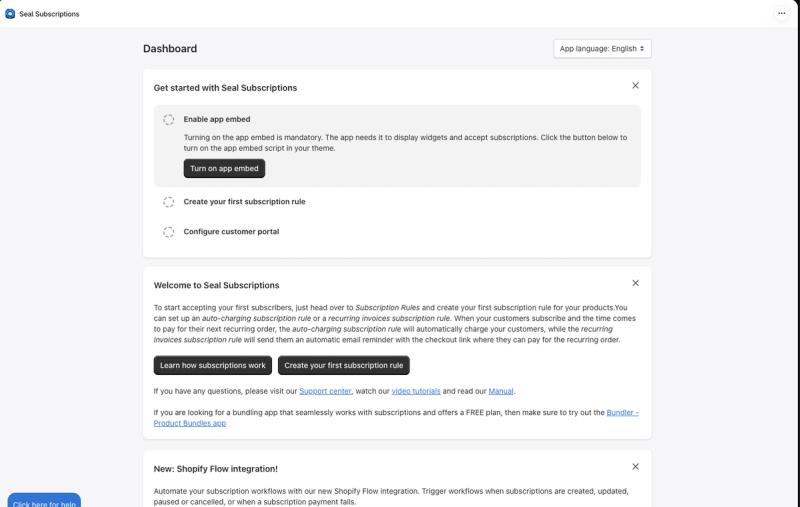
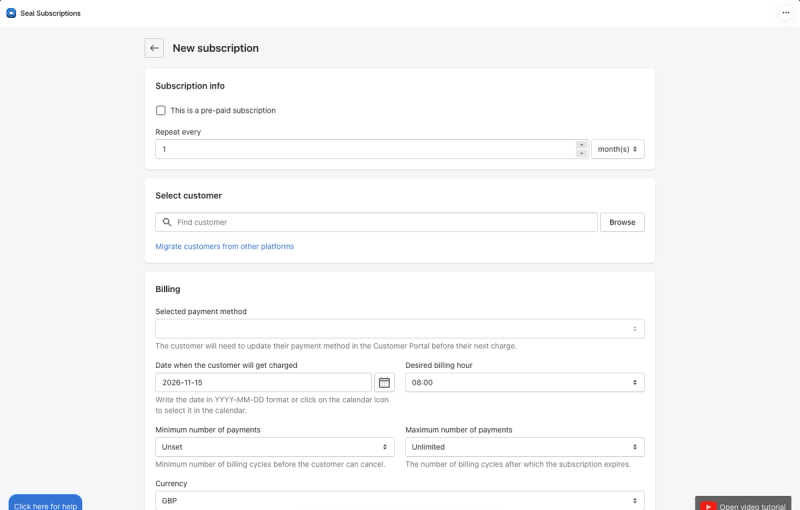
The dashboard lists three steps to get started: turn on the app embed, create your first subscription rule and configure the customer portal. A subscription rule sets the plan's name on the product page, the label before the frequency selector and the products it applies to, with a preview of the widget alongside. Seal offers two kinds of rule: auto-charging, which bills the subscriber automatically, and recurring invoices, which emails them a checkout link to pay each time. Setup took me about 15 minutes, from onboarding to the app embed showing on a product page.
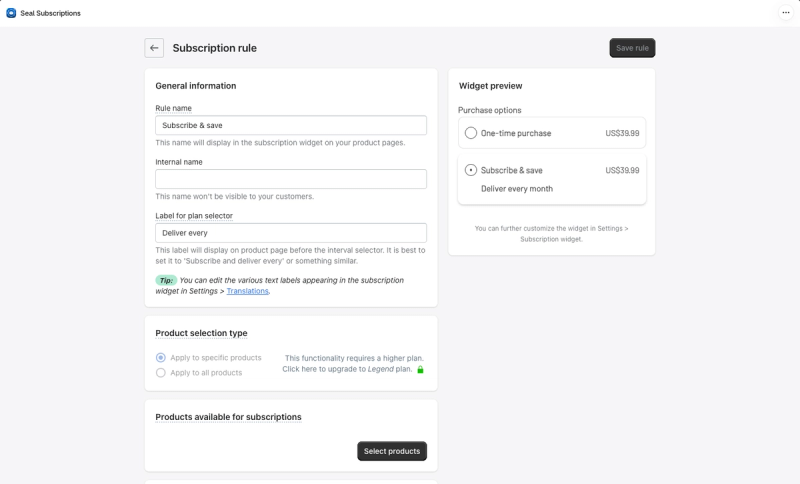
Expect the plan to matter early. Applying a rule to all products, rather than choosing them one by one, needs the $24.95 Legend plan.
What your subscribers see
The product page widget is a simple choice between a one-time purchase and subscribe and save, and every text label can be changed in the translation settings.
I didn't test the subscriber side in depth. According to Seal's App Store listing, a passwordless customer portal starts on the $5.95 plan and a codeless portal editor on the $199 plan. Merchant reviews describe subscribers skipping, pausing and swapping products there, and Seal notes that the portal link has to be set up in your theme, so make sure customers can find it.
Keeping subscribers
Dunning settings, automated product swaps and subscription editing are on every plan, including the free one. When you create a subscription by hand, you can set a minimum number of payments before the customer can cancel and a maximum after which it ends. On the listing, the cancellation flow starts on the $9.95 plan and cancellation offers on the $199 plan.
Running it day to day
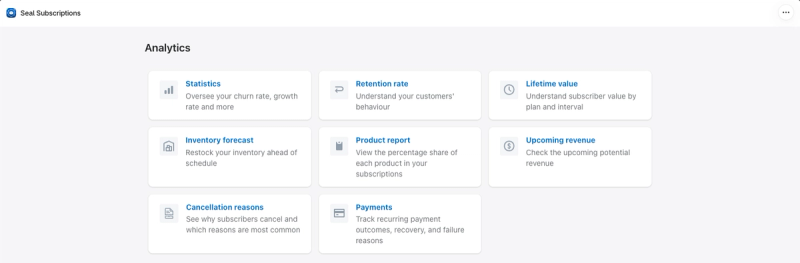
The analytics section lists eight reports: statistics on churn and growth, retention rate, lifetime value by plan and interval, an inventory forecast, a product report, upcoming revenue, cancellation reasons and payment outcomes. Seal has also added a Shopify Flow integration, so you can trigger workflows when a subscription is created, updated, paused or cancelled, or when a payment fails.
Drawbacks
- The interface feels dated next to the other four. Screens are plainer, some are confusing to navigate, and it lacks the polish of Loop, Skio or Recharge.
- The plan page you see on install is hard to read. Seven tiers with names like Supersale, Rising Star and Legend make it harder than it should be to see what changes between them.
- Useful features are spread across those tiers, so the free plan is a starting point rather than the full app.
If you have outgrown the basics or want a more modern experience, Loop has a free plan for up to 50 subscriptions and much more room to grow.
Seal Subscriptions on the Shopify App Store
Should you use your subscription app's built-in rewards?
Most of the apps on this list now include some form of subscriber rewards, from streaks and punch cards to points and referrals. Using one vendor for both is tempting, so it is worth being clear about the trade-off.
One vendor means one bill and one admin. The catch is who the rewards reach. Rewards built into a subscription app are designed around subscribers, so one-time buyers, the customers you most want to convert, sit outside them. They also tie your rewards to your subscription app: if you switch apps, the program and its history have to move too.
A dedicated loyalty program covers every customer and still rewards subscribers specifically. Love Sweat Fitness is a good example: one loyalty program for its whole community, with 100 points for starting a subscription and rewards members apply straight to their active Loop subscription.
My view: choose the best subscription app for your store and the best loyalty program for your store, then connect them. If you are comparing loyalty platforms too, see our guide to the best Shopify loyalty apps for subscription brands, including Mage's loyalty program.
How to reward subscribers for staying
Subscribe-and-save discounts reward the sign-up, then stay the same at every renewal. The moments that matter more come later: the third order, the sixth, the point where a subscriber is about to skip or cancel. A loyalty program connected to your subscription app can reward those moments and let subscribers spend their rewards where they already buy.
Here is how it works with a loyalty platform such as Mage:
- Connect your subscription app. Mage connects directly to Loop Subscriptions, Skio, Recharge and Stay AI.
- Reward milestones. Award points when someone starts a subscription and when they reach a set number of renewals. Each milestone pays out once per subscription.
- Let subscribers spend points on their next renewal. They swap points for a discount that is applied straight to their subscription, with no code to copy at checkout.
- Show the balance where subscribers look. Points and rewards can appear in the loyalty widget, in emails and, with some apps, in the subscription portal itself.
Why it works:
- It rewards commitment, not just the sign-up. Milestone rewards give subscribers a reason to reach the next renewal instead of skipping it.
- The cost is controlled. A redeemed reward is a set amount off one renewal, not a permanent extra discount on every order.
- It reaches everyone. One-time buyers earn the same points, and starting a subscription becomes one more way to earn.
- Referrals feed subscriptions. With Loop, Skio and Recharge, a referred friend's discount can apply automatically when they start a subscription.
For more on combining the two, see our guides to loyalty and subscriptions on Shopify and connecting your loyalty program to Recharge.
The Shopify loyalty program growing brands trust
See how Mage helps Shopify brands lift repeat purchase rate with loyalty, referrals and store credit.
Book a demo“Cannot say enough good things about the team at Mage Loyalty, one of the absolute best organizations we have ever worked with, full stop! So glad we connected with them, completely redid our loyalty program, new concepts, use of loyalty, increasing user engagement, showing us where we were not valuing our best customers, just WOW, amazing team!”


Read the West Coast Goalkeeping case study →
Frequently asked questions
What is the best free subscription app for Shopify? Seal Subscriptions is free for up to 50 subscriptions and charges no transaction fees on any plan. Loop Subscriptions is also free for up to 50 active subscriptions, with much more room to grow when you upgrade. Recharge has a $25 plan with no transaction fees for your first 50 subscribers.
Does Shopify have its own subscription app? Yes. Shopify Subscriptions is a free app made by Shopify that lets you sell subscriptions from the Shopify admin, including on Shopify POS. It covers the basics. The apps on this list add deeper retention tools such as cancellation flows, payment recovery and subscriber analytics.
Do subscription apps charge transaction fees? Most do, on top of the monthly price. On their current plans, Loop charges 1% on Starter and 0.75% on Pro, Recharge 1.49% plus 19¢ on Starter and 1.34% plus 19¢ on Plus, Skio 1% plus 20¢ and Stay AI 1% plus 19¢. Seal charges no transaction fees.
Can I switch subscription apps without losing subscribers? Yes. Subscriptions on these apps run on Shopify's own subscription system, so they can be moved between apps. Most of the larger apps offer to run the migration for you, and Seal has a tool to migrate customers from other platforms.
Is Skio owned by Recharge? Yes. Recharge bought Skio in April 2026, and the App Store listing now reads "Skio, a Recharge Company". The two still run as separate apps with their own pricing.
Can customers use loyalty points on subscription orders? Yes, if your loyalty program connects to your subscription app. With Mage, subscribers on Loop Subscriptions, Skio, Recharge and Stay AI can spend points on a discount that is applied directly to their next subscription order.
Our verdict
- If you want every retention tool in one place, choose Loop Subscriptions. It is the most complete app on this list, from cancellation flows and payment recovery to campaigns and a portal builder, and the free plan lets you start small.
- If you want the most modern admin and like building in flows, choose Skio, and budget for $599 a month.
- If reporting drives your decisions, choose Recharge. I didn't see anything like its benchmarks against other stores in your vertical in the other four, though its fees are the highest.
- If you want to see which products drive revenue and churn, choose Stay AI.
- If budget comes first, start with Seal Subscriptions, and expect to move to a more complete app as your subscription program grows.
Whichever you choose, connect it to your loyalty program so every renewal earns the subscriber a reason to stay.

Graeme is the co-founder at Mage Loyalty. He heads product development, from complex loyalty migrations and large-scale data handling to building the features shaping the future of loyalty on Shopify.