A return doesn't have to be a lost sale. The right returns app turns refunds into exchanges and store credit, keeps your team out of the inbox, and costs you a predictable amount as returns grow. The wrong one surprises you with per-return fees, plan limits or a contract.
This guide is written by Graeme, co-founder of Mage, a loyalty and store credit platform for Shopify. Mage has native integrations with Loop Returns and Redo, and can also integrate with AfterShip Returns and Return Prime.
Our quick picks
- Best for exchange-first brands: Loop Returns. A clean, modern platform built around turning refunds into exchanges, with an AI assistant that helps you set it up.
- Best for free returns and the lowest cost: Redo. The returns module costs you nothing because shoppers buy coverage at checkout, and returns are handled with real sophistication.
- Best for an AI-assisted setup inside Shopify: AfterShip Returns. A native Shopify app that turns your pasted return policy into return rules.
The four apps compared
| App | Free option | Paid from | Price based on | Cost at 100 returns a month | Cost at 500 returns a month | Store credit paid as | Mage integration | App Store rating |
|---|---|---|---|---|---|---|---|---|
| Loop Returns | Checkout+ (shoppers pay a fee at checkout) | $155/month | Returns submitted, annual contract | From $155 | From $155 or $340, overage not published | Shopify gift card by default | Native | 4.6 (447) |
| Redo | Returns module (shoppers buy coverage) | Add-ons from $10/month | Shopper-paid coverage | $0 | $0 | Shopify gift card by default | Native | 4.9 (808) |
| AfterShip Returns | Return Care (shopper-funded, revenue share) | $19/month | Returns per month | $59 (Essentials) | $259 (Essentials) | Shopify store credit | Yes, not native | 4.7 (1,542) |
| Return Prime | 5 requests a month | $19.99/month | Requests per month | $39.59 (Grow) | $124.49 (Grow, 450 tier) | Shopify store credit | Yes, not native | 4.8 (775) |
App Store ratings as of 16 October 2026. Prices from the App Store listings and each vendor's own pricing pages, checked 16 and 17 October 2026, for software only (labels and shopper fees are extra). Loop doesn't publish how many returns its plans include.
How I researched these apps
I've used Loop Returns for a year with Mage brands such as Youswim, and Redo for six months with brands such as West Coast Goalkeeping. I've used AfterShip Returns and Return Prime first-hand on the stores of Mage clients. The screenshots are my own, captured in October 2026, with store names, customer details and sample products removed.
These are the factors that decide the choice for most stores:
- What you pay as returns grow. Some apps charge per return, some by contract, and some are paid for by your shoppers.
- How the app keeps the sale. Exchanges for other products, store credit and bonus credit are what turn a refund into revenue.
- Where you work. Whether the app runs inside the Shopify admin or on its own platform, and whether you can sign up yourself or start with a sales call.
- Loyalty fit. Whether returns keep your customers' points and store credit accurate, and whether shoppers can start a return from their account.
1. Loop Returns: best for exchange-first brands
Best for: established brands with steady return volume that want to turn refunds into exchanges, and are happy to set up through a sales team.
Pricing: Checkout+ has no subscription fee: shoppers pay a small fee at checkout for free returns, and shoppers who skip it pay a handling fee when they return. Essential starts at $155 a month and Advanced at $340 a month (App Store listing and loopreturns.com, 16 October 2026). Paid plans are billed on returns submitted each month, on an annual contract (loopreturns.com, 16 October 2026).
App Store rating: 4.6 from 447 reviews (as of 16 October 2026).
Loop is simple to use, with a clean, modern interface that's easy to follow, and anything that isn't obvious you can ask Loop Assistant. I've used Loop Returns for a year with Mage brands such as Youswim.
Setting it up
Loop is sales-led. Every plan on its pricing page, including the free one, has a "Book a demo" button rather than a sign-up, and merchants describe an onboarding call before they can use the app. Once you're in, Loop Assistant is very helpful for working out how to set things up, and the admin is laid out around returns: a returns management area for processing, warranty claims, blocklists and policy settings, plus analytics, tracking, point of sale and a newer order editing tool for shoppers who want to change an order before it ships.
What your shoppers see
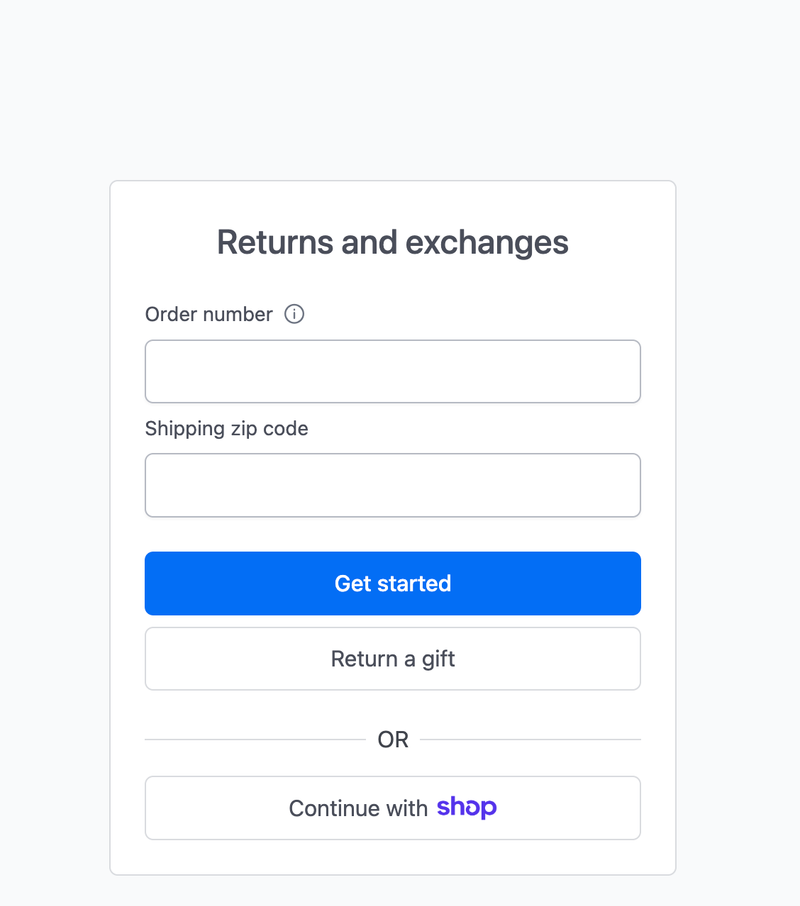
The shopper return portal asks for an order number and shipping zip code, with a "Return a gift" option for people returning something they were given and a "Continue with Shop" button for shoppers signed in to the Shop app. From there, shoppers pick the items, give a reason and choose a refund, store credit or an exchange.
Exchanges and store credit
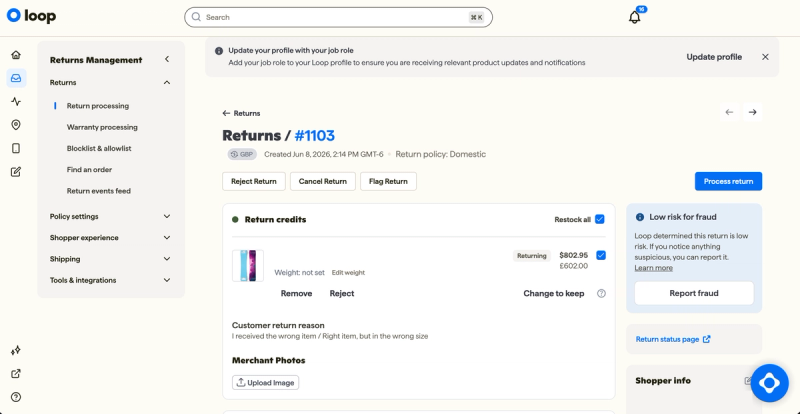
This is what Loop is known for. Shop Now lets a shopper exchange for any product in the store rather than just another size, Instant Exchange ships the new item before the original comes back, and Bonus Credit tops up store credit to make it more attractive than a refund. All three are on the $340 Advanced plan (App Store listing). On the return itself, you can see the outcome the shopper chose, whether it's an exchange or a refund, with the return reason alongside.
Running it day to day
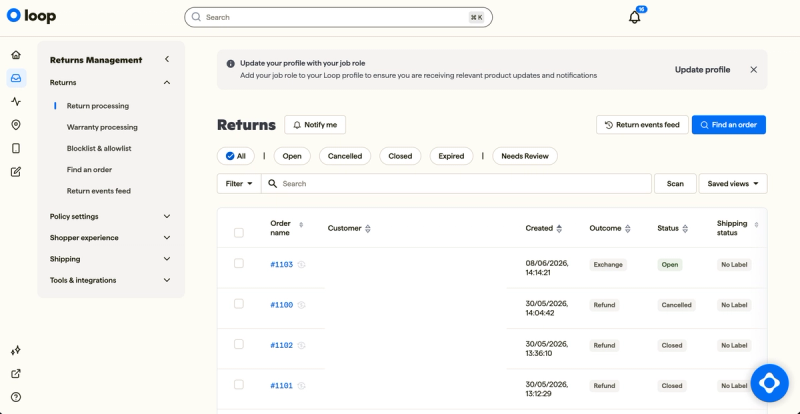
The returns list can be filtered by status, from open and closed to expired and needs review, and shows each return's outcome and shipping status at a glance. Each return opens to a page where you process, reject, cancel or flag it, restock the items or let the shopper keep one, and see Loop's fraud risk check.
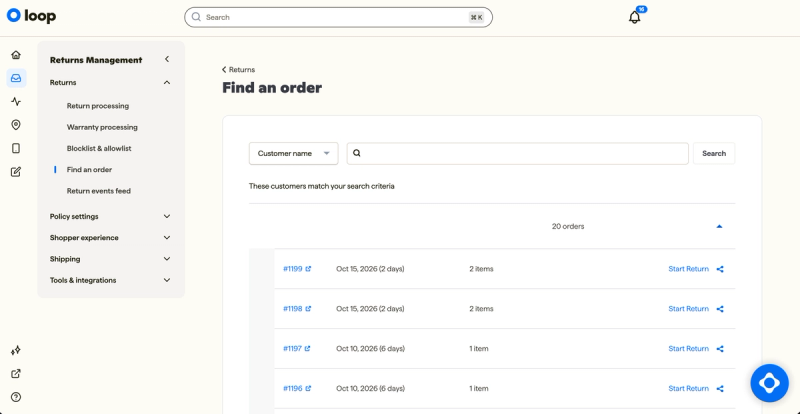
If a shopper contacts support instead of using the portal, you can find their order by customer name and start the return for them.
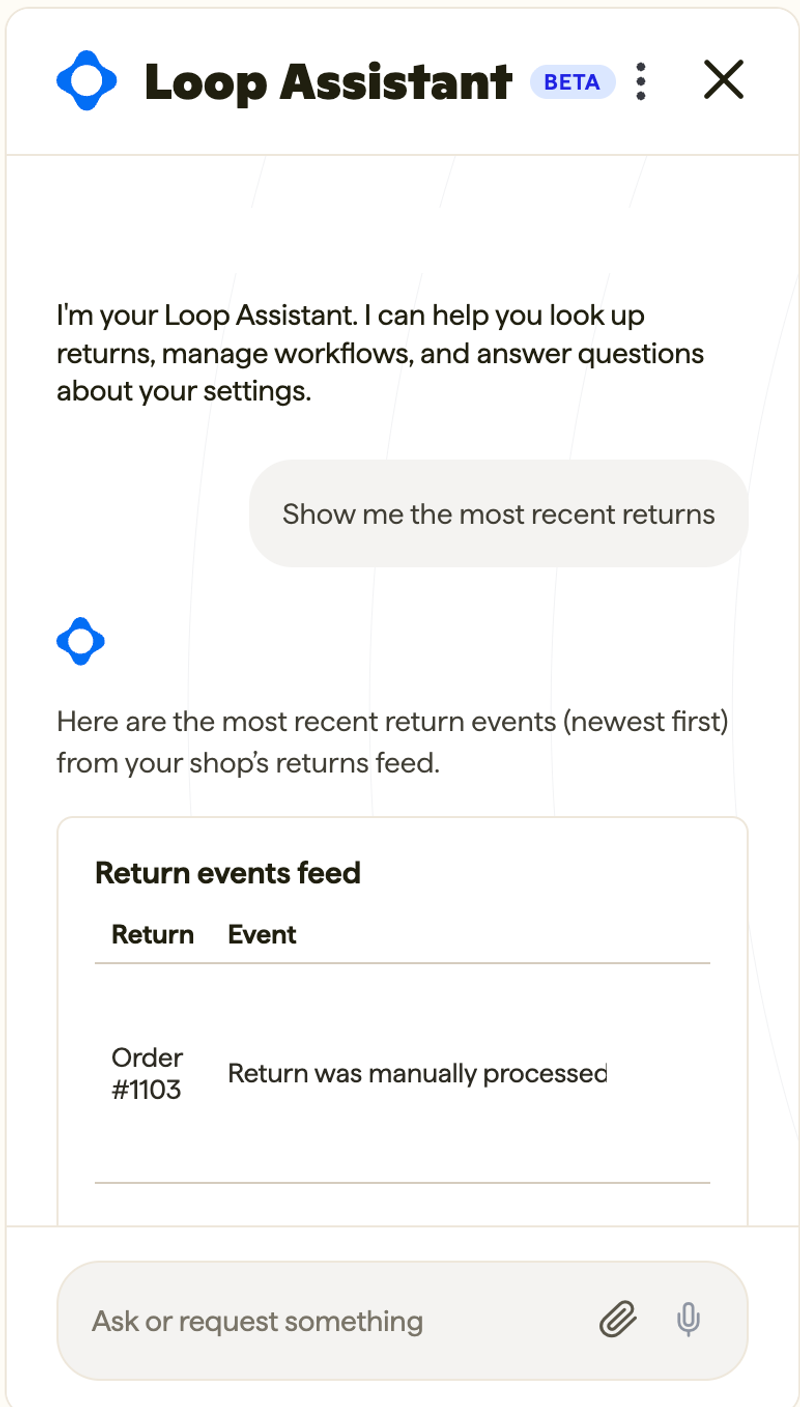
Loop Assistant, in beta, answers questions about your returns and settings in plain English. Asked for the most recent returns, it pulled them straight from the returns feed.
What merchants report
On the Shopify App Store, support is what merchants mention most: "Loop is not the cheapest solution on the market but you will not find better support," one wrote in November 2025. The exchange features earn the most specific praise: "Both we and our customers LOVE the Shop Now feature." The complaints that come up are about getting started and paying: an onboarding call before you can try the app (February 2026), pricing that rises with the number of returns each year, and contracts that are hard to leave.
Drawbacks
- The analytics feel dated. The reports and analytics pages look older than the rest of the app.
- Every plan starts with a demo. You can't sign up and try it yourself, and paid plans are billed on returns submitted each month, on an annual contract.
If you're a smaller store or want to start without a sales call, look at Return Prime or AfterShip. If you want free returns paid for by shoppers, look at Redo.
Using Loop Returns with Mage
Loop's API makes it seamless to connect to Mage accounts. The Mage Loop Returns integration generates a Loop returns portal link for each order automatically, so every eligible order in the Mage account sidebar has its own "Start a return" link with the order already filled in, and shoppers can follow the return from the same place. Brands such as Youswim have it connected. Because Youswim only issues store credit once its 31-day returns period has passed, a return never means taking credit back off a customer.
Loop Returns on the Shopify App Store
2. Redo: best for free returns and the lowest cost
Best for: brands that want to offer free returns without paying for them, and are open to running more of their post-purchase stack through one vendor.
Pricing: The returns module is free (App Store listing, 16 October 2026). Free returns are funded by shoppers, who buy return coverage at checkout; Redo sets that price from your store's return rate and label costs (Redo help center, 6 July 2026). Other Redo products are extra: the App Store lists checkout optimisation and email and SMS from $10 a month plus usage, and fulfilment at $99 a month, while Redo's own site prices them on usage only.
App Store rating: 4.9 from 808 reviews (as of 16 October 2026).
I've used Redo for six months with Mage brands such as West Coast Goalkeeping. Because it does a lot more than returns, it feels bigger, more enterprise and more complex than Loop, but it's still nice to use. And it does returns well: returns are far from an afterthought in Redo, with plenty of sophistication.
Setting it up
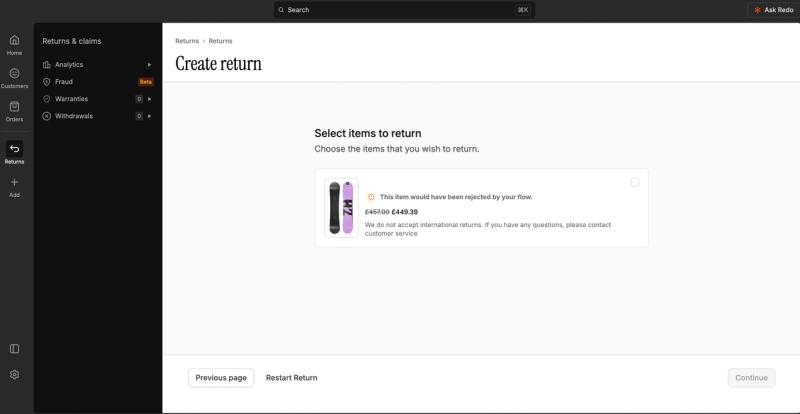
Redo is more than a returns app. The admin brings returns and claims together with customers, orders and a Redo AI assistant you can ask from any page, and the returns area covers analytics, fraud checks (in beta), warranties and withdrawals. Your return rules sit in flows, and they apply even when your team creates a return by hand. When we started a return for an international order, Redo flagged that the item would have been rejected by the flow and showed the customer-facing message: "We do not accept international returns."
What your shoppers see
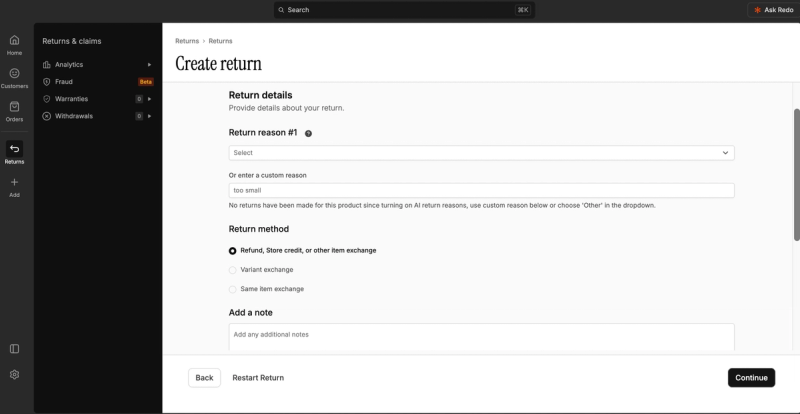
Shoppers who buy coverage at checkout get free returns, with the label covered by Redo. Each return asks for a reason and a return method, and Redo's AI return reasons draw on the returns a product has had before.
Exchanges and store credit
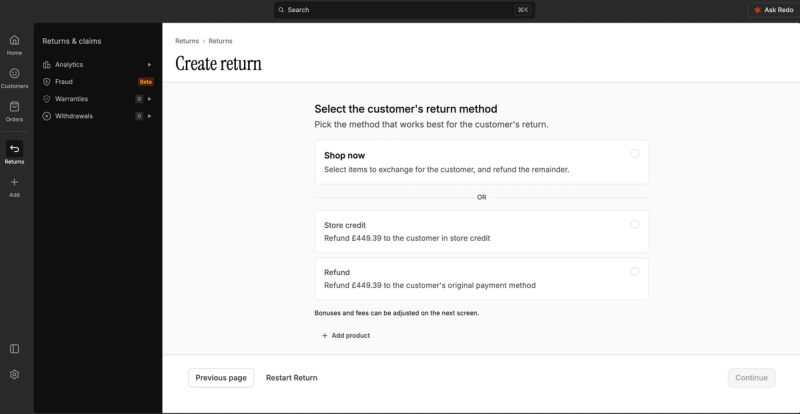
Redo offers three ways to swap: an exchange for a different product, a variant exchange such as another size, or the same item again. At the resolution step, Shop Now lets the shopper put the value towards new items and refunds the rest, and store credit and a straight refund sit alongside it. Bonuses and fees are set on the next screen. Redo issues store credit as a Shopify gift card by default (Redo help center).
Running it day to day
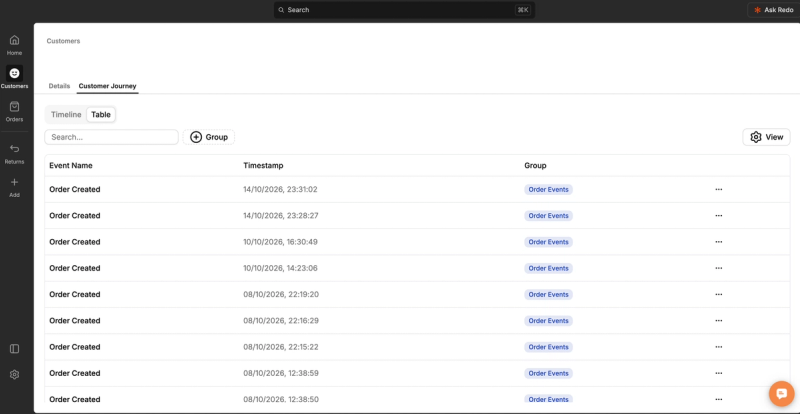
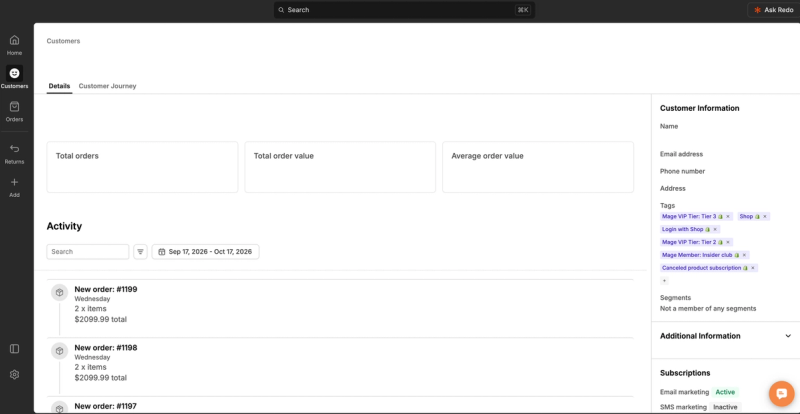
Because Redo also runs customers and orders, each customer has a profile with their order activity, Shopify tags, segments and email and SMS subscription status, plus a customer journey view that lists every event by time. For a returns team that means the return, the order and the customer's history are in one place.
What merchants report
Redo's App Store reviews lean heavily on praise for its support team, often naming the person who helped. Beyond that, merchants like shopper-paid coverage, which one said "derisks the purchase for a first time customer", and moving shipping and email over to Redo. Coverage also draws the sharpest complaint: "Our returns roughly doubled for no reason other than the returns were 'free'" (October 2026). One merchant who moved from another returns app reported incorrect refund amounts and taxes (April 2026).
Drawbacks
- It's a whole suite, not a returns app. Returns sit alongside shipping, email, SMS, helpdesk and checkout tools, so the product isn't solely focused on returns.
- It can feel busy. Next to Loop, the admin is more enterprise and more complex, because it's doing so much more than returns.
If you want deep exchange workflows and don't mind a contract, look at Loop. If you want a low-cost returns app with no shopper-paid model, look at Return Prime or AfterShip.
Using Redo with Mage
The Mage Redo integration refunds a customer's points automatically when they return items through Redo, so balances stay accurate without anyone reconciling them by hand. You can also set points multipliers on Redo's shipping protection, so customers who add coverage earn faster. Brands such as West Coast Goalkeeping have it connected and link the Redo return portal from the Mage account sidebar, so customers can reach it straight from their orders. Redo's customer profiles also show the Shopify tags Mage adds, such as VIP tier and membership.
3. AfterShip Returns: best for an AI-assisted setup inside Shopify
Best for: brands that want a branded return portal with exchanges and store credit, set up quickly with plenty of guidance.
Pricing: Return Care is free, with returns paid for by shoppers and a revenue share for AfterShip. Essentials is $19 a month for 20 returns, then $0.50 each, and Premium is $119 a month for 100 returns, then $1 each, both with a 7-day free trial (App Store listing, 16 October 2026). On AfterShip's own site, higher volumes are priced on request, and extra team seats cost more on every plan.
App Store rating: 4.7 from 1,542 reviews (as of 16 October 2026).
I've used AfterShip Returns first-hand on the stores of merchants we work with at Mage. It's a native Shopify app that runs inside the Shopify admin rather than on its own platform, and it's simple to use. The best part is that you can paste in your return policy and it generates your return rules for you, rather than you configuring each one by hand. Its AI chat is useful too.
Setting it up
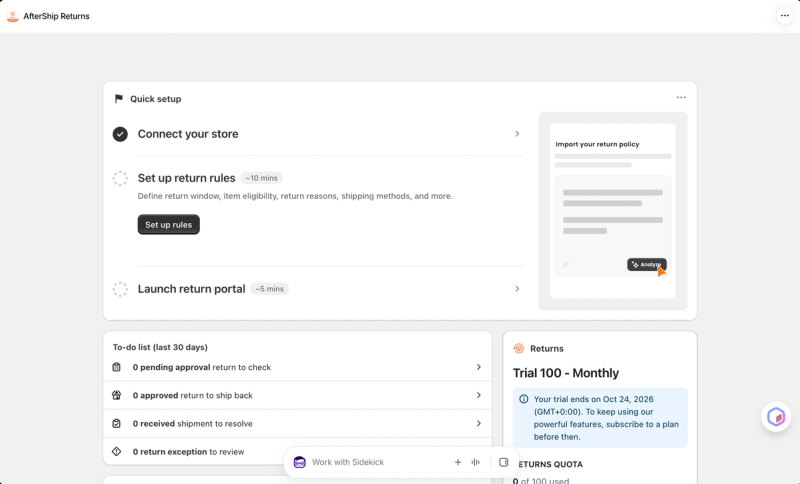
AfterShip gets you to a working setup quickly. The home page has a three-step quick setup: connect your store, set up return rules (which it estimates at about 10 minutes) and launch your return portal (about 5). For the AI policy import, you paste your return policy as text or a link, or upload a file, and AfterShip prepares your settings from it. It says your data stays private and is never used to train its AI.
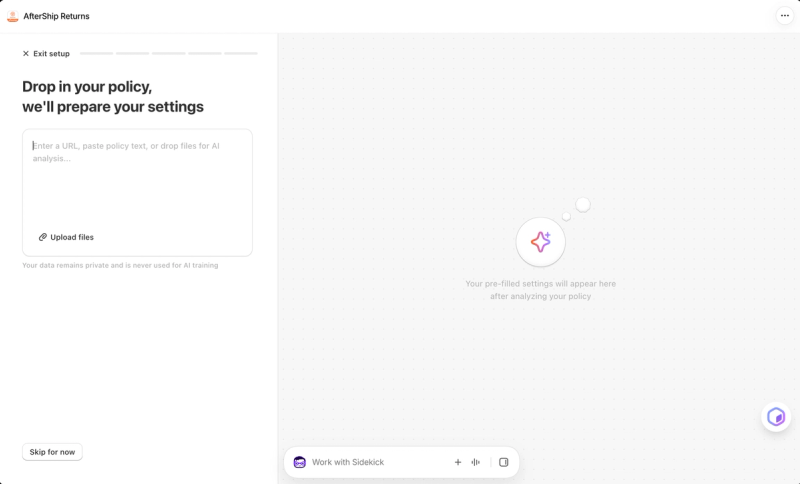
The guided setup then walks through each part of the policy with a recommended setup alongside. For the return window, it recommends starting from the fulfilment date and allowing 30 days. You can block products from returns by tag or type, or import a list. Some options, such as a return checklist shoppers confirm before submitting, are marked as Premium as you go.
What your shoppers see
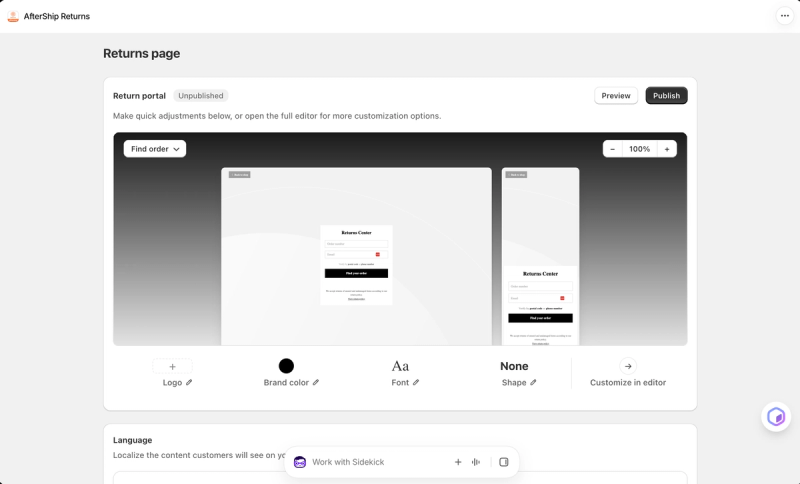
The return portal, called the Returns Center, asks for an order number and email, verified by postal code or phone number. Quick settings change the logo, brand colour, font and button shape, with desktop and mobile previews side by side, and a full editor covers the rest. You can localise the portal's text for other languages.
Exchanges and store credit
Shoppers can choose a refund to their original payment, store credit or an exchange, and you choose which of those to offer. AfterShip pays store credit as native Shopify store credit and can add a percentage or fixed bonus to make it more attractive than a refund (AfterShip help center, June 2026).
Running it day to day
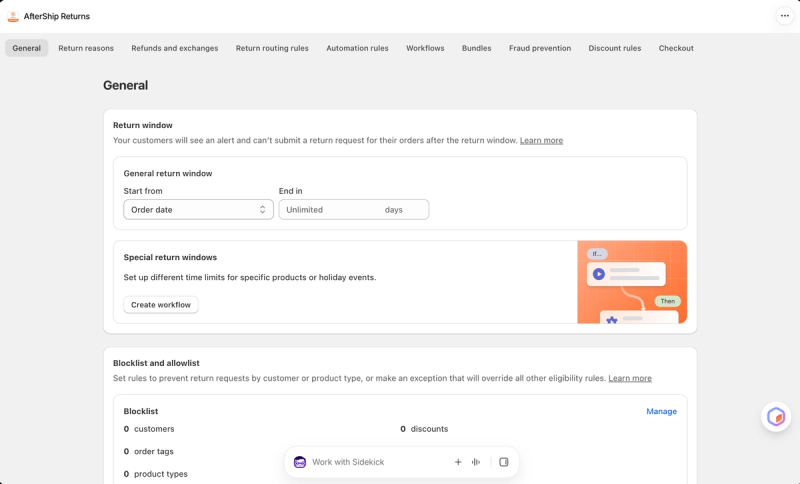
The settings cover a lot of ground: return reasons, refunds and exchanges, routing and automation rules, workflows, bundles, fraud prevention, discount rules and checkout. Special return windows for particular products or holiday periods are set up as workflows. For labels, you add your own carrier accounts, or use AfterShip's discounted labels across more than 30 carriers.
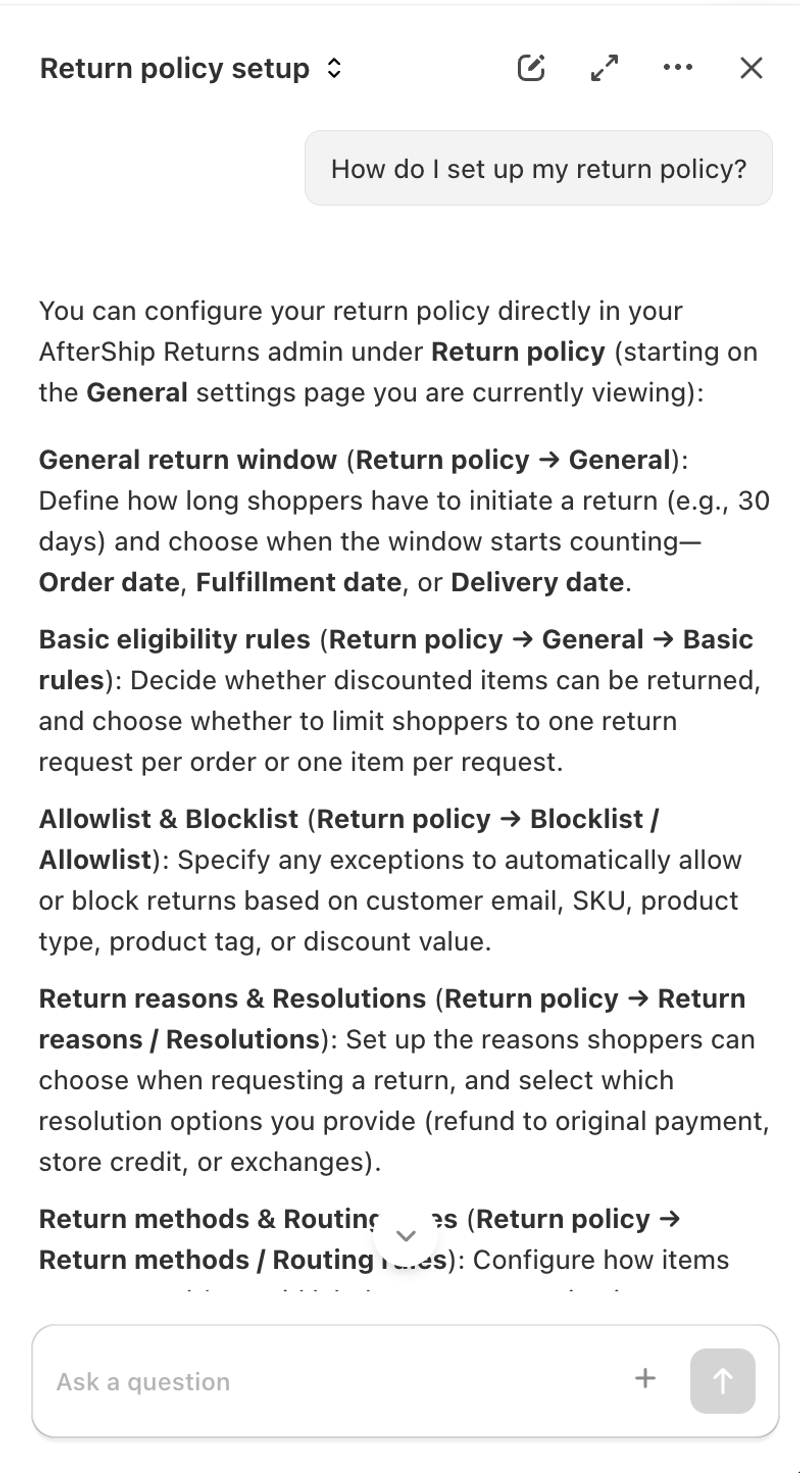
AfterShip also has an AI assistant for questions about returns and settings. Asked how to set up a return policy, it explained each part of the policy and where to find it in the admin, including that the return window can start from the order, fulfilment or delivery date.
What merchants report
Recent App Store reviews of AfterShip Returns mostly thank a named support agent for a call or screen share that got them set up. The complaint that comes up most in recent reviews is finding features locked to a higher plan partway through setup: "you can't even set up basic return criteria like using the 'delivery date' for the return window without paying for the $119 plan," one merchant wrote in October 2026. Others praise the store credit options, such as "a 15% store credit bump when customer opts in" (May 2026).
Drawbacks
- It feels a little older. In places the admin is clunkier than a modern platform like Loop.
- Some features are locked to Premium. Options such as the return checklist are marked Premium during setup, and merchants report finding others, such as a delivery-date return window, partway through.
If you want free returns that cost you nothing, look at Redo, or Return Prime for a cheaper paid plan. If exchanges are your priority and you're a larger brand, look at Loop.
AfterShip Returns on the Shopify App Store
4. Return Prime: a budget option with a free plan
Best for: small and growing stores that want to start free and keep the cost of each return low as they grow.
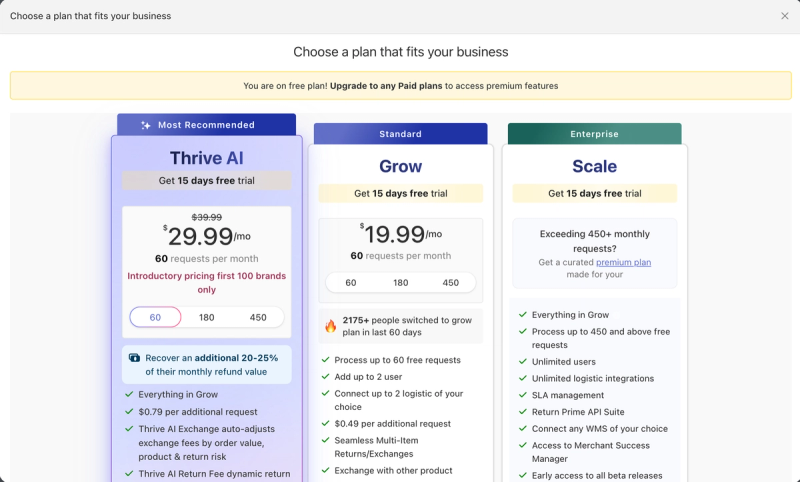
Pricing: The free Start plan covers 5 return requests a month, then $0.49 each (App Store listing). Grow is $19.99 a month for 60 requests, with 180- and 450-request tiers, and $0.49 per extra request. Thrive AI, which adds AI-adjusted exchange and return fees, starts at $29.99 a month for 60 requests at an introductory price for the first 100 brands, with $0.79 per extra request. Above 450 requests a month, Scale is priced for you. Every paid plan has a 15-day free trial (Return Prime's in-app plan picker, 17 October 2026).
App Store rating: 4.8 from 775 reviews (as of 16 October 2026).
I've used Return Prime first-hand on the stores of Mage clients. It runs on its own platform rather than inside the Shopify admin, and it feels older and clunkier than the others here: busy, and in need of some UI refinement next to Loop.
Setting it up
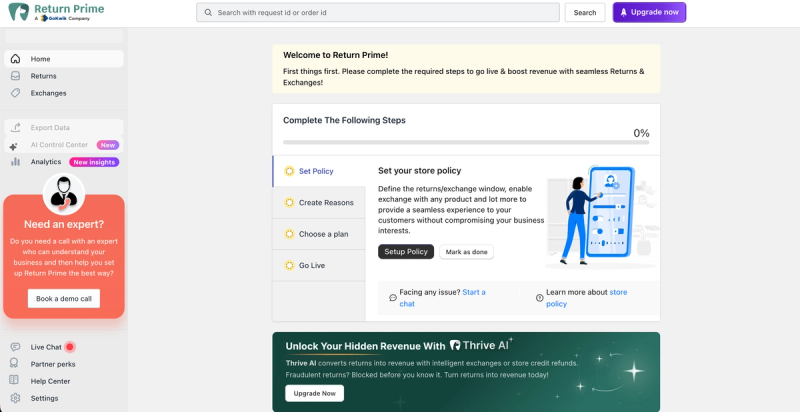
Return Prime opens on a four-step checklist: set your policy, create return reasons, choose a plan and go live. The policy step covers the return and exchange window and whether shoppers can exchange for any product. If you'd rather not do it alone, there's a "Need an expert?" panel to book a setup call, and live chat is in the sidebar.
What your shoppers see
Shoppers raise returns and exchanges through a branded return portal, which can be shown in several languages and includes an EU-compliant withdrawal button on every plan (App Store listing).
Exchanges and store credit
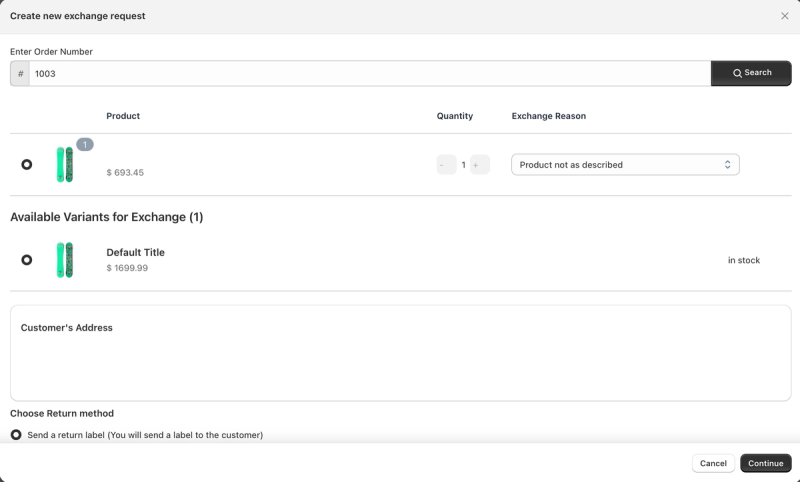
Exchanges are where Return Prime is most generous for the price. On the exchange screen, Return Prime lists the variants available for exchange with their stock, and Grow lets shoppers exchange for a different product, not just another size. Refunds to store credit start on the Grow plan; on the free plan, the refund options when you create a return are the original payment method, a bank transfer or another manual method. Return Prime's 2025 help article says store credit goes to the customer's Shopify store credit balance.
Running it day to day
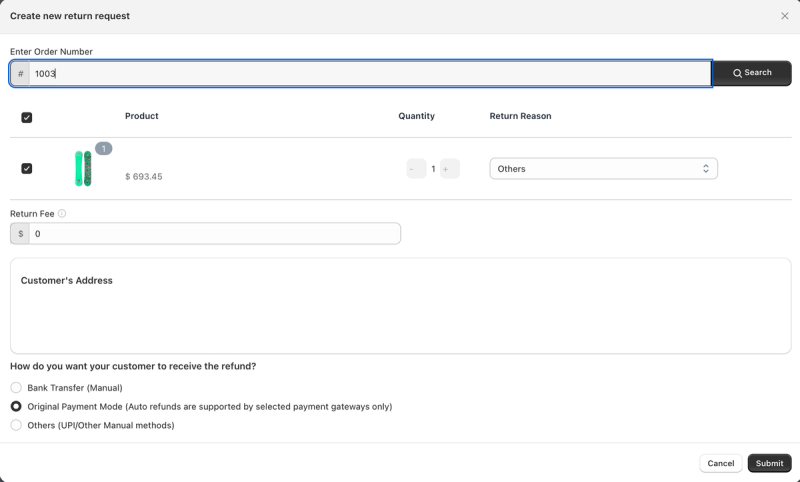
Returns and exchanges have their own lists, and your team can raise a return or exchange for a customer by order number, set a return fee and choose how the refund is paid. Analytics, data export and an AI Control Center sit in the same sidebar.
The plan picker shows exactly what each tier includes and costs, including the request tiers within each plan.
What merchants report
Return Prime's App Store reviews lean on support, with many thanking a named agent soon after install. Value is the other big theme: "Hands down the best value return app I've found." Merchants also like exchanging for other products, "not just variants". The complaints are mostly from early 2026 and about reliability: one merchant said that "during the busiest time of year it completely failed", and others reported settings changing without notice. US merchants raise label and USPS automation as a weak spot.
Drawbacks
- It feels dated and busy. The interface needs refinement next to Loop, and the upsell is constant: "Upgrade now" buttons, a Thrive AI banner and a call-booking panel are on the home screen from day one.
- Store credit refunds need a paid plan. On the free plan, refunds go to the original payment method or a manual method.
- US label automation is weaker. Merchants report USPS and multi-item labels as a gap.
If you want a modern, exchange-first platform and have the budget, look at Loop. If you want free returns paid for by shoppers, look at Redo.
Return Prime on the Shopify App Store
Does Shopify have built-in returns?
Yes, and for some stores it's enough. Shopify's self-serve returns let signed-in customers request a return from their order page. You set the return window, final sale items and any return or restocking fee in your return rules, and you can refund to the original payment method, to Shopify store credit, or split between the two.
There are limits that push most growing brands to an app:
- You approve every request yourself. Shopify doesn't document automatic approvals.
- Customers can't choose an exchange. You add the exchange item yourself when you approve the return.
- Return labels are US only. Shopify creates labels only when your store location and the customer are both in the US.
- Customers need the new customer accounts. Self-serve returns don't work with legacy accounts.
If you handle a modest number of returns, ship mainly within the US and are happy to handle exchanges by hand, start with Shopify. If you want shoppers to swap for other products themselves, bonus store credit, automatic approvals or labels outside the US, use one of the apps above.
What happens to loyalty points when orders come back
Returns and loyalty programs meet in one place: the points or store credit a customer earned on an order they then send back. In Mage, a refund reverses the earnings automatically. On a full refund, all remaining earnings from the order are reversed, anything still pending is cancelled, and the customer's VIP spend and order count go down. On a partial refund, the same share of the earnings is reversed.
The cleaner approach is not to pay out until the return window has closed. Mage's approval time holds earnings as pending for a set number of days, and the help center recommends matching it to your returns window. If an order is refunded while its earnings are pending, the pending amount is simply reduced, and nothing is taken off the customer's balance. Youswim does exactly this: it issues store credit only once its 31-day returns period has passed, so a return never means clawing credit back.
A few practical points:
- Match the approval time to your returns window so customers never see a balance go down.
- Offer store credit or an exchange before a refund. All four apps here can do it, and the value stays in your store.
- Let customers start returns from their account. With the Loop Returns integration, every eligible order in the Mage account sidebar has its own return link. Brands on Redo, such as West Coast Goalkeeping, link its portal from the sidebar too.
- Keep returns store credit and loyalty rewards distinct in how you talk about them, so customers know what they earned and what they were refunded.
For more, see our guides on handling returns and refunds in a loyalty program, using loyalty to reduce return rates and Shopify store credit versus loyalty app store credit.
The Shopify loyalty program growing brands trust
See how Mage helps Shopify brands lift repeat purchase rate with loyalty, referrals and store credit.
Book a demo“Cannot say enough good things about the team at Mage Loyalty, one of the absolute best organizations we have ever worked with, full stop! So glad we connected with them, completely redid our loyalty program, new concepts, use of loyalty, increasing user engagement, showing us where we were not valuing our best customers, just WOW, amazing team!”


Read the West Coast Goalkeeping case study →
Frequently asked questions
Do I need a returns app on Shopify? Not always. If you handle a modest number of returns, ship mainly within the US and are happy to approve requests and add exchange items by hand, Shopify's built-in returns may be enough. A returns app makes sense when you want customers to choose exchanges themselves, bonus store credit, automatic approvals, labels outside the US or deeper reporting.
Can I refund to store credit on Shopify without an app? Yes. When you process a return in the Shopify admin, you can refund to the original payment method, to Shopify store credit, or split it between the two, and you can set an expiry date on the credit. Your store needs the new customer accounts, and the order must be linked to a customer.
How much does a returns app cost? It depends on how many returns you handle. At 500 returns a month, Return Prime costs $124.49 and AfterShip's Essentials plan $259. Loop starts at $155 a month on an annual contract and doesn't publish what extra returns cost. Redo's returns module is free, paid for by shoppers who buy return coverage at checkout.
What is the best Loop Returns alternative? If cost is the reason, Return Prime and AfterShip Returns both start free and cost far less at low volumes. If you want free returns without paying for them, Redo's shopper-paid model is the closest alternative for an established brand.
What happens to loyalty points when a customer returns an order? With Mage, a refund reverses the points or store credit earned on the returned items automatically, and lowers the customer's VIP spend. If you hold earnings as pending until your returns window closes, a refund just reduces the pending amount, so nothing is taken off the customer's balance.
Our verdict
- If exchanges matter more than refunds and you want a modern, simple platform, choose Loop Returns.
- If you want free returns paid for by shoppers, and don't mind a broader suite, choose Redo.
- If you want an app inside Shopify that sets itself up from your return policy, choose AfterShip Returns.
- If you need a free plan to start and don't mind a dated interface, Return Prime is a budget option.
Whichever you choose, connect it to your loyalty program so points and store credit stay accurate when orders come back.

Graeme is the co-founder at Mage Loyalty. He heads product development, from complex loyalty migrations and large-scale data handling to building the features shaping the future of loyalty on Shopify.