Tea Drops migrated 200,000+ member records, points balances, and loyalty history from Yotpo in under two weeks. To migrate from Yotpo Loyalty safely, treat the move as a data, storefront, and messaging project, not a CSV handoff. Your replacement Shopify loyalty program needs to preserve what customers have earned and what your team has built around it.
Short answer: Start before your renewal or notice deadline, audit loyalty data and Klaviyo dependencies, then build and test the replacement before switching anything off. Freeze Yotpo activity for the final snapshot, import balances and history, manually sync Klaviyo, validate key customer journeys, and uninstall Yotpo only after the new program is live and reconciled.
Migrate from Yotpo Loyalty before the renewal date, not after it
Find the contractual deadline first
Pull the agreement and find the renewal date, cancellation method, notice period, auto-renewal language, final billing date, and data-access terms. Do not assume a standard notice period or contract length. Verify the terms that apply to your account.
Also establish who owns cancellation. Ecommerce, finance, and legal teams can each assume someone else has sent the notice.
Build backward from the launch date
Start the migration before the notice deadline, even if that means a short overlap between systems. That overlap gives you room to configure earning rules, rebuild emails, test the storefront, reconcile balances, and fix surprises without rushing a launch.
A points import may be quick, but the work around it is not. If you are evaluating a replacement, use a Yotpo alternative for Shopify review as one input, then assess your own program requirements.
What to ask Yotpo before exporting
Confirm which loyalty records you can access, how long exports remain available, and whether any app removal affects storefront code or connected workflows. Save exports and screenshots before you cancel access. Your customer data handling should also follow your wider approach to loyalty data and privacy.
Audit the program before you export Yotpo loyalty data
| Area | Export or record from Yotpo | Rebuild or validate in the new platform | Owner |
|---|---|---|---|
| Member data | Balances, lifetime points, birthdays, enrollment dates | Field mapping and identity matching | Ecommerce |
| VIP program | Tier names, members, thresholds | Tiers, entry rules, expiry settings | Retention |
| Rewards | Record redeemed activity and current reward types | Reward catalog and checkout behavior | Ecommerce |
| Customer experience | Screenshots of pages, widget, checkout, emails | Storefront design and messages | Design and CRM |
| Automations | Properties, events, flows, segments | New triggers and personalization | CRM |
Create a data inventory
A points balance export is only one file in the migration. Inventory current balances, lifetime points, earning and redemption activity, VIP tiers, birthdays, enrollment dates, loyalty status, referral records, pending rewards, campaigns, and expiry rules.
Separate what must move from what must be rebuilt. Balances and member attributes are data. Earning rules, reward logic, referral timing, page design, and emails are settings.
Use a Shopify customer export as an identity check, not as a loyalty-data replacement. Shopify customer CSV exports and imports are limited to 15 MB, so larger files may need splitting.
Record the live customer experience
Capture the loyalty page, widget, account area, checkout redemption, referral experience, reward descriptions, and loyalty emails.
This becomes your test script. Without it, a team may import balances correctly but miss a broken referral link, tier message, or checkout reward.
List every downstream dependency
List each Klaviyo flow, segment, campaign, template, conditional split, and dynamic field tied to loyalty data. Include support workflows and Shopify automations if they reference member status or VIP tiers.
Assign an owner to every dependency. The migration is ready for launch only when each owner has confirmed their work.
Choose direct API migration or a CSV fallback
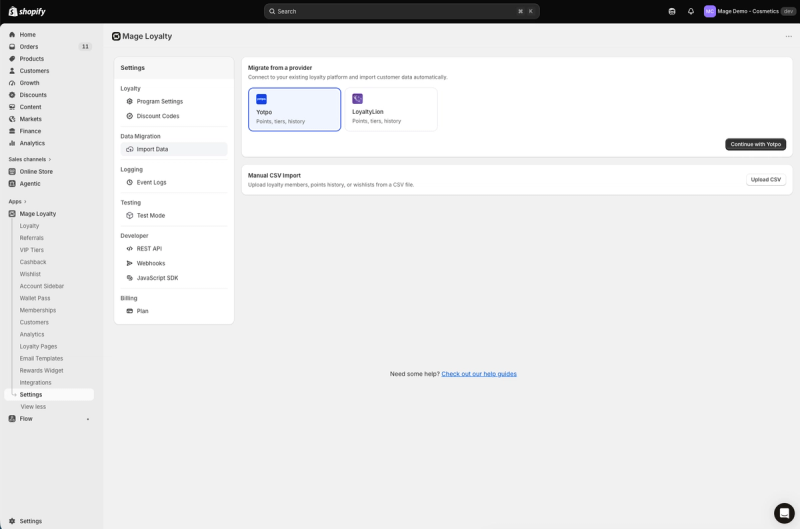
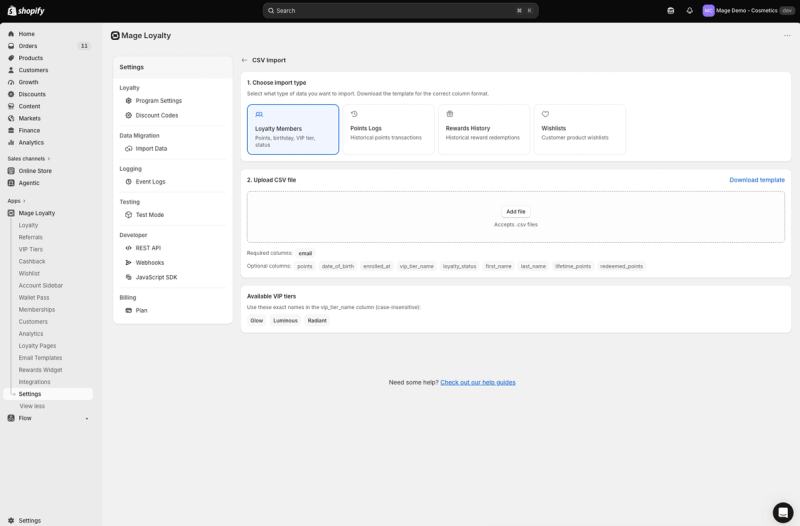
| Migration route | Best for | Data handled | Main risk or limitation |
|---|---|---|---|
| Direct Mage import | A supported Yotpo export path | Balances, history, tiers, birthdays, enrollment dates | Later activity after snapshot does not carry over |
| Loyalty Members CSV | Controlled spreadsheet-based migration | Member balances and profile fields | Emails must match Shopify customers |
| Points Logs CSV | Preserving selected earning history | Historical positive earning activity | Does not change balances and repeat uploads duplicate history |
Direct Yotpo migration into Mage
Mage offers a direct migration from Settings > Migrate from Yotpo. It requires the Yotpo Loyalty API Key and GUID, not Reviews API credentials. The import brings across current balances, lifetime earned points, approved earning and redemption activity, VIP memberships, birthdays, and enrollment dates when available.
The job runs in the background with progress tracking. If a retry is needed, customers already imported are not duplicated. Existing Mage customer activity remains intact, while imported history is added alongside it.
Create VIP tiers before starting. Tier names match by name, ignoring capitalization, but otherwise must be identical. “Gold” matches “gold.” “Gold Member” does not match “Gold.”
CSV member import
Use a CSV when the direct path is unavailable or when your team wants spreadsheet-level control. Mage’s Loyalty Members import can include email, points, birthday, enrollment date, VIP tier, loyalty status, first and last name, lifetime points, and redeemed points.
The member import establishes the current balance. It also updates existing loyalty records rather than duplicating customers. Rows for emails that do not match a Shopify customer are skipped, so review the results before treating the import as complete.
Historical points logs
Points Logs add historical earning activity to a customer record but do not alter the current balance. Import Loyalty Members first, then follow the destination platform’s required format for historical points logs.
Do not upload the same Points Logs file twice. A second upload creates duplicate history. Keep a dated copy of every file and reconcile row counts before moving to the next stage.
“Cannot say enough good things about the team at Mage Loyalty, one of the absolute best organizations we have ever worked with, full stop! So glad we connected with them, completely redid our loyalty program, new concepts, use of loyalty, increasing user engagement, showing us where we were not valuing our best customers, just WOW, amazing team!”


Read the West Coast Goalkeeping case study →
Map balances, tiers, and rewards before the final snapshot
Build a field-mapping sheet
Create one shared mapping sheet with five columns: source field, destination field, transformation, validation owner, and test customer. Include email, current balance, lifetime points, redeemed points, birthday, enrollment date, VIP tier, loyalty status, and historical activity date.
Use test customers that represent awkward cases: a zero balance, a high balance, a recently redeemed reward, an expired tier, and an email that may not match Shopify.
Match VIP tiers by name
Create and review destination tiers before importing members. Match names exactly apart from capitalization, then avoid changing the configuration until imported assignments have been validated.
Review customers with a tier name that does not map cleanly. Decide whether they should be assigned manually, moved to a default tier, or excluded until resolved.
Decide what not to recreate
Map reward types to fixed discounts, percentage discounts, free shipping, free products, points, or store credit as appropriate. Configure rules before launch so testing reflects the live program.
Decide separately how to handle pending points, expired points, unused rewards, referral links, and customers without a matching Shopify record. Export a final report immediately before the freeze. That report is your reconciliation baseline if a customer later disputes a balance.
Rebuild Klaviyo properties, variables, and flows before cutover
| Klaviyo dependency | Old dependency to audit | New property or event to map | Validation test |
|---|---|---|---|
| Balance email | Points-balance profile field | Mage Loyalty Points Balance | Preview zero and non-zero balances |
| Tier campaign | Tier property and segment | Mage Loyalty VIP Tier Name | Check each tier audience |
| Earned-points flow | Loyalty event trigger | Points Awarded | Send a test event |
| Redemption message | Reward event and variables | Reward Redeemed | Redeem a test reward |
| Tier celebration | Tier-change trigger | VIP Tier Changed | Move a test customer tier |
Replace profile properties
A loyalty migration changes the source of your profile data. Do not assume old properties, segments, or variables will continue to update after cutover.
Mage syncs points balance, lifetime points, redeemed points, VIP tier, birthday, enrollment date, and, where flexible redemption is enabled, points as cash balance. Review every message that displays a balance, tier, reward, or loyalty date.
For a points-balance email, use:
{{ person|lookup:'Mage Loyalty Points Balance'|default:'0' }}
The default prevents a blank value when a customer has a zero balance.
Replace event triggers
Rebuild or duplicate flows in draft status. Mage can send events including Points Awarded, Reward Redeemed, and VIP Tier Changed. Send test events, preview emails, and inspect conditional splits for missing tiers or zero-point customers.
Use loyalty email templates as a practical reference while rebuilding customer-facing messages.
Send a manual sync after import
Imported records do not automatically update third-party integrations. After the migration completes, open the relevant integration settings and run Sync All Customers.
Then validate profiles, segments, and test-event behavior through the Klaviyo loyalty integration.
Plan a realistic timeline for 10,000 to 200,000 members
| Member volume | Documented import example | What still needs time | Planning implication |
|---|---|---|---|
| 1,000 | About 2 minutes | Mapping, QA, flow testing | Suitable for a controlled test |
| 10,000 | About 20 minutes | Reconciliation and storefront testing | Schedule a freeze window |
| 100,000 | About 3.5 hours | CRM rebuild, approvals, launch support | Plan the wider project in weeks |
| 200,000+ | Tea Drops completed a full Yotpo-to-Mage migration in under two weeks, customer case study | Full program and communications work | Use as an example, not a promise |
Separate import time from project time
Mage documents direct-import processing at roughly 8 customers per second, including about 20 minutes for 10,000 customers and about 3.5 hours for 100,000. That is API processing time, not the complete project timeline.
Configuration, data review, Klaviyo work, QA, reconciliation, approvals, and customer communication take longer.
Use the member count to plan risk
Tea Drops is a useful scale reference, not a service-level guarantee. Its 200,000+ member migration completed in under two weeks.
Plan several weeks for complex programs or large lists. Data quality and approval speed usually create more delay than the import itself.
Why large migrations need a freeze window
Schedule the final snapshot during a lower-volume period. Avoid launching directly before a major promotion, when orders, rewards, and customer-service demand make discrepancies harder to diagnose.
Cut over without downtime or balance mismatches
Freeze the old program
Use a short, controlled freeze for earning and redemption activity. Record the exact timestamp. Running two loyalty systems in parallel for weeks creates conflicting balances and makes reconciliation harder.
Mage snapshots each customer’s Yotpo balance when the import begins. Points earned or redeemed after that moment do not transfer automatically.
Import and sync the new program
Run the final import, then manually sync connected customer data to Klaviyo. Reconcile low, medium, and high balances, every VIP tier, recent earners, recent redeemers, birthdays, and unusual loyalty statuses.
Check total members, total points, tier distribution, and recent activity against the final export. Investigate exceptions before enabling the new customer experience.
Run the launch checklist
Test the journeys customers actually use:
- Sign up and purchase earning
- Reward redemption and checkout behavior
- Refund handling on new orders
- VIP progress and tier display
- Referral attribution
- Account area, loyalty page, and widget
- Klaviyo events and flow delivery
Enable the replacement storefront only after a complete test order passes. Keep Yotpo installed but inactive while the team validates the new program, unless your Shopify configuration requires a different sequence.
Uninstall Yotpo last
Shopify recommends exporting needed data before uninstalling an app. It also warns that app-dependent workflows and store features stop after removal, and some theme code may need separate cleanup.
Uninstall only after the new program is live, reconciliation is signed off, and your team has saved exports, screenshots, and configuration notes. Shopify also states that, after an app is uninstalled, it sends the developer a request to erase customer personal information after 48 hours.
Validate the first 30 days after leaving Yotpo
Check data integrity
Compare imported member totals, total points balance, tier distribution, and recent activity against the final baseline. Monitor skipped records, duplicate emails, unmatched Shopify customers, missing tiers, and unexpected reward redemptions.
Monitor customer experience
Tag migration-related support tickets. Look for repeated issues such as missing balances, emails with blank personalization, reward confusion, or referral attribution problems.
Measure migration success
Track member logins, points earned, reward redemption, repeat purchase behavior, VIP movement, referral activity, and Klaviyo flow delivery. The first month gives you the baseline needed to assess the rebuilt program.
FAQs
What is the safest time to migrate from Yotpo Loyalty?
Start before your renewal or cancellation-notice deadline. Allow time to configure the replacement, audit exports, rebuild Klaviyo flows, test storefront behavior, and run a controlled freeze.
What Yotpo loyalty data can you export?
Available data depends on your access and destination process. Mage’s direct path can import current balances, lifetime earned points, approved earning and redemption activity, VIP memberships, birthdays, and enrollment dates when available. Confirm referral records, pending rewards, campaigns, and other program objects separately.
How long does it take to migrate 100,000 loyalty members?
Migrating 100,000 loyalty members through Mage’s direct import takes about 3.5 hours in the documented processing example. The full project takes longer because mapping, Klaviyo changes, QA, reconciliation, and launch support are separate workstreams.
How do you replace Yotpo loyalty variables in Klaviyo?
Inventory existing properties, event triggers, segments, and flow logic. Rebuild them with the new platform’s properties and events, send test events, preview dynamic fields, and manually sync imported customer data before activating flows.
Can you switch loyalty apps without downtime?
Yes, with preparation and a short controlled freeze. Build and test the replacement first, stop old-program activity for the final snapshot, import and reconcile data, then remove the old app after the new experience is working.
What happens to points earned during the migration?
In Mage’s direct Yotpo migration, balances are captured when the import begins, so later earning or redemption activity does not carry over automatically. Record the freeze timestamp and reconcile activity around that cutoff.
Start before the contract deadline, assign clear owners, and use the final export as your reconciliation document.

Graeme is the co-founder at Mage Loyalty. He heads product development, from complex loyalty migrations and large-scale data handling to building the features shaping the future of loyalty on Shopify.