To remind customers about store credit, start with the balance they can actually use and a clear path to redeem it. The Circle, The GoTo’s loyalty program, pays cashback as store credit after the returns period, then gives customers a reason to come back and use it. Unused store credit is already value the customer earned. Your email flow should make that value visible at the right moment, without adding another discount that teaches people to wait.
Short answer: Start with a segment-triggered Klaviyo flow when a customer newly qualifies for a positive balance and inactivity condition. Use a metric-triggered flow only when your setup sends a reliable credit or redemption event. A Shopify loyalty program can make the balance useful, but the reminder flow needs current data, clear suppression rules, and a destination where customers can redeem.
How to remind customers about store credit in Klaviyo
Separate balance, last credit date and last purchase date
A balance alone does not tell you whether a customer is inactive. Build a field map before touching Klaviyo: current balance, currency, last credit date, last purchase date, next expiry date, redemption destination, and marketing consent.
Shopify lets merchants create customer segments using store credit balance, upcoming expiration dates, and last credit date. Use last credit date as supporting context, not proof that credit remains unused. A customer may have spent it since the credit was issued.
Confirm whether the balance is Shopify-native or loyalty-platform data
Shopify-native store credit can be used at checkout by customers signed in through customer accounts or Shop Pay. That is different from a loyalty platform’s internal store-credit ledger.
Mage’s store-credit loyalty mode is an internal ledger, not a customer’s Shopify-native store-credit balance. Mage can also send a Cashback Credited event when cashback is paid as Shopify store credit, so confirm which balance and redemption rail your flow is actually describing.
Separate Shopify issuance notifications from reminder emails
When Shopify-native store credit is issued, Shopify’s customer notification confirms that the credit was added. That issuance notification is different from a Klaviyo balance reminder or expiry sequence.
Use Shopify’s store credit documentation to confirm how the credit is issued and redeemed. Then use Klaviyo to remind customers about a balance that remains available, based on current balance, purchase, redemption, and expiry data.
Make the redemption destination obvious
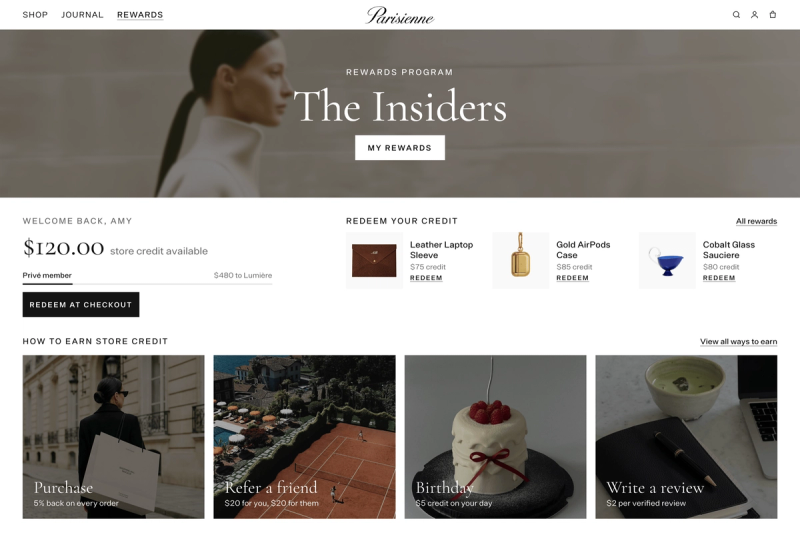
Send customers somewhere useful: their account, loyalty page, cart, or checkout path. Mage can sync points and cash-value loyalty properties into Klaviyo when configured, and its account sidebar and Rewards Widget give customers places to see and redeem rewards.
A balance reminder with no visible balance after the click creates support tickets, not repeat orders.
“Cannot say enough good things about the team at Mage Loyalty, one of the absolute best organizations we have ever worked with, full stop! So glad we connected with them, completely redid our loyalty program, new concepts, use of loyalty, increasing user engagement, showing us where we were not valuing our best customers, just WOW, amazing team!”

Read the West Coast Goalkeeping case study →
Choose between a segment-triggered flow and a custom inactivity event
| Trigger type | Best use | Data required | Main risk | Recommended starting point |
|---|---|---|---|---|
| Segment-triggered flow | Positive balance plus inactivity | Balance and purchase activity | Stale profile data | Yes |
| Metric-triggered flow | Reliable credit or expiry event | Event properties and timestamps | Fragile event setup | Only when needed |
| Manual campaign | One-off balance cleanup | Exported audience | Fast data decay | No |
When a property or segment qualification is enough
A segment-triggered flow begins when a profile newly qualifies after a data change, according to Klaviyo’s segment-triggered flow guidance. For most merchants, that is enough.
Build a segment around a positive balance, marketable status, and no purchase within your selected inactivity period.
Set re-entry deliberately. One-time entry is safer for a first build. Time-based re-entry makes sense only if customers can leave the segment, later become inactive again, and still have a positive balance.
When a custom event is worth the implementation
Metric-triggered flows can use events sent by an integration or through the Klaviyo API. Use one when it carries data a segment cannot reliably infer, such as credit issued, current balance, expiry date, currency, and source.
For example, Mage can send Cashback Credited events to Klaviyo when cashback is paid as Shopify store credit. It can also send Points Expiry Soon events when enabled. Do not assume your platform sends a generic “unused credit” event. Check the actual event list first.
The trigger decision in one table
Start with the segment. It is easier to audit, easier to explain, and less likely to keep sending after a customer has purchased. Add a custom event only when it materially improves timing or personalization.
Build the 60-day unused store credit reminder flow
Define the audience
Exclude recent purchasers, recent redeemers, and customers whose credit has expired. If you only have a last credit date, use it to narrow the audience, but keep the current balance as the controlling condition.
Set the flow trigger and re-entry rules
Trigger the flow when someone newly qualifies for the segment. Do not trigger it because you manually changed the segment definition. That sends a batch of customers into a flow without proving they just became inactive.
Use one reminder on entry. Then wait 5 to 7 days and run a conditional split. Send the second message only when the balance still exists and the customer has not purchased.
Add the send-time safety checks
Before every email, check four things:
- The balance remains above zero.
- The customer has not placed an order since entering.
- The customer has not redeemed the available credit.
- The credit has not expired or entered an expiry flow.
These checks matter more than a clever subject line. A customer who used their balance yesterday should never receive a message telling them it is waiting.
Use one reminder before adding an incentive
The first email should show the credit already available. Use a clear CTA such as “Shop with your credit” or “See what your balance covers.” Add relevant products, but do not turn the email into a generic catalogue.
Do not add a new discount by default. Existing credit is the incentive. A second offer belongs in a controlled test, not in every reminder.
Sequence store credit expiry reminders around the real deadline
| Timing | Message goal | Required data | Suppress when | Urgency |
|---|---|---|---|---|
| 30 days before | Make the balance visible | Current expiry date | Balance is zero | Low |
| 7 days before | Prompt a planned purchase | Balance and expiry date | Customer redeemed | Medium |
| 1 day before | Prevent accidental expiry | Current balance and timezone | Credit expired or redeemed | High |
Use expiry data instead of a generic inactivity timer
Expiry is different from inactivity. An unused balance may be worth a reminder. An expiring balance has a real deadline and needs the actual expiration date.
For Shopify-native store credit, expiry is set per issuance and expires at the end of the store’s timezone day, according to Shopify’s store credit documentation. Shopify does not document a store-wide default expiry automation, so avoid building one universal timer around the date credit was issued.
A practical 30-day, 7-day and final-day sequence
Recheck the balance and deadline before each send.
Mage’s Points Expiry Soon event works differently. It fires when points are due to expire within 7 days, and it aggregates expiring amounts within that window to reduce duplicate notifications. Use it for the final reminder. Build earlier timing from a synced expiry property or the platform’s own reminder settings if available.
Check legal, timezone and currency conditions
Review local rules before setting expiration dates. Make the policy visible before the credit is issued, show the exact date in the email, and use the customer’s currency where possible.
If the balance or expiry value can be blank in Klaviyo, set a default value. Empty personalization damages trust quickly.
Write balance emails that get opened without creating reward dependency
Lead with usable value, not loyalty jargon
Use plain customer language: credit, balance, ready to use. “Your $24 store credit is waiting” works because it states the value. “Your loyalty benefits update” does not tell the customer what they can do.
For an expiry message, use the deadline honestly: “$24 in credit expires in 7 days.” Do not manufacture urgency for a balance that has no expiry date.
Show the balance and the next action
Put the exact balance near the top. Add the currency, expiry date where relevant, and one primary CTA: “Shop with your credit,” “View your balance,” or “Use my credit before it expires.”
Mage’s Klaviyo loyalty integration can sync loyalty data into profiles for personalization. Set a fallback value when a synced field may be missing or blank.
Use urgency only when it is real
A normal unused-balance email needs no countdown. An expiry email does. Keep product blocks narrow and relevant to likely use of the credit. The email should help customers spend value they already have.
For more layouts and message structures, see these loyalty email templates.
Copy patterns for three email types
Unused balance: “You have $24 ready to use. Apply it to your next order.”
Expiring balance: “Your $24 credit expires on Friday. Use it before the deadline.”
Lapsed customer: “Your balance is still available. See what your credit covers.”
Never write, “We added more credit,” unless you actually added more credit.
Turn an unused-credit reminder into a controlled win-back flow
Match the delay to the buying cycle
Klaviyo recommends timing win-back messages around the customer’s average buying cycle.
Consumable categories may justify a shorter test. Food and beverage loyalty programs often have faster replenishment rhythms. High-consideration purchases may need a longer gap and product-led messaging.
Test credit-led versus product-led messaging
Run a split test with identical audience rules. One version leads with the balance. The other leads with relevant products, then shows the credit as the reason to act now.
Compare redemption rate, purchase rate, revenue per recipient, and margin. An open is only a signal that the subject line earned attention.
Do not let the flow compete with other automations
Review Smart Sending, campaigns, browse flows, and existing win-back messages. Mage notes that Klaviyo Smart Sending can skip event-driven loyalty emails after a customer recently received another message.
Keep the broader win-back sequence short. Klaviyo recommends no more than three emails per recipient. An unused-credit flow often needs only one or two. For a larger recovery plan, learn how to reactivate lapsed loyalty members.
Measure whether the flow creates incremental revenue
| Metric | What it tells you | How to interpret it | Common mistake |
|---|---|---|---|
| Redemption rate | Whether credit was used | Compare by balance size | Ignoring remaining balance |
| Purchase rate | Whether recipients bought | Compare eligible audiences | Counting only attributed orders |
| Revenue per recipient | Commercial output | Review with margin | Treating revenue as profit |
| Unsubscribe rate | Message fatigue | Watch after each send | Looking at opens alone |
Track redemption and purchase outcomes
Track credit redemption rate, purchase rate, average order value, revenue per recipient, time from email to redemption, and outstanding balance. Also watch unsubscribes, spam complaints, expiry rate, and the share of customers suppressed because they purchased or redeemed.
Compare margin, not just attributed revenue
Use a holdout group when the audience is large enough. An email can receive credit for an order a customer would have placed anyway. Shopify’s native reports include store-credit transactions and outstanding balances, while Mage analytics can track loyalty-email clicks, retention revenue, and incentivized revenue.
Klaviyo’s 2026 benchmark data covers more than 183,000 customers, but your own redemption and margin outcomes matter more.
Run a weekly audit
Audit the flow weekly: balances, expiries, suppression checks, redemptions, revenue per recipient, and margin. If redemption stays low, diagnose the redemption experience before sending more reminders. Start with why customers do not redeem loyalty rewards.
FAQ
What is an unused store credit email?
An unused store credit email is a message reminding a customer that an existing balance is available to redeem. It differs from a promotional discount because it highlights value the customer already earned, then directs them to a clear place to view or use that balance.
How do I remind customers about store credit in Klaviyo?
To remind customers about store credit in Klaviyo, sync the balance and relevant activity data, then create a segment for customers with positive credit and no recent purchase. Trigger a flow when profiles newly qualify, and recheck balance, redemption, and purchase status before each send.
Should I use a property-change trigger or a custom inactivity event?
A segment-triggered flow is usually the better choice when Klaviyo receives a current balance and purchase activity data. Use a custom event only when an integration or developer can reliably send the inactivity state, balance, currency, expiry date, and other properties needed for accurate timing.
How do I build a Klaviyo balance reminder flow?
To build a Klaviyo balance reminder flow, target customers with a positive balance and an inactivity condition, then send one email on entry. Wait 5 to 7 days, recheck whether the balance remains unused, and send a second email only to eligible profiles.
How do I create a store credit expiry email?
To create a store credit expiry email, use the actual expiry date or a reliable expiry event, show the current balance and deadline, and suppress customers who redeemed. Use earlier reminders only when your data supports them, then reserve the final message for customers still holding credit.
How do I win back customers with credit without over-discounting?
To win back customers with credit without over-discounting, treat existing credit as the first incentive and lead with products or account value. Avoid adding a second discount to the first reminder, then measure incremental redemption, purchase rate, revenue per recipient, and margin against a holdout group.
Build the simplest flow your data can support. Start with a segment, make the balance and destination clear, suppress customers who act, and treat expiry as a separate deadline. Then adjust timing based on redemption and margin, not the open rate.

Graeme is the co-founder at Mage Loyalty. He heads product development, from complex loyalty migrations and large-scale data handling to building the features shaping the future of loyalty on Shopify.