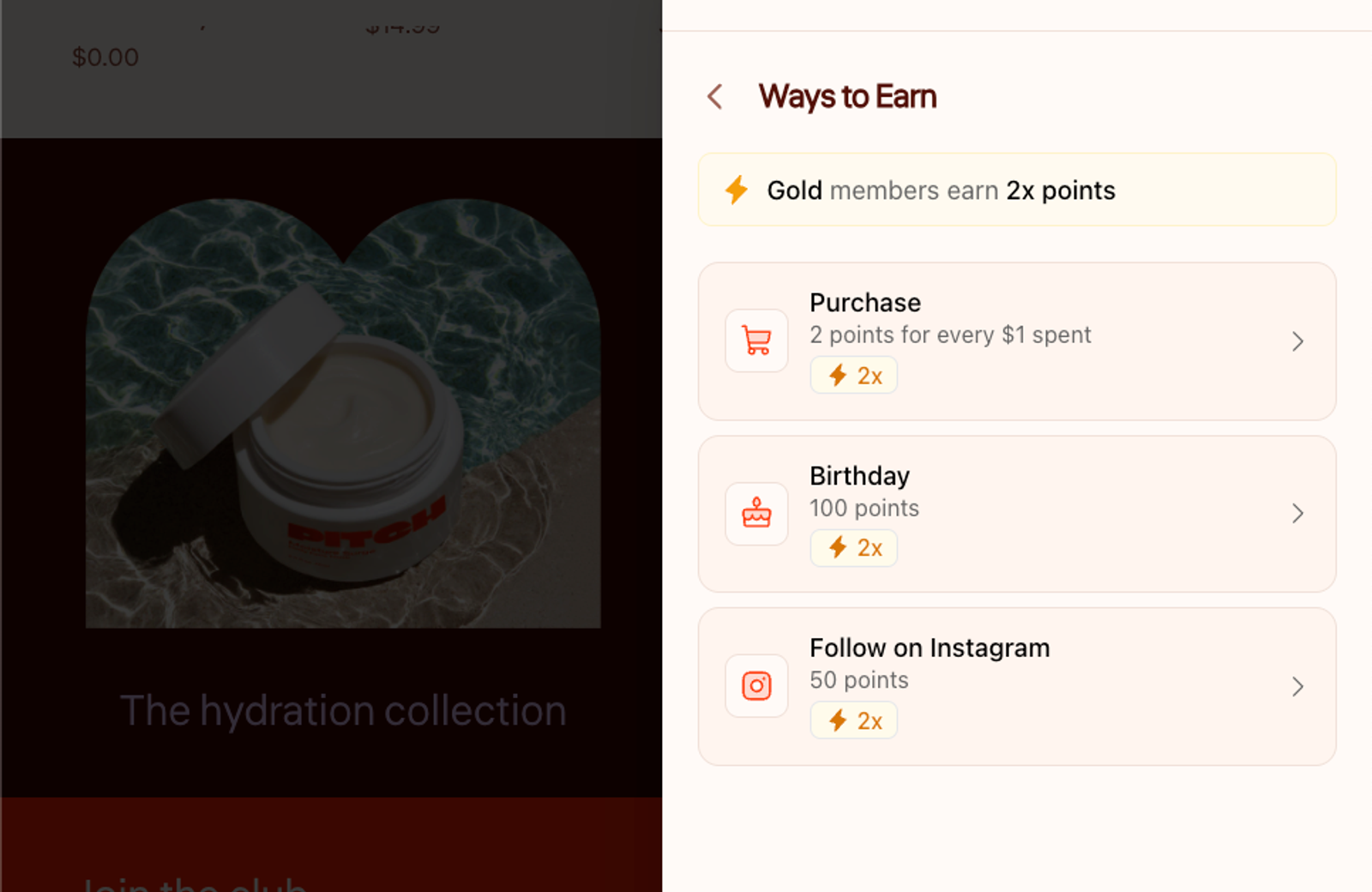
Points multipliers for VIP tiers are permanent purchase earning rates for customers based on their status. They are different from Bonus Points Campaigns, which are time-bound promotions that temporarily change earning.
Short answer: Mage lets you give each VIP tier its own purchase earning rate, so higher-status customers can earn points faster without changing the program's shared spend threshold. Configure it from the Purchase earning rule under Advanced Settings, then test the calculation, campaign interaction, refunds, exchanges and customer-facing explanation before launch.
Introducing points multipliers for VIP tiers
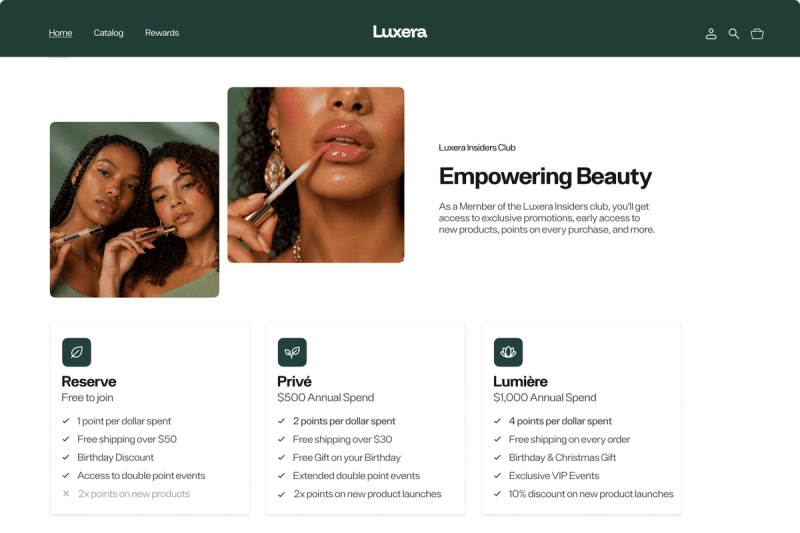
| VIP tier | Example rate | Customer experience | Merchant note |
|---|
What this feature changes
A VIP-tier rate changes the number of points a customer earns from eligible purchase spend. Mage lets you assign a custom purchase earning rate to each VIP tier, while the spend part of the rule stays shared.
If your base rule is 1 point per $1, Silver can earn 1.5 points per $1 and Gold can earn 2 points per $1. Their tier determines the speed at which they earn.
This fits into a broader Shopify VIP tiers program, alongside progress thresholds, tier benefits and status perks.
The difference between a tier rate and a bonus campaign
A custom tier rate is an ongoing purchase-earning rule. A Bonus Points Campaign is time-bound and changes earning during a defined promotion.
Use tier rates to make progression worth pursuing all year. Use a campaign to create urgency around a weekend, collection launch or seasonal event.
A practical example
The table above is an illustrative structure, not a reported customer program. A Gold customer placing a $100 eligible order earns 200 points at 2 points per $1. An Entry-tier customer placing the same order earns 100 points.
You are changing the amount earned, not creating separate purchase-rule logic for every tier.
“Great app! User friendly and straightforward. The customer service team has been great and so helpful.”


Read the SKYNBIO case study →
Before you configure VIP-tier points multipliers
Choose the behavior you want to reward
Start with the behavior you want after a customer reaches a tier. Faster earning can encourage customers to consolidate spend, return sooner or keep moving toward the next reward.
If customers can already reach a reward quickly, a larger multiplier may simply increase points liability without changing the next order.
72% of US loyalty-program members say programs make them more likely to spend with their preferred brand, and 56% say they spend more because of the program. That does not prove a particular multiplier will work for your store.
Set a margin limit
Work backwards from the reward catalog. Calculate what one point is worth when redeemed, then estimate the cost of the extra points issued at each tier.
A multiplier applies on every eligible order from qualifying customers. That cost can build quickly if your best customers also have the highest order values.
Decide how many tiers need accelerated earning
Mage supports up to 10 tiers, though three or four is usually the better starting structure. More tiers mean more customer-facing explanations and more calculations to validate.
Set tier thresholds and benefits first. Higher tiers can also offer early access, upgraded shipping or recognition, rather than relying only on a larger points rate. Read more about why status can beat discounts in VIP tiers and how to design Shopify VIP tiers that drive repeat purchases.
How to set custom points per VIP tier in Mage
Open the Purchase earning rule
The Purchase earning rule is created when Mage is installed. From Shopify admin, open Mage Loyalty and click Loyalty.
In the Earning Points section, select the Purchase rule. Mage’s Purchase earning rule guide covers the full setup and troubleshooting detail.
Set the base earning rate
Enter the amount customers earn and the spend required to earn it. For example, set 1 point for every $1 spent.
The Entry tier uses this base rate, and its row remains locked.
Purchase earnings are based on product spend after discounts. Tax and shipping do not count toward the calculation.
Enable custom points per VIP tier
Expand Advanced Settings in the Purchase rule. Tick Set custom points per VIP tier.
Mage will show a rate field for each eligible VIP tier. The Entry tier row is locked because it always earns the base rate.
Enter the rate for each tier
Enter the amount earned for each higher tier. Keep the spend part unchanged across every row.
For a base rate of 1 point per $1, you could configure Silver at 1.5 points, Gold at 2 points and Platinum at 3 points for every $1 spent. Those numbers are examples, not default recommendations.
Save and verify the rule
Click Save. The new rate applies to orders placed after you save the rule. It does not recalculate points on earlier orders.
Before announcing the change, place test orders with accounts in each tier. Check the customer’s points balance, then review the points activity or order behavior data available in Mage.
Mage automatically updates Shopify customer tags when a customer changes VIP tier. That makes it easier to identify test accounts and later build tier-based customer segments.
How VIP-tier rates interact with campaigns and earning actions
| Mechanic | What it changes | Does it affect purchase earning? | Key rule |
|---|---|---|---|
| Custom VIP-tier rate | Purchase rate by tier | Yes | Replaces the tier multiplier for purchases |
| Standard Bonus Points Campaign | Temporary earning multiplier | Yes | Multiplies the customer’s tier rate |
| Override campaign | Temporary earning comparison | Yes | Awards the higher available rate |
| Custom action | Points for an external event | Not a purchase rule | VIP and campaign multipliers apply |
| Points Drop | One-time balance addition | No | Does not change an earning rate |
Purchase earning rules
When custom VIP-tier rates are enabled, they replace the usual tier multiplier for purchases. A Gold customer with a custom rate earns according to that custom rate, not a separate purchase multiplier on top.
The customer’s VIP multiplier can still apply to other earning rules where that multiplier is relevant.
Bonus Points Campaigns
A standard Bonus Points Campaign multiplies the customer’s tier rate. If Gold earns 8 points per $1 and you run a 2x campaign, Gold earns 16 points per $1 during that campaign.
An override campaign works differently. Mage gives the customer whichever is higher: their custom tier rate or the base rate multiplied by the campaign multiplier.
A fashion brand might use permanent tier rates for status, then run a double-points campaign around a collection launch. A fashion loyalty program can use both mechanics, provided the customer-facing copy explains the offer clearly.
Other earning rules and custom actions
Custom actions can award points for a custom event your backend or Shopify Flow sends to Mage, such as a mobile app install. Those points receive the customer’s VIP-tier multiplier and any active Bonus Points Campaign multiplier.
Do not assume every earning rule follows purchase-rule math. Test the specific rule you plan to promote.
Points Drops
Points Drops are separate from campaigns. A drop adds a one-time amount to the selected audience’s balance at a scheduled time. It does not change the rate a customer earns from purchases or actions.
Use a drop when the message is “you have received a bonus.” Use a campaign when the message is “earn more by acting during this period.”
Build a safe launch test before announcing the multiplier
| Test | Expected result | Pass condition |
|---|---|---|
| Signed-in Entry-tier paid order | Base rate is awarded | Points match the base rate |
| Signed-in higher-tier paid order | Custom tier rate is awarded | Points match the tier rate |
| Guest checkout | No purchase points awarded | No earning entry appears |
| Pending approval order | Points remain pending | Status changes after approval time |
| Partial refund | Proportional points reversal | Reversal matches refunded share |
| Exchange | Workflow is validated before launch | Actual earning and reversal behavior is documented |
| Standard campaign | Tier rate is multiplied | Calculation matches campaign math |
| Override campaign | Higher rate is awarded | Calculation follows override rule |
Test refunds, exchanges and approval time
Purchase points are awarded when an order is paid. If Approval Time is above zero, they remain pending until that period passes.
Set Approval Time to match your returns window if you want to avoid issuing available points before an order is settled. Test a partial refund too. Mage reverses a proportional share of purchase earnings.
Mage’s purchase-rule documentation describes paid orders, approval time and refund reversals, but does not document a separate exchange rule. Test your full exchange workflow before launch, including whether the original order is refunded, how the replacement order is recorded and the resulting points balance.
If Exclude discounted products is enabled, test a discounted order. Those products should earn nothing.
Test customer-facing messaging
Guest checkouts do not earn purchase points because the customer must be signed in. State that in program terms.
Update the loyalty page, Rewards Widget and account surfaces so customers can see that higher tiers earn at different rates. A vague “earn more” label creates avoidable questions at checkout.
How to choose multiplier values without eroding margin
Use a simple earning-rate model
Use this formula:
Points earned = eligible product spend after discounts × tier earning rate
Eligible spend excludes tax and shipping. If discounted products are excluded in your Purchase rule, remove those products from the calculation entirely.
Then calculate the reward value those points create. Base the decision on redemption cost, gross margin and how much incremental repeat behavior the rate needs to generate.
Keep the jump between tiers meaningful
A progression such as 1x, 1.5x, 2x and 3x is easy for customers to understand, but it is only a starting example. Your reward costs, average order value and redemption rules determine whether it works.
Small changes customers cannot notice do little for tier appeal. Huge jumps can make lower tiers feel weak or create too much cost at the top.
For high-AOV or low-frequency categories, smaller rate increases paired with early access, anniversary rewards or upgraded shipping can make status visible without adding points to every large order.
Measure whether VIP-tier multipliers change customer behavior
Metrics to monitor
Track repeat purchase rate, purchase frequency, average order value, reward redemption rate, points issued, points redeemed and reward cost by VIP tier.
Review Mage’s Loyalty and VIP Tiers analytics alongside Shopify customer reports. Mage can show loyalty revenue, points activity, engagement, order behavior, tier revenue, AOV, distribution and progression data, depending on your enabled features and plan.
Shopify defines repeat purchase rate as repeat customers divided by total customers. Use it with purchase frequency and cost data, rather than treating issued points as proof of success.
How to compare tiers fairly
Compare the same tier before and after the earning-rate change where you have enough history. Use matched periods. A holiday campaign period is not a fair comparison against an ordinary month.
Separate customers who newly entered a tier from customers who were already there. Tier progression changes the audience, and newly qualified customers may already have higher purchase intent.
Shopify customer reports include returning customers, cohorts, purchase frequency and customer lifetime value. Customer segments can group shoppers with filters, operators and values, which helps isolate each tier for review.
What to change after the first review
If points issued rise but repeat purchases do not, inspect the reward catalog and the path to redemption before increasing the multiplier again.
If a tier shows stronger repeat behavior but reward cost is rising too quickly, reduce the rate gap for future customers or shift more value into access perks. Review tier-level revenue, AOV, progression and reward cost together.
FAQ
What are points multipliers for VIP tiers?
Points multipliers for VIP tiers are higher earning rates assigned to customers based on their VIP status. In Mage, each tier can have its own purchase earning rate, while the Entry tier keeps the base rate and the shared spend requirement stays the same across tiers.
How do I set different points rates for VIP tiers in Mage?
Different points rates for VIP tiers are set from Shopify admin by opening Mage Loyalty, selecting Loyalty, opening the Purchase rule, expanding Advanced Settings and enabling Set custom points per VIP tier. Enter the amount each higher tier earns, then save the rule. See the Purchase earning rule guide.
Do VIP-tier multipliers apply to past orders?
VIP-tier multipliers do not apply to past orders. A new custom rate applies only to orders placed after you save the Purchase earning rule, so changing a Gold rate today does not recalculate points awarded on previous Gold-tier purchases.
Can VIP-tier rates stack with a bonus points campaign?
VIP-tier rates can stack with a standard Bonus Points Campaign because the campaign multiplies the customer’s tier rate. An override campaign works differently: Mage awards whichever is higher, the customer’s tier rate or the base rate multiplied by the campaign multiplier.
How do exchanges affect VIP points?
Mage documents how purchase points are awarded, held pending and reversed on refunds, but it does not document a separate exchange rule. Test your exchange workflow before launch to confirm how refunded original orders and replacement orders affect points.
Why did a customer not earn the expected VIP points?
A customer may not earn expected VIP points if the Purchase rule or Program Status is disabled, they were not signed in, the order was unpaid, cancelled or refunded, or excluded discounted products were in the order. Check Approval Time too, because points can remain pending before they become available.
How should I measure whether VIP-tier multipliers are working?
VIP-tier multipliers are working when profitable customer behavior improves after reward cost is considered. Track repeat purchase rate, purchase frequency, AOV, redemption rate, points issued and reward cost by tier, then compare consistent periods and separate newly promoted customers from those already in the tier.
Ready to see Mage in action? Book a demo.

Kris is the co-founder of Mage Loyalty. I spend most days talking to merchants, and making sure our customers get real results. If you run a Shopify store or Agency we should chat!