Run one loyalty program across your retail store and online shop so every purchase, in any location, moves your customers forward.
Loyalty feels broken when stores treat online and in-store like separate worlds. A customer earns points on your website, walks into your retail location, and has no idea their balance even exists at the register. Or worse, they try to redeem a reward in person and your staff has no way to look it up. The moment falls flat, and so does the relationship.
As Mage Loyalty has grown, one request has come up again and again from merchants running physical stores across the US: they want their Shopify POS loyalty program to work the same way their online loyalty program does. Same points. Same rewards. Same single customer profile. We shipped that.
This post covers exactly what Mage's POS integration does, why it matters for your retention strategy, and how to use it to build a genuinely omnichannel rewards program.
“We are really happy with working with the Mage team and getting this program up and running. They are very responsible and professional. Very seamless and the upsell features seem to already be helping with adoption!”


Read the Tea Drops case study →
TLDR
- Mage Loyalty now supports Shopify POS, letting customers earn and redeem points at your physical retail locations, not just online.
- One unified loyalty profile spans both channels, so in-store purchases count toward points balances, VIP tier progress, and reward eligibility.
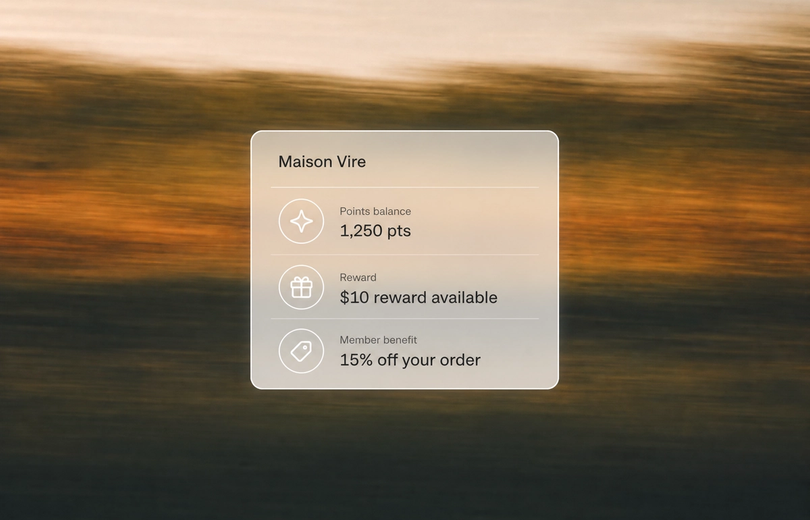
- Staff can look up any customer at the POS terminal to see their balance, tier status, and available rewards in real time.
- In-store and online orders both count toward VIP tier qualification, meaning your most active multi-channel shoppers climb tiers faster.
- Klaviyo, Gorgias, Postscript all stay in sync, so your marketing and support stack benefits from the combined purchase data.
- Growing demand from US merchants running physical stores drove this feature, and it is available now inside your Mage admin.
Why This Feature Matters
When you run both a physical store and an online shop, you have two separate streams of purchase data pointing at the same customers. But if your loyalty program only lives online, you're leaving a significant portion of your purchase activity outside the program entirely. Every in-store transaction becomes a missed opportunity to deepen the relationship and increase customer lifetime value.
Omnichannel rewards are not just a nice-to-have. Customers who shop both in-store and online tend to have higher lifetime value than single-channel shoppers. Connecting those two touchpoints inside one loyalty program gives you a cleaner view of your best customers, and gives them a reason to keep coming back through either door. If you're working on customer retention as a growth lever, this is one of the highest-leverage moves available to a retailer.
There's an operational angle too. When your staff can pull up a customer's points balance and rewards at the POS terminal, they can have better conversations at checkout. Instead of saying "you can check your points online," they can say "you've got 800 points, which is worth $8 off today, would you like to use them?" That's the kind of moment that builds real loyalty.
If you're thinking about the broader picture of why retail store loyalty programs drive growth, the mechanics are straightforward: more earning moments, more redemption moments, and more reasons for customers to choose you over a competitor who doesn't reward in-store purchases. For a deeper look at building the retail side of your program, the guide to building a retail loyalty program is worth a read.
What Mage's Shopify POS Integration Does
Mage connects your loyalty program directly to Shopify POS, so points and rewards work at the register the same way they work at checkout online. There is no separate POS loyalty system to manage, no manual syncing, and no duplicate customer profiles.
Here is what the integration covers:
Points earning at the register
When a customer completes a purchase in your physical store through Shopify POS, they earn points on that transaction automatically. The same earning rules you've configured in your Shopify points program apply in-store, including per-spend points, spend threshold rules, and collection-specific multipliers if you've set those up.
- Points are attributed to the customer's existing loyalty account
- The same configurable points-per-dollar rate applies across all channels
- In-store orders count toward VIP tier progress alongside online orders
Reward redemption in person
Customers can redeem their points balance against an in-store purchase. Staff apply the reward at the POS terminal, and the discount is deducted from the order in real time.
- Supports fixed discounts, percentage discounts, and free shipping rewards
- Works with flexible redemption so customers can choose how many points to apply
- Redemption is reflected immediately in the customer's account, keeping balances accurate across channels
Customer lookup at the terminal
Staff can look up any customer's full loyalty profile directly from the POS. This gives them the context they need to have a meaningful conversation at checkout.
- View current points balance and lifetime points earned
- See the customer's VIP tier and current tier status
- Check which rewards are available and ready to redeem
How to Use This in Your Loyalty Strategy
POS support is not just a feature to toggle on. It opens up several plays that are hard to run without it.
Turn every in-store visit into a points moment. If your retail store gets consistent foot traffic, you have been leaving earning events on the table. Every purchase that goes through POS without earning points is a missed touchpoint. Connecting POS means your most active retail customers start building balances fast, which gives them a reason to come back. This is one of the best loyalty program strategies for retailers on Shopify.
Use VIP tiers to reward your best multi-channel shoppers. Because in-store and online purchases now both count toward tier progress, your highest spenders will climb tiers faster. A customer who shops in-store weekly and places occasional online orders might hit Gold faster than you expect. That opens the door to exclusive tier rewards you can use to recognize them. If you haven't decided on your tier structure yet, points vs tiers is a useful starting point, and how to design VIP tiers that turn shoppers into brand loyalists covers the mechanics in detail. You can also stack points multipliers on VIP tiers to accelerate earning for your top customers.
Train staff to prompt redemption at checkout. When staff can see a customer's balance and available rewards in the POS terminal, redemption prompts become natural. Build this into your checkout script: "I can see you have 600 points. Want to use those today?" This turns a passive loyalty balance into an active retention tool.
Drive online-to-store traffic with double points campaigns. Run a bonus campaign with in-store purchase multipliers to push online customers into your physical location. Use Klaviyo to email loyalty members with a "Earn 2x points this weekend in store" message and track the lift in foot traffic.
Give your retail customers a reason to register online. When in-store shoppers realize their purchases are earning points, they become motivated to create an account and log in online. This bridges the gap between an anonymous retail customer and a known loyalty member you can market to. A well-structured loyalty page gives those newly registered customers a reason to stay engaged long after they leave the store.
Use receipt submission as a fallback for unlinked purchases. If a customer forgot to give their details at the register, Mage's AI receipt scanning feature lets them submit their in-store receipt afterward to earn points. This is a useful safety net for retail-heavy merchants.
Example Scenarios
For a fashion boutique with one flagship store and an online shop:
Before Mage's POS integration, their loyalty program was entirely online. In-store regulars had no idea points existed, and staff had no way to surface them. After connecting POS, every in-store purchase earns points automatically. Their most loyal customers, who shop both online and in the store, are now climbing VIP tiers twice as fast. For fashion merchants looking to build a complete program, there's more on fashion loyalty programs and how they drive repeat purchase in that vertical.
For a wellness brand with retail locations across multiple US states:
They had tried running separate in-store and online incentive programs, which created confusion and required manual reconciliation. With Mage's retail loyalty Shopify integration, everything lives in one place. Customers earn points regardless of where they shop, and the brand's Klaviyo flows fire based on combined purchase activity rather than channel-specific events. Their reactivation emails now reach customers who have only ever bought in-store, which was not possible before. Wellness brands looking for a broader retention playbook will find the health and wellness loyalty program page useful.
For a specialty food and beverage retailer:
Their in-store orders are higher frequency but lower value than their online subscription orders. Connecting POS means frequent in-store visitors accumulate points at a steady pace, which then get redeemed online, driving a clear loop between channels. They use VIP tier multipliers to give their top-tier members bonus points on in-store purchases during slow periods, which smooths out foot traffic without discounting publicly. More on building loyalty in this vertical on the food and beverage loyalty program page.
How to Set This Up in Mage
Getting POS earning and redemption running in your store is straightforward once your loyalty program is already configured.
- Go to Integrations in your Mage admin and enable the Shopify POS integration.
- Confirm that your earning rules are set to apply to all order types, including POS orders. If you have collection or product filters on any rules, check that your in-store product catalog is included.
- Make sure your rewards are configured and active. Fixed discounts, percentage discounts, and flexible redemption options all work at the POS.
- Brief your staff on using the customer lookup feature at the terminal so they can surface balances and rewards during checkout.
- If you want to promote the change to existing customers, use a Klaviyo segment to email loyalty members who have placed at least one in-store order, letting them know their purchases now earn points.
For the full breakdown of what the POS integration covers, see our Shopify POS loyalty feature page.
How This Works with the Rest of Your Stack
Klaviyo: Because in-store purchases now fire loyalty events inside Mage, those events sync to Klaviyo customer profiles. You can trigger flows based on in-store points earned, tier changes driven by retail purchases, or points expiry reminders for customers whose balance came from in-store activity. This is where the omnichannel rewards program really comes alive from a marketing perspective. See the full Klaviyo integration for details on which events are available.
Gorgias: Your support team can see a customer's full loyalty profile, including points earned in-store and any active rewards, directly inside the Gorgias helpdesk. If a customer contacts support about a missing in-store transaction, your team has the context to resolve it without switching tools. The Gorgias integration connects loyalty data to your support queue automatically.
AI receipt scanning: Not every in-store transaction gets linked to a loyalty account at the moment of purchase. Customers sometimes forget to identify themselves at the register, and some merchants also sell through third-party stockists or external storefronts like Amazon where POS is not an option at all. Mage's AI-powered receipt scanning closes that gap.
Customers upload a photo of their receipt, Mage's AI reads and validates the line items, and points are awarded once approved. It works as a fallback for missed POS transactions and as the primary earning mechanism for purchases made anywhere outside your Shopify store, keeping your loyalty program genuinely omnichannel even when the sale happens off-platform.
One Program, Every Location
Loyalty that only works online is not really a loyalty program. It's a website perk. The merchants getting the most out of Mage are the ones treating every purchase as a loyalty moment, whether it happens at a register in Chicago or at checkout on a phone.
If you're running a Shopify store with a physical presence, or planning to expand into retail, POS support means you can build a single program your customers recognize everywhere. For more on the omnichannel angle, the post on connecting your Shopify POS with your online store goes deeper on strategy. Read more about how the full Shopify loyalty program comes together in Mage, or head to the POS feature page to see exactly what's included.
Ready to connect your store? Book a call with the founders of Mage Loyalty and get your in-store and online rewards running as one.

Graeme is the co-founder at Mage Loyalty. He heads product development, from complex loyalty migrations and large-scale data handling to building the features shaping the future of loyalty on Shopify.