A signup popup is still the fastest way to grow an email and SMS list, and the app behind it decides how good it looks, who sees it and when, and how much you pay as your traffic grows. I've used all five apps in this guide with Mage merchants or freelance clients, and set each one up again on my own store to compare them side by side.
This guide is written by Kris, co-founder of Mage. Mage is a loyalty and customer accounts platform for Shopify. We don't sell a popup app, and none of the apps here is a Mage partner.
Our quick picks
- Best overall: OptiMonk. The best self-serve onboarding I've used: its AI designed, wrote and planned a complete popup for my store, with a free plan to start.
- Best for a quick, simple setup: Poptin. The cleanest interface of the five, and a popup live in about five minutes.
- Best for advanced targeting: Wisepops. An enterprise-feeling builder with detailed display rules and product recommendation blocks.
- Best for gamified and quiz popups: Alia. Quizzes, pick-a-card games and scratch-offs, with AI that decides when to show them.
- Best for detailed segments and workflows: Justuno. A long-established platform with pixel-level design control and ready-made visitor segments.
The five apps compared
| App | Free plan | Paid from | Priced by | Runs in | My setup time | App Store rating |
|---|---|---|---|---|---|---|
| OptiMonk | Yes, 10,000 pageviews a month | $29/month | Pageviews (campaigns pause at the limit) | Its own app | About 20 minutes, with the AI building the popup | 4.8 (456) |
| Poptin | Yes, 1,000 visitors a month (branded) | $25/month | Visitors | Its own app | About 5 minutes | 4.9 (345) |
| Wisepops | No, 14-day trial | $299/month | Pageviews | Its own app | About 15 minutes | 4.9 (71) |
| Alia | No | $100/month | Visitors | Shopify admin | About 20 minutes | 4.6 (114) |
| Justuno | No, free trial | $59/month | Visitors | Its own app | About 30 minutes | 4.6 (669) |
Pricing and App Store ratings as listed on 18 October 2026.
How I used these apps
I've used OptiMonk with two Mage merchants, Poptin, Alia and Justuno with Mage merchants, and Wisepops and Alia with freelance clients before we built Mage. For this guide I set each one up again on my own store, building the same kind of campaign in each: an email signup popup for Black Friday and Cyber Monday. The screenshots come from my own store, so no merchant data is shown.
These are the factors I weighed most:
- Time to a good-looking popup. Templates, AI help and how quickly you can go live.
- The builder. How much design control you get, on desktop and mobile.
- Targeting. Triggers, audiences and how often the popup shows.
- Offers. Discount codes, games and other incentives.
- Cost as you grow. Most popup apps price by pageviews or visitors, so the bill rises with your traffic.
1. OptiMonk: best for AI-built popups and onboarding
Best for: stores that want a polished, on-brand popup built for them in minutes, with the AI planning when and how it should appear.
Pricing: free up to 10,000 pageviews a month; Essential $29 (20,000), Growth $99 (100,000) and Premium $249 (500,000), with lower prices on annual billing. Campaigns pause when you reach your pageview limit rather than charging overage (as of 18 October 2026).
App Store rating: 4.8 from 456 reviews (as of 18 October 2026).
OptiMonk has the best self-serve onboarding I've used in any app on the Shopify App Store, outside of Mage. In a few minutes its AI designed, wrote and planned a complete popup for my store, and the dashboard around it is clean and modern. It feels like people put real thought into making it simple. I've used OptiMonk with two Mage merchants, and the screenshots here come from my own store.
Setting it up
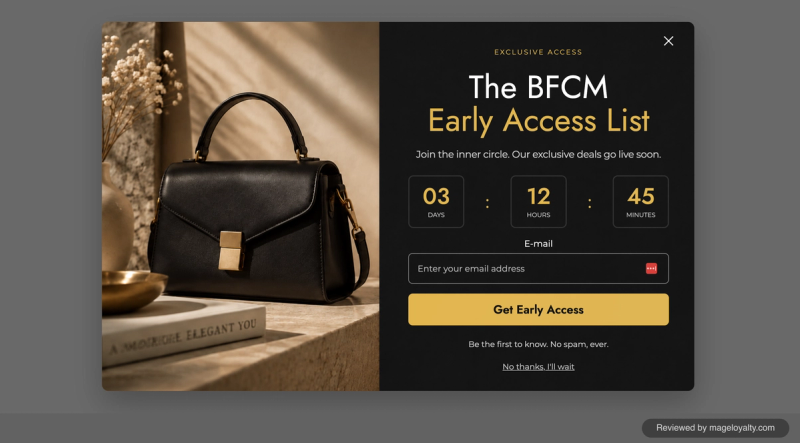
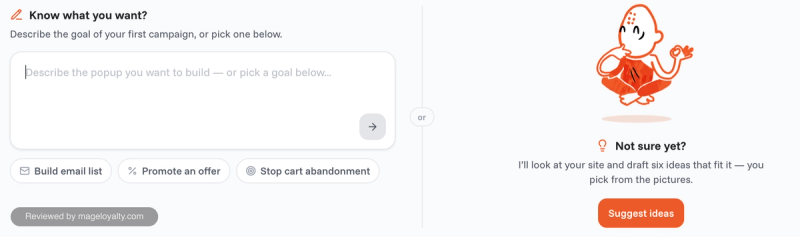
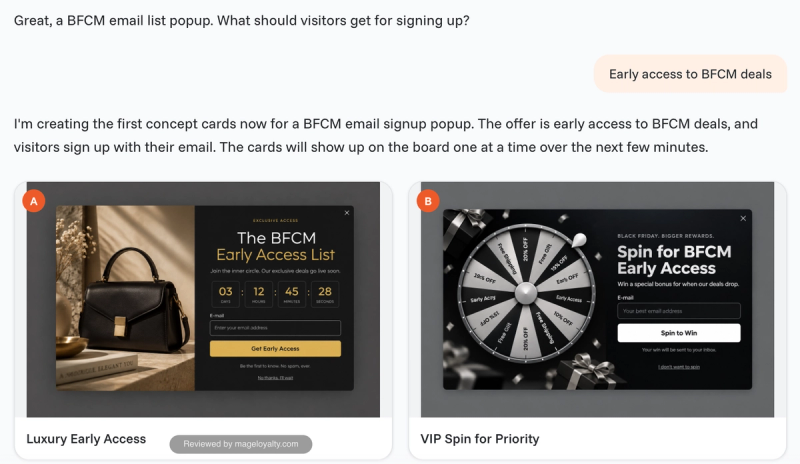
You're given two ways to start: describe the popup you want, or let OptiMonk look at your site and draft six ideas for you to pick from. I went in with a clear goal, collecting emails ahead of Black Friday and Cyber Monday. The AI asked what visitors should get for signing up, I said early access to the deals, and it produced design concepts, including a luxury early-access list and a spin-to-win for priority access. The whole process took me about 20 minutes, most of it spent going back and forth with the AI and waiting for it to build the popup. It can be quicker or longer depending on how much detail and strategy you want.
Designing the popup
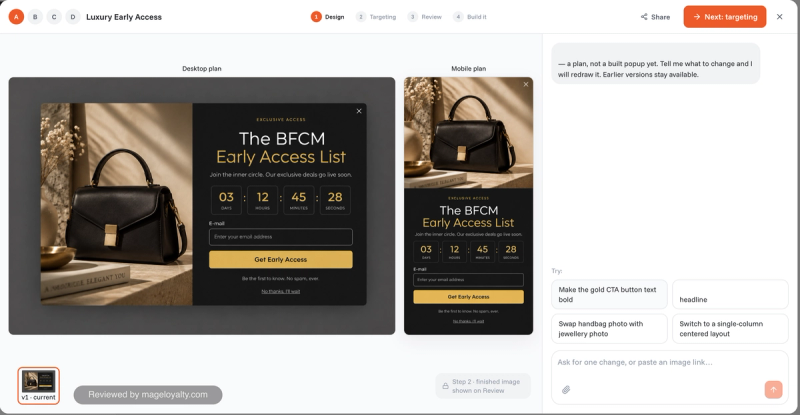
From start to finish, the AI did the work: the design, the image, the copy, and a desktop and mobile version of each step, all based on its read of my brand. I could keep refining it in the chat, with suggestions such as making the button text bold or switching to a single-column layout, and earlier versions stay available. When I was happy, it built the popup and connected it to my store.
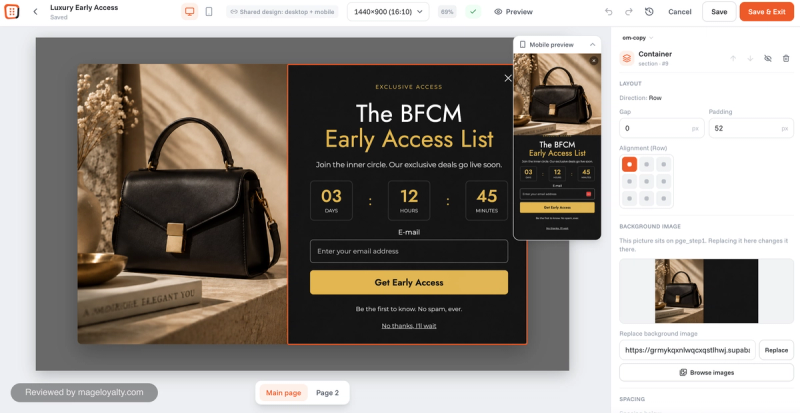
If you'd rather not use the AI chat, the drag-and-drop editor is just as good. You click directly on any part of the popup to change it, with a live mobile preview alongside.
Targeting and offers
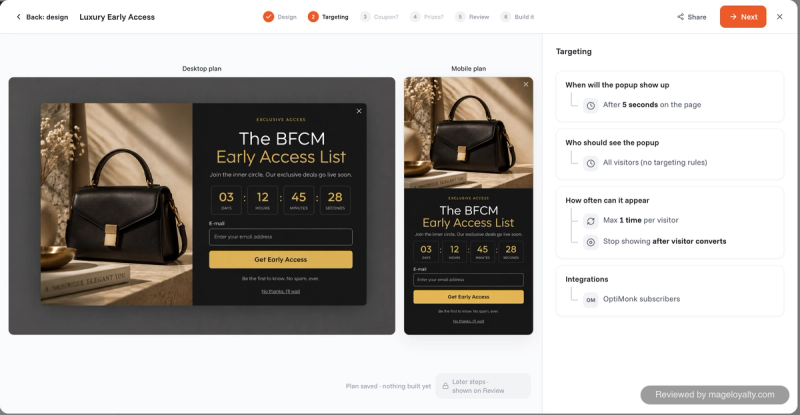
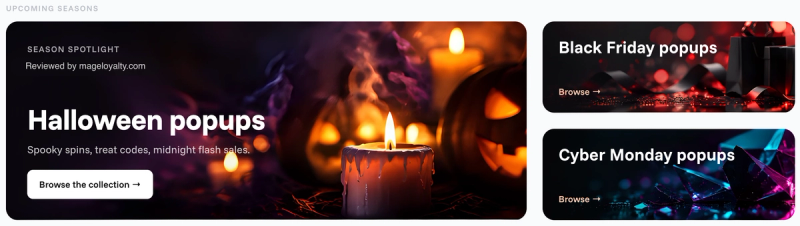
The AI also planned how the popup should behave: show it after five seconds, to all visitors, at most once per visitor, and stop showing it once someone signs up. Coupon and prize steps come next if your offer needs them. If you're short of ideas, the library has ready-made popups kept up to date for the current and upcoming seasons, such as Halloween, Black Friday and Cyber Monday, and they look great.
Drawbacks
- It runs off-platform, in OptiMonk's own app rather than the Shopify admin. Having used it, I can see why.
- Pricing is by pageviews, and every pageview on the store counts towards the limit, so busy stores move up the plans quickly.
Honestly, I struggled to find anything else to fault. If pageview-based pricing doesn't suit your traffic, Poptin prices by monthly visitors instead.
OptiMonk on the Shopify App Store
2. Poptin: best for a quick, simple setup
Best for: small and medium-sized stores that want a clean, friendly popup tool they can have live in minutes.
Pricing: free for up to 1,000 visitors a month, with Poptin branding; Basic $25 (10,000 visitors), Pro $59 (50,000) and Agency $119 (150,000) a month (as of 18 October 2026).
App Store rating: 4.9 from 345 reviews (as of 18 October 2026).
Of all the apps here, Poptin has the cleanest interface. It is soft, friendly and easy to use, and it never feels overwhelming or pushes features at you. It suits small and medium-sized stores best, though there is nothing stopping a larger store using it. If you need something fired up quickly with a gentle, straightforward interface, this is the one to go for. I've used Poptin with a Mage merchant, and the screenshots here come from my own store.
Setting it up
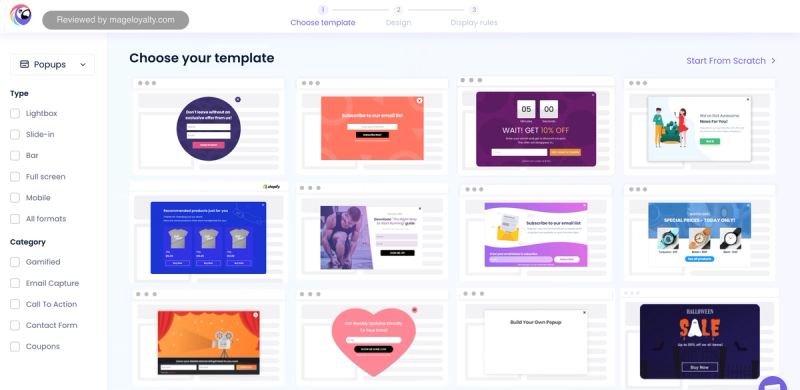
Setup took me about five minutes, the quickest of the apps here. Building a popup is three steps: choose a template, design it, then set the display rules. Templates can be filtered by type, such as lightbox, slide-in, bar, full screen or mobile, and by goal, such as gamified, email capture, coupons or a contact form.
Designing the popup
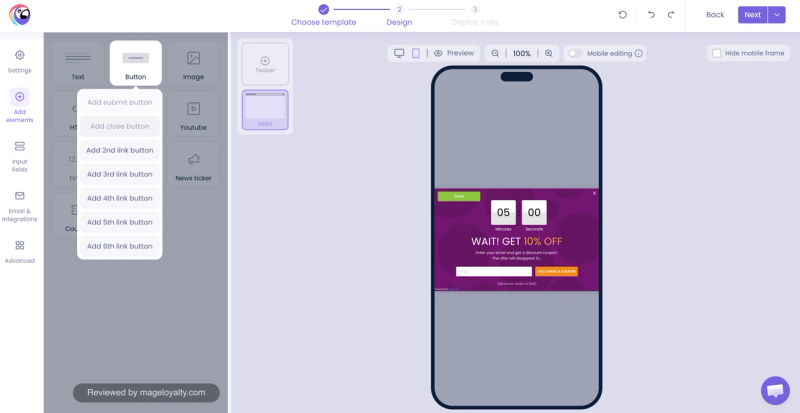
The builder is nice to use. You click any element to edit it, and the settings panel covers size, button colours, fonts and what happens on submit: show a thank-you message, close, link somewhere or add a product to the cart. A popup can have a teaser, a small tab shown before the main popup, as well as the main step.
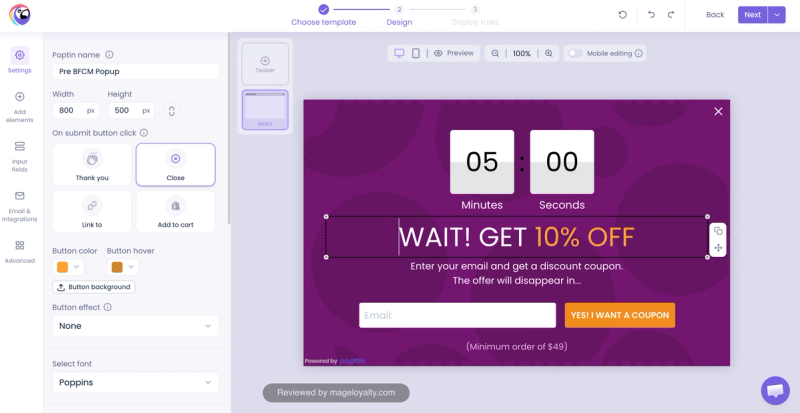
Elements include text, buttons, images, HTML, YouTube videos, a countdown timer, a news ticker and a coupon, and a mobile preview lets you check the popup on a phone.
Targeting and offers
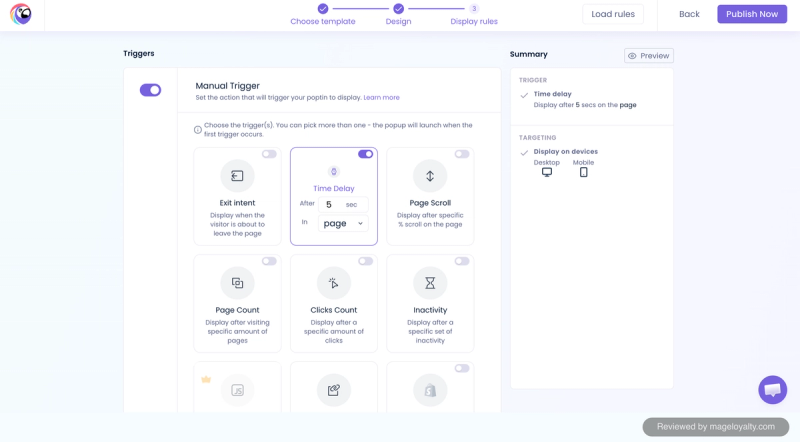
Display rules are simple toggles: exit intent, a time delay, scroll depth, the number of pages or clicks, inactivity, and more, with a summary of the rules and the devices the popup will show on. Several triggers can be on at once, and the popup opens on whichever happens first.
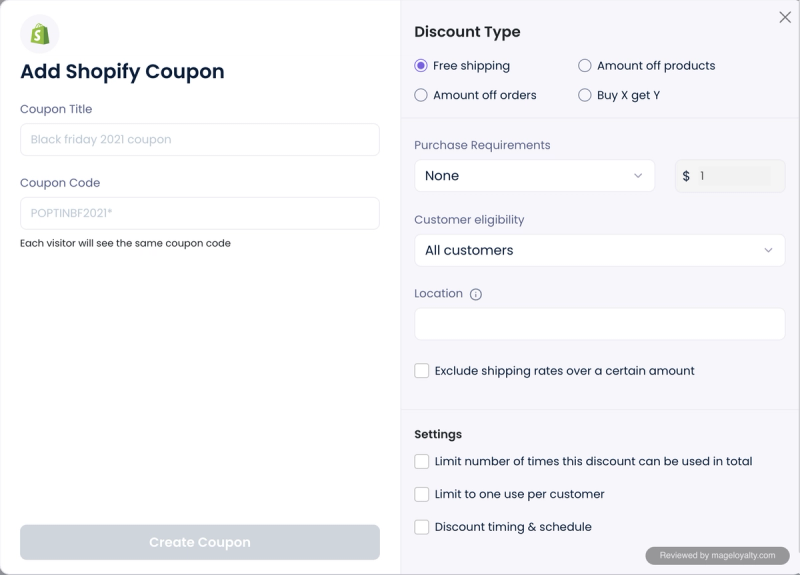
Discounts are created as Shopify coupons from inside Poptin: free shipping, an amount off orders or products, or buy X get Y, with purchase requirements, customer eligibility, usage limits and scheduling.
Measuring results
The dashboard shows visitors, views, conversions and conversion rate for each popup, split between desktop and mobile. Beyond popups, Poptin also has embedded forms, a list of leads, segments and its own email campaigns and automations.
Drawbacks
- It runs off-platform, in Poptin's own app.
- The free plan only covers 1,000 visitors a month and shows Poptin branding on your popups.
If you want AI to design and plan the popup for you, OptiMonk is the step up.
Poptin on the Shopify App Store
3. Wisepops: best for advanced targeting on larger stores
Best for: established stores that want a capable, enterprise-feeling popup builder with detailed display rules, product recommendations and revenue goals.
Pricing: one Shopify plan at $299 a month (or $2,990 a year) for up to 500,000 pageviews, with a 14-day free trial; Wisepops also sells a managed service through its website (as of 18 October 2026).
App Store rating: 4.9 from 71 reviews (as of 18 October 2026).
Wisepops is a very good, competent builder with a soft, calm interface. It feels more enterprise than the other apps here, and like OptiMonk it feels designed by people rather than thrown together. It doesn't have OptiMonk's AI onboarding, though. I first used Wisepops with a freelance client before we built Mage, and the screenshots here come from my own store.
Setting it up
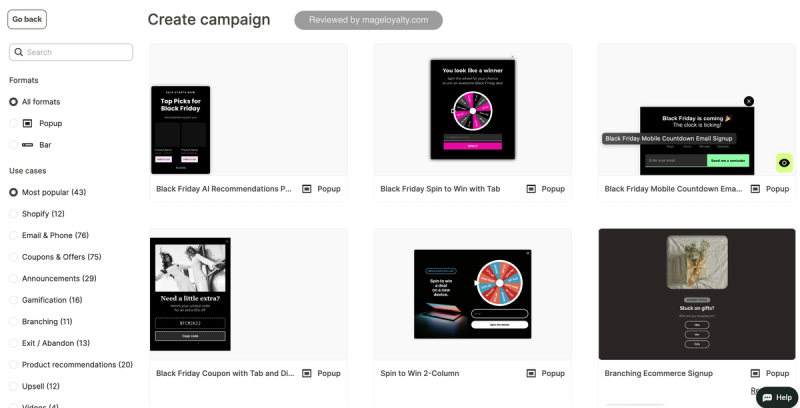
Rather than onboarding you, Wisepops more or less drops you straight into the app. You start from the campaign library, which is decent: templates filtered by format, popup or bar, and by use case, including email and phone capture, coupons and offers, gamification, branching, exit intent, product recommendations, upsells and video, with a Black Friday collection at the top. Getting my first popup set up took about 15 minutes.
Designing the popup
The editor covers style, position, closing behaviour and custom CSS, with standard sizes from small to full screen, a background overlay and multi-column layouts.
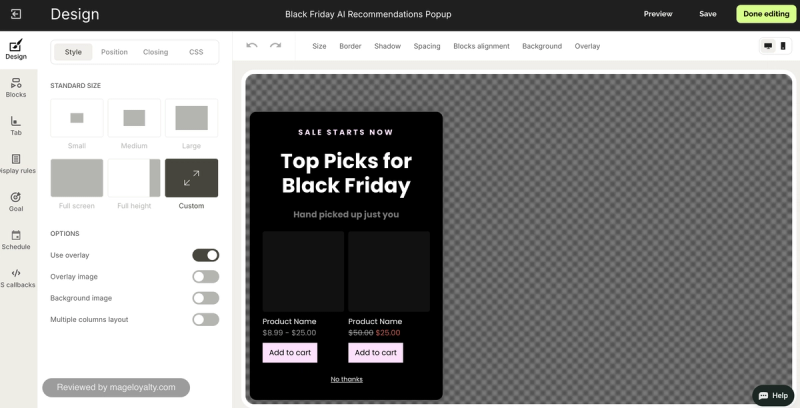
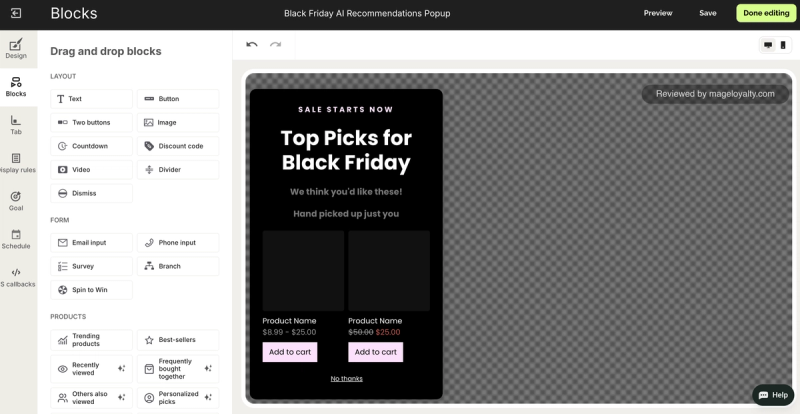
Content is built from drag-and-drop blocks: text, buttons, images, a countdown, a discount code and video, plus email and phone inputs, surveys, branching questions and spin to win. A set of product blocks adds trending products, best sellers, recently viewed, frequently bought together and personalised picks, so a popup can sell as well as collect emails.
Targeting and offers
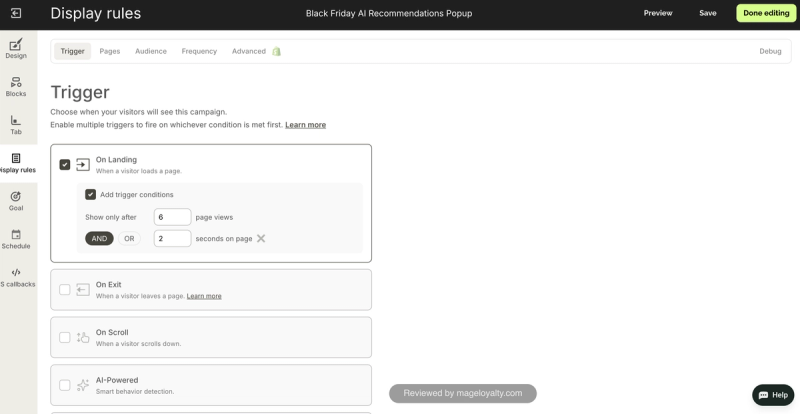
The display rules are where Wisepops shows its depth. Triggers include landing on a page, exit intent, scrolling and an AI-powered option, and each can carry conditions, such as only after six pageviews and two seconds on the page. Separate tabs control pages, audience, frequency and advanced Shopify rules, with a debug view to check why a campaign did or didn't show.
Measuring results
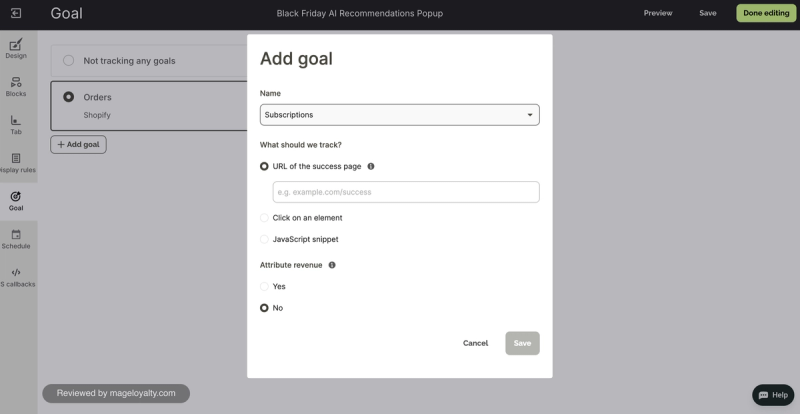
Each campaign can track goals, such as Shopify orders, a success page, a click or a JavaScript event, and attribute the revenue to the popup.
Drawbacks
- The app throws you in rather than onboarding you, so expect to find your own way around at first.
- It runs off-platform, in Wisepops' own app.
- It is the most expensive self-serve plan here at $299 a month, priced by pageviews.
If you want a popup built for you in minutes, OptiMonk is the better start.
Wisepops on the Shopify App Store
4. Alia: best for gamified and quiz popups
Best for: stores that want playful popups, such as quizzes, pick-a-card games and scratch-offs, with AI that decides when to show them and which discount to offer.
Pricing: from $100 a month for up to 20,000 visitors, rising with traffic; a fully managed plan starts at $400 a month; no free plan (as of 18 October 2026).
App Store rating: 4.6 from 114 reviews (as of 18 October 2026).
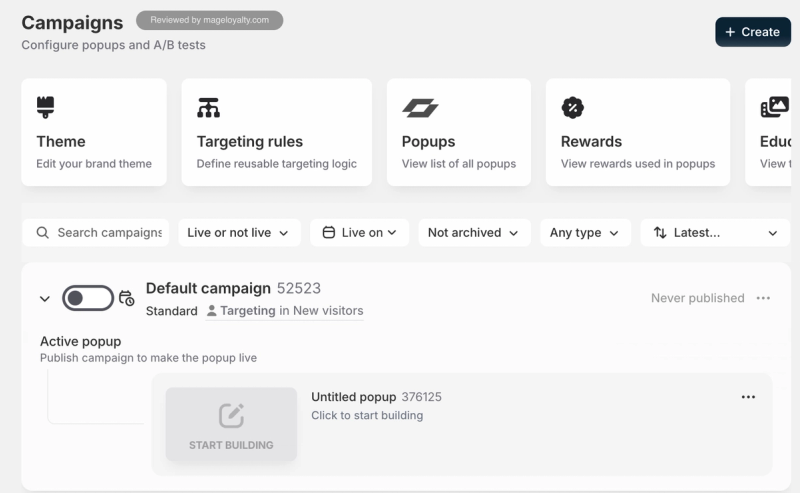
Alia runs inside the Shopify admin, which I like, and it has the widest variety of popup formats of the apps here. The flip side is an interface that feels busy. It isn't as clean as OptiMonk, and with this many features it can be overwhelming if you want something simple. I've used Alia with a Mage merchant and with a freelance client before that, and the screenshots here come from my own store.
Setting it up
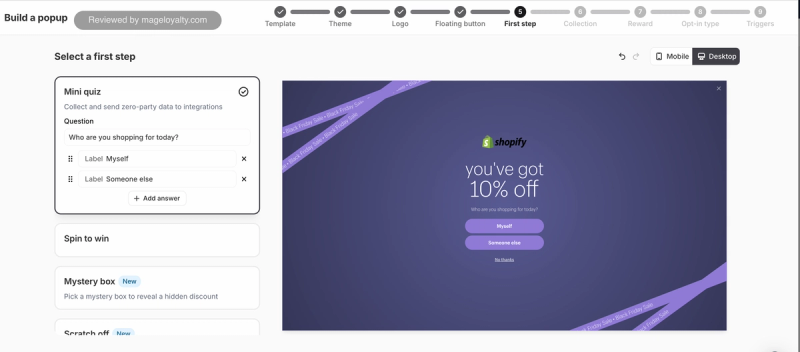
A "Get live with Alia" checklist runs through six steps: pick a plan, embed Alia in your theme, build your first campaign, connect integrations, go live and set up Slack notifications. Building a popup is a nine-step wizard: template, theme, logo, a floating button that lets shoppers reopen the popup after closing it, the first step, a product collection, the reward, the opt-in type and the triggers. It took me about 20 minutes to get a popup live.
Designing the popup
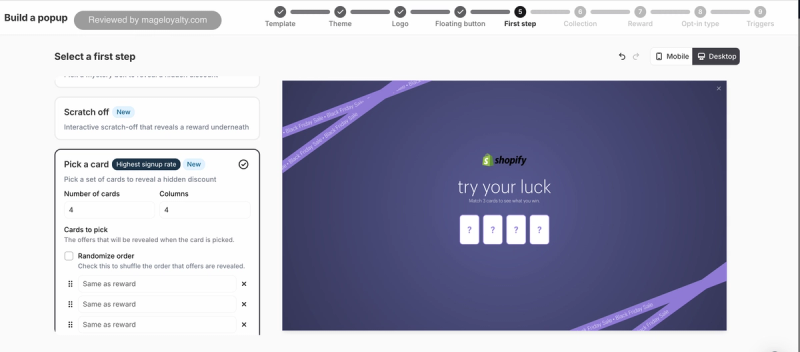
The first step is where Alia differs from the rest. Instead of going straight to an email field, you can open with a mini quiz, such as "Who are you shopping for today?", which also collects answers you can send to your email platform. Or you can use a game: spin to win, a mystery box, a scratch-off or pick a card, which Alia labels as its highest sign-up rate format.
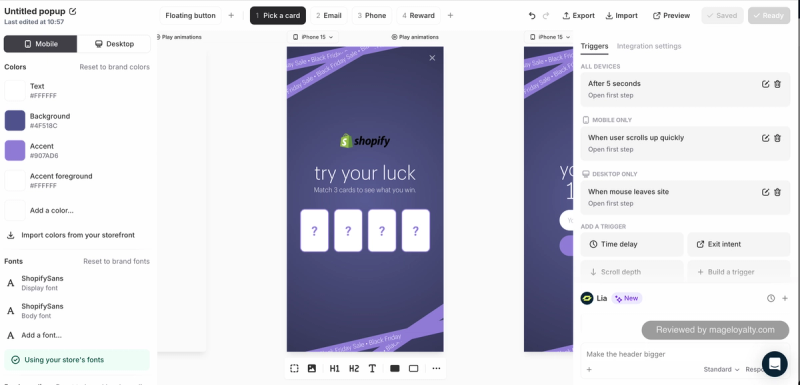
The editor uses your store's colours and fonts, with mobile and desktop previews of every step, and Lia, Alia's AI assistant, sits alongside to make changes such as "make the header bigger".
Beyond popups, Tracks adds a small widget in the corner of the store that walks shoppers through short content and questions before unlocking a reward.
Targeting and offers
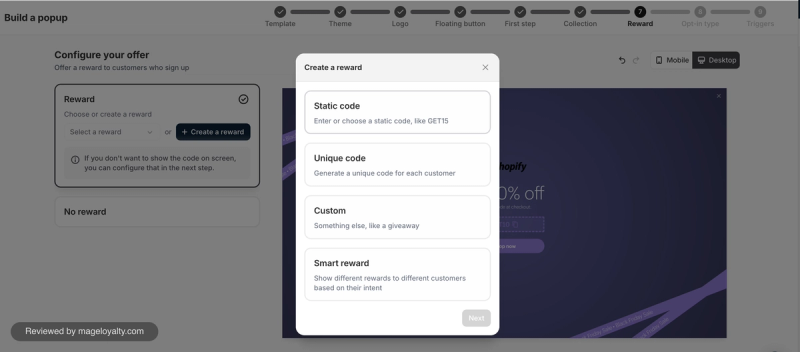
Rewards can be a static code, a unique code for each customer, something custom such as a giveaway, or a smart reward that shows different offers to different customers based on their intent.
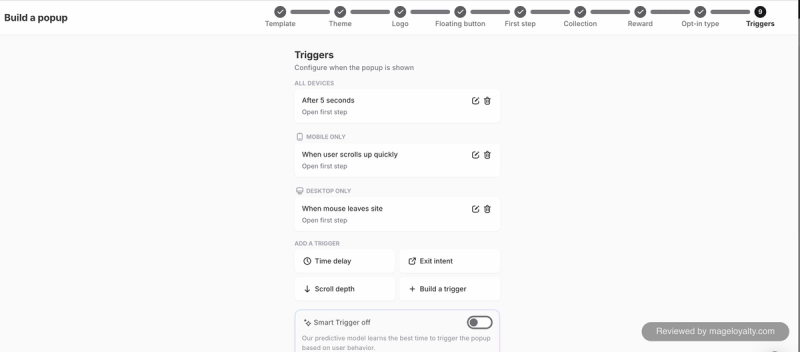
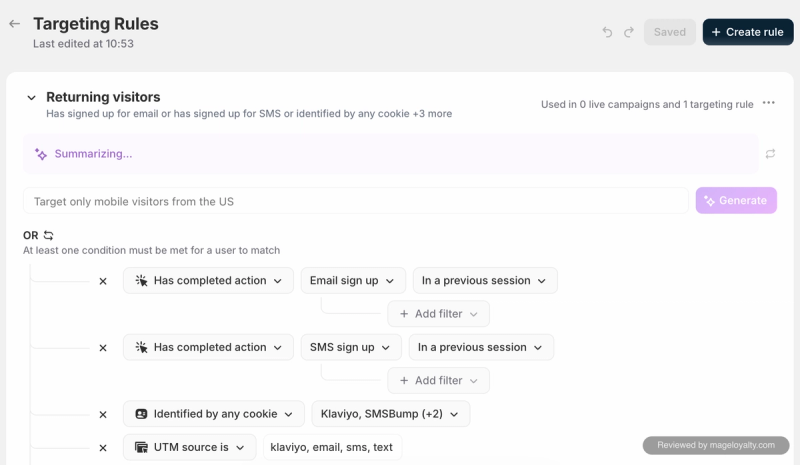
Triggers are set per device: after five seconds on all devices, when a shopper scrolls up quickly on mobile, or when the mouse leaves the page on desktop, with an optional smart trigger that learns the best moment. Targeting rules can be written in plain English, such as "target only mobile visitors from the US", and the default returning-visitor rule recognises people who've already signed up or arrive from your email and SMS.
Measuring results
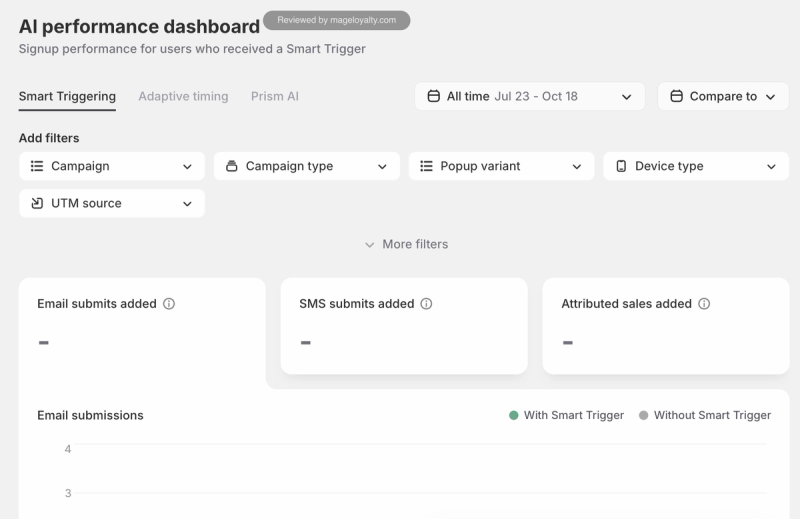
An AI performance dashboard compares email sign-ups, SMS sign-ups and attributed sales for visitors who saw a smart trigger against those who didn't.
Drawbacks
- The interface feels busy and is less clean than OptiMonk's.
- The sheer number of features can be overwhelming if you want a simple popup.
- At $100 a month with no free plan, it is one of the more expensive ways in.
If you want the simplest route to a good-looking popup, OptiMonk is easier to start with.
5. Justuno: best for detailed segments and workflows
Best for: stores that want fine control over every pixel of a popup and are happy to build segment-based workflows for different visitors.
Pricing: on the Shopify App Store, from $59 a month for up to 10,000 monthly visitors, then $99 (20,000), $199 (50,000) and $299 (100,000); Justuno also sells a managed done-for-you plan on its website (as of 18 October 2026).
App Store rating: 4.6 from 669 reviews (as of 18 October 2026).
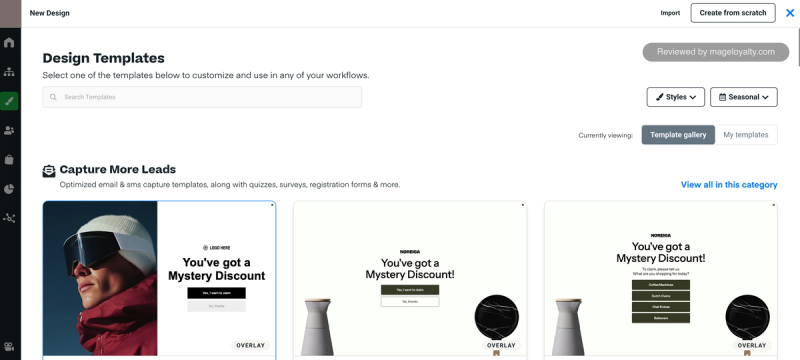
Justuno feels like an older platform that has had years to build up a lot of features. Some stores will use all of them, while others will only want the basics. It runs off-platform, and the first impression is dated. I've used it with a Mage merchant, and the screenshots here come from my own store.
Setting it up
Setup took me about 30 minutes, the longest of the apps here. Justuno gives you plenty to start from: the default templates are decent, if nothing exceptional next to the competition, and there are ready-made workflows and segments to build on.
Designing the popup
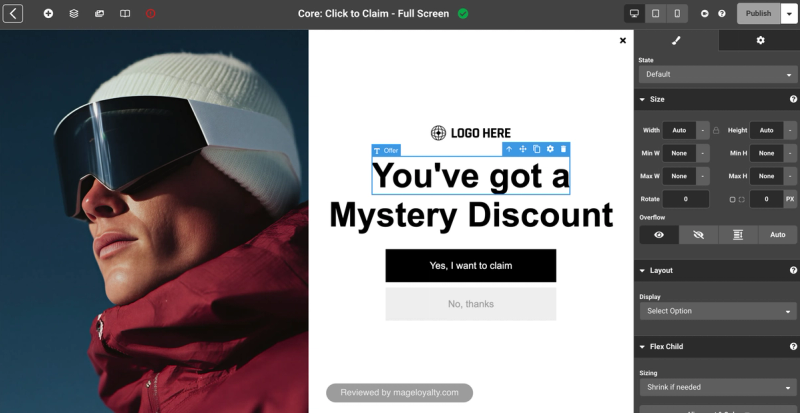
The builder is fine, and it has every setting you could want. It is detailed enough to feel like a visual version of writing CSS: padding, margins, flexbox settings, shadows and animations, all edited directly on the popup, with layers like a photo editor.
Targeting and offers
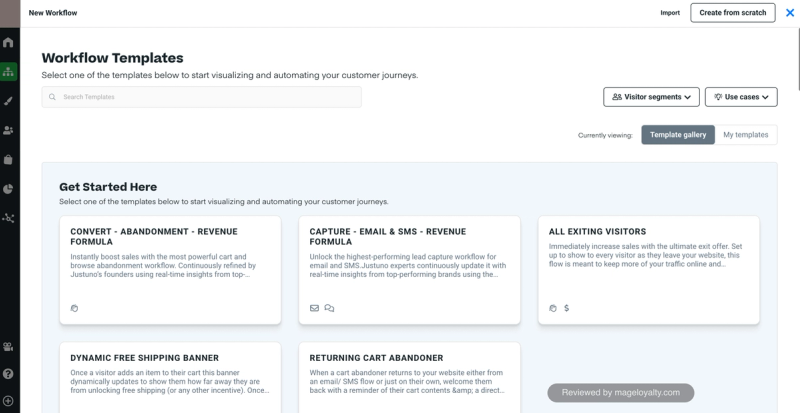
Workflows are where Justuno is strongest. Templates cover cart and browse abandonment, email and SMS capture, an offer for every exiting visitor, a dynamic free shipping banner and a reminder for returning cart abandoners. Each one spells out who is enrolled: the abandonment workflow, for example, targets visitors who are leaving with something in their cart, have never bought before, and have viewed at least two pages and spent five seconds on the page.
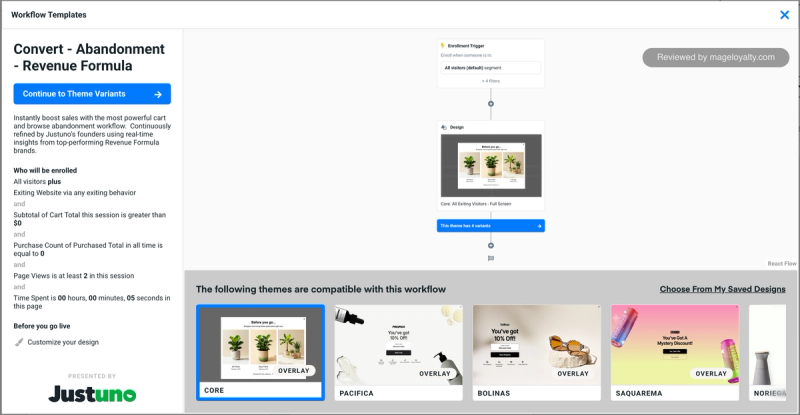
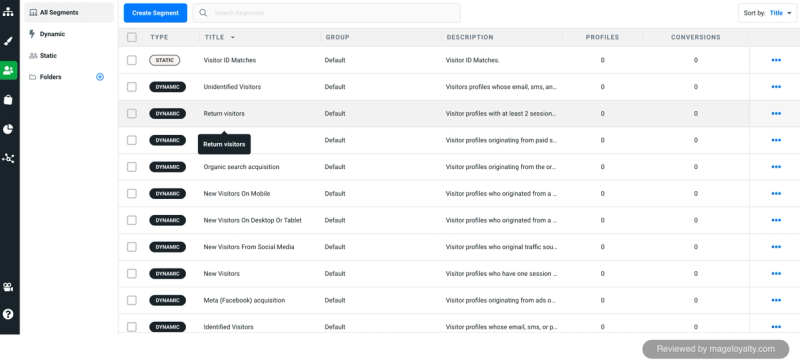
Fifteen default segments come built in, from return visitors and new mobile visitors to visitors arriving from organic search, social media or Meta ads.
Drawbacks
- It runs off-platform and immediately feels dated next to OptiMonk or Wisepops.
- There is a lot to learn. The depth suits stores that want it, but it is more than most need for a simple signup popup.
- Several App Store reviewers report trouble cancelling and with billing, so check how your account is billed when you sign up.
If you want a modern builder that does most of the work for you, choose OptiMonk.
Justuno on the Shopify App Store
Do you need a popup app at all?
Shopify has its own free app, Shopify Forms, which adds a simple email signup popup or form to your store and is rated 4.5 from 751 reviews (as of 18 October 2026). Most email platforms, Klaviyo included, also have their own signup forms. If you only need a basic email capture with a discount, either can be enough. A dedicated popup app earns its cost when you want better design, smarter targeting, games, multi-step popups or testing. For more on choosing an email or SMS platform, see our best Shopify email and SMS apps.
Popups and Google's mobile guidance
Google's guidance on intrusive interstitials says that popups which cover the main content on mobile, straight after someone arrives from search, can make a page harder to use. Popups for legal reasons, such as cookie consent or age checks, and banners that use a reasonable amount of screen space are fine. In practice: use a short delay or exit intent on mobile, keep the mobile popup smaller, or use a teaser tab that expands when tapped. Every app here supports at least one of these.
Offer store credit instead of a discount code
The usual signup offer is 10% off the first order. It works, but the code can be shared, and once it's used the relationship ends. A loyalty program gives you a different offer: store credit or points that sit on the customer's account and bring them back.
Here is how it works with a popup app and a loyalty platform such as Mage:
- Build the signup popup as usual in your popup app, collecting an email address.
- Reward the signup in the loyalty program. With one Mage merchant using OptiMonk, Mage detects each new newsletter signup automatically and adds store credit to the customer's account, with no discount code involved.
- Reward SMS consent too. Mage has an SMS opt-in earning rule, so customers can earn for adding a phone number.
- Welcome them when they create an account. A signup bonus rewards customers once when they create an account.
Why it works: store credit can't end up on a coupon site, it builds toward the customer's next order rather than expiring after one, and the balance gives you a reason to email them again.
Wisepops' analysis of one billion popup displays found an average signup rate of 4.82%, rising to 7.45% when the popup offered a discount, compared with 4.60% without one (Wisepops). An incentive clearly helps. Store credit is one that keeps working after the first order.
The Shopify loyalty program growing brands trust
See how Mage helps Shopify brands lift repeat purchase rate with loyalty, referrals and store credit.
Book a demo“We are really happy with working with the Mage team and getting this program up and running. They are very responsible and professional. Very seamless and the upsell features seem to already be helping with adoption!”


Read the Tea Drops case study →
Frequently asked questions
What is the best free popup app for Shopify? OptiMonk's free plan covers 10,000 pageviews a month, which suits most small stores. Poptin's free plan covers 1,000 visitors a month and shows Poptin branding. Shopify Forms is free and handles a basic signup popup.
Do popups hurt SEO? Not if you follow Google's guidance on intrusive interstitials. Avoid popups that cover the page on mobile as soon as someone arrives from search; use a delay, exit intent, a smaller mobile design or a teaser instead.
What signup rate should a popup get? Wisepops' analysis of one billion popup displays found an average of 4.82%, with popups offering a discount converting at 7.45%. Your rate will depend on your offer, design and targeting.
Are spin-to-win popups worth it? They often convert well because they feel like a game, but every spin still gives away a discount. Wisepops reports spin-to-win popups converting at 29.99% in its data. OptiMonk, Wisepops, Poptin and Alia all offer game formats.
Should I use a popup app or Shopify Forms? Shopify Forms is free and fine for a simple email capture. A popup app is worth it when you want stronger design, targeting by visitor or page, games, multi-step popups or A/B testing.
Can I offer loyalty points or store credit instead of a discount? Yes. With a loyalty platform such as Mage, a newsletter signup can earn store credit or points automatically, and customers can earn again for SMS consent and for creating an account.
Our verdict
- If you want the best overall experience, choose OptiMonk. Its AI builds a complete, on-brand popup for you, and the free plan lets you start without paying.
- If you want something simple and quick, choose Poptin, the cleanest and fastest to set up.
- If you need advanced targeting on a larger store, choose Wisepops, and budget for $299 a month.
- If you want quizzes and games, choose Alia.
- If you want pixel-level control and detailed workflows, choose Justuno, and allow time to learn it.
Whichever you choose, think about what you offer for the signup, so the first order isn't the last.

Kris is the co-founder of Mage Loyalty. I spend most days talking to merchants, and making sure our customers get real results. If you run a Shopify store or Agency we should chat!