A cashback offer shopify campaign should create a reason for the customer to return, not make the first order cheaper for everyone. Build it around a specific retention job, then control who qualifies, what earns credit, when it pays out, and how you will judge the second purchase.
Short answer: A margin-safe cashback offer is targeted, delayed, and tied to a clear return objective. Limit who qualifies, what they can buy, how much they can earn, and when the credit becomes available, then measure second purchases rather than first-order conversion alone.
Start with the retention job, not the cashback rate
Decide which customer behaviour the offer should change
Start with the behaviour you need: a first-time buyer placing order two, a lapsed segment returning, or a VIP customer trying a replenishable collection.
Shopify cites an analysis of more than 156,000 DTC customers with an average repeat purchase rate of 18.8%. That is not a universal benchmark. Category, replenishment cycle, price point, and product satisfaction all change the number.
A cashback offer can support a broader Shopify loyalty program, but it should have one clear assignment at launch.
The opinion: do not make cashback your default welcome incentive
Do not launch an always-on, store-wide cashback offer as a substitute for having a retention strategy.
A permanent public offer can become part of the price customers expect. It also pays rewards to people who may have purchased again without one. Start with an audience, a product scope, an end date, and a measurable reason for running it.
Shop Cash is a Shopify-funded program for Shop app customers, while Shopify Credit cashback applies to eligible business spending. This article concerns a merchant-run offer for your customers.
Choose credit-back when the next purchase matters
An upfront discount lowers the price of the order in front of the customer. Credit-back gives them value after they buy, provided they return.
That makes cashback useful when the objective is repeat revenue, not simply first-order conversion.
Step 1: Set the economics before you build the campaign
| Decision | Use it when | Margin control | Customer experience |
|---|---|---|---|
| Flexible cashback | Order values vary | Add a per-order maximum | Credit scales with qualifying spend |
| Fixed cashback | The offer is a defined promotion | Use a minimum order and award limit | Every qualifying customer receives the same value |
| Store credit | The benefit should support ongoing repeat buying | Tie redemption to signed-in checkout | Credit applies at checkout |
| Discount code | The offer is a fixed opt-in promotion | Control code combinations and expiry | Customer receives a single-use code |
Choose flexible or fixed cashback
Flexible cashback pays in proportion to qualifying spend. Fixed cashback pays the same amount for every qualifying order.
Use flexible cashback when basket values vary, then add a maximum per-order cap so a large order does not create an outsized reward. Use fixed cashback when the proposition itself is fixed, such as credit back after a first qualifying order.
Set a minimum order and a maximum payout
Set the economics before you touch campaign settings. Account for product margin, fulfilment, payment fees, expected redemption, returns, and the value of retaining the customer.
A minimum order amount can keep rewards away from low-value baskets. A cap protects against unusually large orders. Mage calculates cashback from product subtotal only, excluding taxes and shipping, which keeps the reward tied to merchandise revenue.
Use this guide to calculate your loyalty reward rate against your own numbers. There is no responsible universal cashback percentage.
Decide whether the reward is store credit or a discount code
Store credit suits an ongoing rate-based benefit. The credit is available for a future checkout, which keeps the value connected to a return visit.
A single-use discount code suits a fixed opt-in promotion. It can carry a clear amount, expiry date, and combination rules. Discount-code cashback is fixed amount only, so do not choose it if the reward needs to scale with spend.
“I looked into so many different integrations for loyalty and referrals for our Shopify Store, but no one impressed me more than Mage on human connection, customer service, and value.”


Read the Reelie case study →
Step 2: Target the people and products that can afford the offer
| Targeting control | Example use | What qualifies | Risk to check |
|---|---|---|---|
| New customers only | First-purchase return incentive | First qualifying purchase | Paying customers who would return anyway |
| Shopify Segment | Win-back or high-intent audience | Customers in the selected segment | Segment logic is current and accurate |
| VIP tier | Tier-specific perk | Customers currently in that tier | Exposing premium value too broadly |
| Product or collection limit | Replenishable or higher-margin range | Orders containing selected items | Low-margin items remain excluded |
Use segments instead of a blanket offer
Mage can target all customers, new customers only, a VIP tier, or a Shopify Segment. For a first test, choose one audience.
A first-time purchaser campaign can focus on getting order two. A merchant-created Shopify Segment can identify lapsed customers. A VIP offer can reward a defined group without making the same benefit public across the storefront.
Keep the first test simple enough to interpret. If you change the audience, product scope, reward amount, and message together, you will not know which decision changed the result.
Limit cashback to selected products or collections
Product restrictions protect margin when categories have different economics. They also let you focus a campaign on replenishable products, seasonal stock, or a collection where repeat ordering makes sense.
For a flexible Mage offer limited to products or a collection, cashback is calculated on matching-item spend only. It is not calculated on the full basket just because one eligible item is present.
A food and beverage loyalty program may use lower-threshold credit-back on products customers regularly need to reorder, while excluding items that cannot support the same reward.
Use opt-in when the customer must actively claim the perk
Opt-in makes the benefit feel claimed, rather than permanently attached to every shopper.
A customer enters their email through a popup or form, completes the claim step on your storefront, then places a qualifying order with that same email. Opting in alone does not award cashback.
Mage can capture opt-ins through a popup or form, but the Mage app embed must be enabled on the live theme. Test the full path on the actual storefront before promoting the offer.
Step 3: Add a delay so cashback brings customers back
| Stage | Customer sees | Merchant action | Margin implication |
|---|---|---|---|
| Pending | Cashback earned but not yet available | Hold through approval period | Protects against immediate reward leakage |
| Approved | Credit or code is available | Send a clear notification | Creates a return opportunity |
| Refunded or cancelled | Reward is reversed | Review exceptions if needed | Prevents rewards remaining on returned sales |
Set approval time around the returns window
Approval time is the period between a qualifying order and cashback payout. Set it around your own returns window instead of paying instantly by default.
The order qualifies, the cashback remains pending, the approval period passes, then the customer receives store credit or a discount code. Holding it until your return window closes means a refunded order does not pay out a reward that has no underlying sale.
Explain pending, approved, and reversed rewards
Mage labels earned cashback as pending while it waits for approval. After the hold period, it becomes approved and pays out automatically.
Cancelled and refunded orders reverse cashback automatically. Partial refunds reduce cashback proportionally. That matters when an order contains several items and only part of the purchase comes back.
Tell customers that credit is pending, then remind them once it is available.
Choose an expiry date that creates urgency without pressure
Cashback expiry is a separate store-wide setting. A defined redemption window can encourage a return visit, while no expiry may better suit a premium or longer-consideration purchase cycle.
Check applicable legal requirements before setting expiry terms. If you use discount codes, make the expiry date and combination rules clear in the customer message.
Mage discount-code notifications are off by default. Enable cashback email templates or trigger the relevant Klaviyo events so customers know the code exists.
Step 4: Build the cashback campaign in Shopify
Create the offer
In Shopify admin, open Mage Loyalty, choose Cashback, and select Create Offer. Give the offer an internal name that identifies the audience and purpose, such as “New customer replenishment test.”
Keep the offer in Draft while you configure and test it, then activate it when the customer journey, notification, and eligibility rules are ready.
Configure qualification and payout
Set the reward method first: Shopify store credit or a discount code. Then choose flexible or fixed cashback, enter the amount, and set a maximum per order if the offer is flexible.
Work through qualification in this order:
- Choose the audience.
- Turn on opt-in if customers must claim the perk.
- Set the maximum awards per customer.
- Add a minimum order amount.
- Restrict the offer to products or a collection if needed.
- Set approval time and cashback expiry.
Maximum awards per customer defaults to one. For an ongoing campaign that should reward every qualifying order, deliberately set the limit to unlimited by entering zero or leaving it blank.
Discount-code offers can be combinable with product, order, or shipping discounts. All combinations are off by default. Leave them off unless you have a specific stacking policy.
Schedule the campaign and activate it
Use a schedule for a seasonal launch, replenishment window, post-purchase test, or fixed first-purchase campaign. Add an end date to tests so an old offer does not quietly become permanent.
Mage can run multiple offers at once, but each order earns only one. It awards the highest-value qualifying offer, so review overlapping audience and product rules before launching.
Cashback can also run alongside points. That can make sense when points reward ongoing engagement and cashback is reserved for a tightly defined return objective.
Step 5: Position credit-back as a perk, not a price cut

Use benefit language instead of discount language
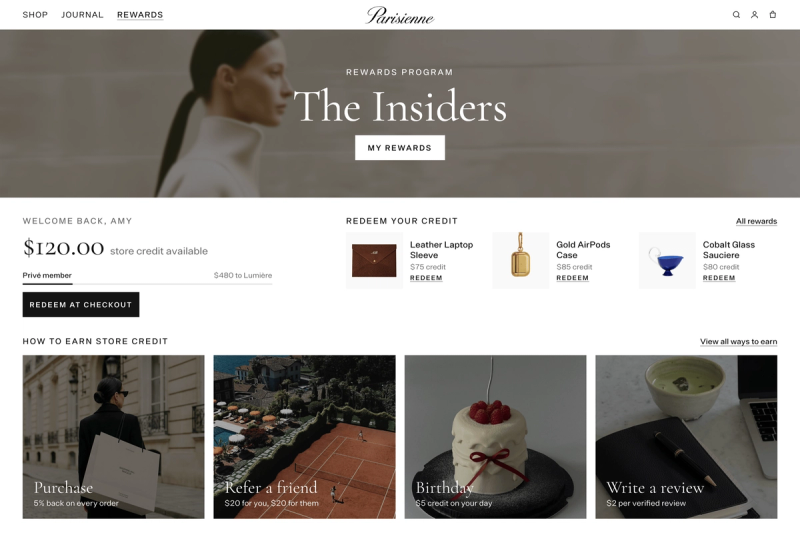
Say “earn store credit for your next order” or “your purchase unlocks credit after the return window.” Avoid leading with “save today” when the value is earned for later.
The language should explain what customers earn, when it becomes available, and where they can use it.
Show the future value at the right moment
Show the earn message where a customer is deciding to buy: product pages, the loyalty experience, and relevant post-purchase communication.
For discount codes, state the value, expiry, and whether it combines with other discounts. For store credit, explain that it is tied to the customer account and applies at checkout.
Shopify states that store credit can be used at checkout through customer accounts. It is not available for legacy customer accounts, so confirm the account setup before selecting store credit as the reward method.
Pair the offer with a return path
A cashback message should point toward the next useful action, such as replenishing a product, browsing a related collection, or returning when the credit becomes available.
The difference between cashback versus a welcome discount is timing and objective. A welcome discount helps close the current order. Credit-back gives the customer a reason to come back after it.
Step 6: Measure whether the offer earns a second purchase
| Metric | Why it matters | How to compare | Decision it informs |
|---|---|---|---|
| Second-order rate | Measures repeat buying | Qualifiers versus a comparable audience | Whether the offer earns return revenue |
| Time to second purchase | Shows purchase speed | Before and after approval | Whether timing supports reordering |
| Reward cost per redeemer | Shows campaign cost | Against retained contribution margin | Whether the rate is sustainable |
| Refund reversal rate | Shows reward leakage risk | By product scope and audience | Whether approval time needs adjustment |
Track second-order rate and time to second purchase
The primary metric is the share of qualifying customers who place a second order within a defined period after cashback approval.
Track time to second purchase, redemption rate, second-order average order value, reward cost per redeemer, refund reversals, and contribution margin after cashback. Use your time to second purchase framework to define a window that matches your category.
Compare reward cost with retained revenue
Do not judge the campaign against total store revenue. Compare customers who qualified or opted in with a relevant audience that did not.
Separate opt-in customers from non-opt-in customers. Review whether the additional repeat contribution margin justifies cashback paid out.
Review activity before expanding the audience
Mage’s Cashback page shows offer-level revenue and cashback paid out. View Activity shows pending, approved, rejected, cancelled, and refunded rewards.
Change the audience, rate, delay, product scope, or message, then review the result before changing another variable.
Shopify cashback offer launch checklist
Before launch
- Confirm audience, product scope, minimum order, reward amount, per-order cap, award limit, approval time, expiry, and dates.
- Confirm whether payout is store credit or a discount code.
- If using store credit, confirm new customer accounts are enabled and customers can sign in at checkout.
- If using codes, confirm notifications and combination rules are configured.
After the first orders
- Test an eligible order and an ineligible order.
- Test a full refund and a partial refund.
- Check a customer who has reached the award limit.
- Review pending rewards and confirm the payout timing is correct.
Before making the offer permanent
Keep eligibility narrow until second-order rate, redemption, refunds, and contribution margin support expansion.
Frequently asked questions
What is a cashback offer on Shopify?
A cashback offer on Shopify is a merchant-run promotion that gives a customer store credit or a discount code after a qualifying order. It is separate from Shop Cash, which is Shopify-funded for Shop app customers, and Shopify Credit cashback, which applies to eligible merchant business purchases.
How do I set up a cashback offer on Shopify?
To set up a cashback offer on Shopify, define the retention goal, choose the audience and product scope, set the payout and amount, add approval time and expiry, then test before activating it. A loyalty app can manage qualification, payout, scheduling, and reward activity in one setup flow.
Is cashback better than a discount for Shopify stores?
Cashback is better than a discount when the objective is to encourage a future purchase rather than reduce the current order price. A discount can be simpler for immediate conversion, while deferred store credit or a future-use code gives the customer a reason to return after purchase.
How much cashback should I offer?
The right cashback amount depends on product margin, fulfilment and payment costs, expected redemption, return behaviour, and retained customer value. Start with a targeted, capped offer rather than a store-wide rate.
Can I limit a Shopify cashback offer to certain customers or products?
A Shopify cashback offer can be limited by customer eligibility and product scope when your loyalty app supports those controls. Mage can target new customers, VIP tiers, or Shopify Segments, and can restrict flexible cashback to selected products or collections rather than the whole catalog.
When should Shopify cashback be paid out?
Shopify cashback should be paid out after the store’s return window where possible, so refunded orders do not leave unrecoverable rewards behind.

Kris is the co-founder of Mage Loyalty. I spend most days talking to merchants, and making sure our customers get real results. If you run a Shopify store or Agency we should chat!