Can a wallet pass loyalty program keep a customer’s in-store and online rewards in one place? A wallet pass loyalty program can do that when the pass, customer identity, transaction source, and loyalty ledger are connected through a workable checkout process.
Short answer: A wallet pass loyalty program puts a digital loyalty card in Apple Wallet or Google Wallet, while the loyalty platform manages the balance, rewards, and tier data behind it. For Shopify retailers, Shopify POS is the cleanest way to connect online and in-store activity. Receipt scanning covers purchases made through stockists, pop-ups, wholesale partners, salons, or tills that do not create Shopify orders.
What is a wallet pass loyalty program?
The wallet pass is the card, not the loyalty ledger
A wallet pass loyalty program gives customers a digital card they can keep in Apple Wallet or Google Wallet. It makes membership easier to find at checkout.
The loyalty platform holds the customer balance, earning rules, rewards, VIP tier, expiry settings, and redemption logic. That is the role of a Shopify loyalty program, whether the customer shops online, at a store counter, or through a stockist.
Apple documents that loyalty passes can display updates, send notifications, use barcodes or NFC, and be distributed through web pages, email, SMS, QR codes, and apps (Apple Developer). Google Wallet loyalty cards can also use barcode or account identifiers and send update notifications (Google Developers).
What customers can see and do from a digital loyalty card
A useful pass should answer the questions a customer has while standing at the counter: What is my balance? What tier am I in? Do I have a reward ready?
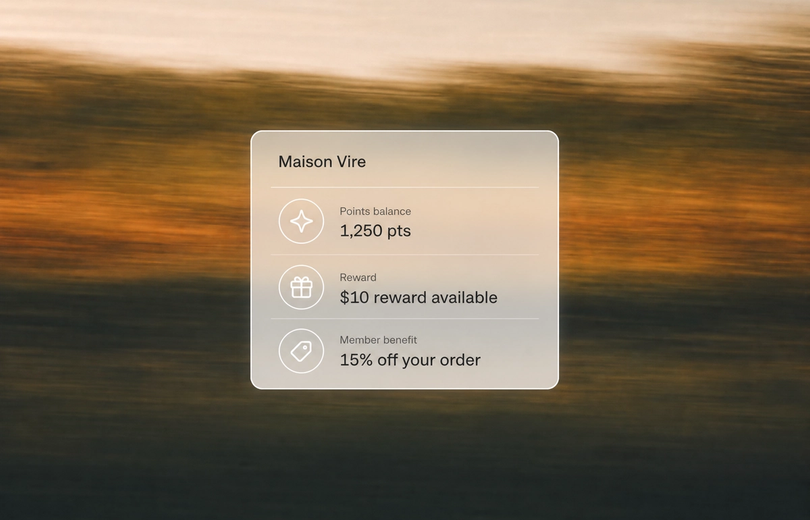
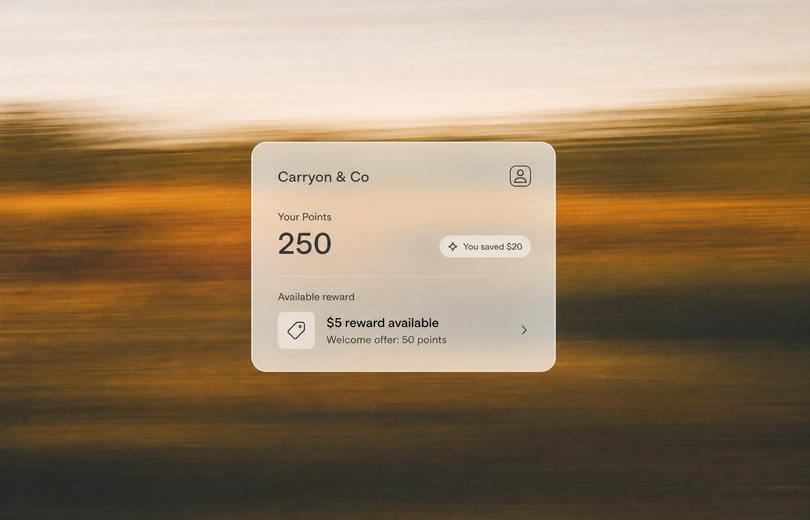
Mage Wallet Pass shows a live points balance, VIP tier, and available rewards. It updates after a customer earns or spends, so the merchant does not need to issue a replacement card after each balance change.
Myth: a digital loyalty card automatically creates omnichannel loyalty
| Layer | What it does | Example |
|---|---|---|
| Customer identity | Connects a person to a purchase | Email, phone number, account, or barcode |
| Transaction source | Records where the purchase happened | Shopify POS, online checkout, or receipt submission |
| Loyalty ledger | Applies earning and reward rules | Points balance, VIP tier, and reward eligibility |
The three layers that must work together
Adding a card to Apple Wallet or Google Wallet does not automatically connect an in-store transaction to the customer’s online balance. The pass is visible to the customer, but staff still need to identify the customer and the sale must enter a connected workflow.
The first layer is identity. Staff need a reliable way to attach the right customer to the order, whether that is an email address, phone number, Shopify customer profile, or barcode lookup.
The second layer is the transaction source. A Shopify POS order can feed into the same customer record as an online order. A purchase made through another till needs a separate process, usually receipt submission or a controlled manual adjustment.
Why the customer identity matters more than the barcode
Shopify POS customer profiles can hold contact information, purchase history, preferences, tags, and metafields (Shopify Help Center). That profile allows a purchase to be associated with the right customer rather than sitting as an anonymous till transaction.
The barcode can help staff find that profile, but staff still need to attach the customer to the cart and follow the loyalty workflow.
The practical priority is simple: choose one identifier that customers can provide easily and associates can use consistently.
“Cannot say enough good things about the team at Mage Loyalty, one of the absolute best organizations we have ever worked with, full stop! So glad we connected with them, completely redid our loyalty program, new concepts, use of loyalty, increasing user engagement, showing us where we were not valuing our best customers, just WOW, amazing team!”


Read the West Coast Goalkeeping case study →
Why physical-store brands need loyalty that follows the customer
The cost of splitting online and offline activity
A customer should not need separate balances for the website and the shop floor. They should also not lose recognition because they bought from a pop-up, a stockist, or a counter outside the main ecommerce system.
Connected customer data gives staff better context at checkout and gives the brand a clearer view of what customers buy and where they buy it.
Shopify describes omnichannel POS as a way to manage online and in-store customer data from one back office (Shopify). The goal is to recognize customers across the places where they already spend.
What a connected customer journey looks like
A customer buys online and earns points. They add a wallet pass to their phone. On a later store visit, an associate attaches their profile to the Shopify POS cart and sees the same balance.
Another customer buys from a stockist. They sign in, submit a receipt, and receive an approved reward in that same loyalty balance.
Shopify reported that one merchant, Milligram, saw a 32% increase in group revenue, a 12% rise in omnichannel shopper AOV, and 16% growth in in-store revenue after connecting sales channels. That is one merchant result, not a benchmark, but it shows why joined-up customer records matter.
Before adding more reward mechanics, focus on identification and a reason for the customer to return. That is the foundation of a useful retention hierarchy.
How POS loyalty syncs online and in store with Shopify POS
| Purchase source | Best connection method | Customer action | Merchant control |
|---|---|---|---|
| Shopify online store | Standard loyalty earning and redemption | Sign in or identify at checkout | Earning rules and rewards |
| Shopify POS store sale | Attach customer to POS cart | Give email, phone, or lookup identifier | Staff redemption and adjustments |
| Stockist or pop-up | Receipt submission | Upload receipt while signed in | Store restrictions and approval |
| External system exception | Controlled manual process | Contact staff with proof of purchase | Documented point adjustment |
The checkout workflow for store associates
The cleanest physical retail workflow happens inside Shopify POS. Staff add the customer to the cart, open the Mage Loyalty tile, and view their points balance, available rewards, and points history.
If the customer wants to use a reward, the associate can redeem it from the tile. Mage creates a discount code for the current transaction. Staff can also apply an active unused reward without manually entering the code.
This gives the customer one balance across Shopify POS and online activity, provided they are attached to the cart before payment.
Earning, redeeming, and correcting points
A store checkout can create points through the purchase rule, then show the result in the customer’s history. That history can include the earning rule, points added or deducted, approval status, expiry status, campaign information, and staff notes.
Manual adjustments are for exceptions, such as correcting a missed transaction or handling service recovery. Mage records POS adjustments in the customer activity log with a POS marker and optional staff note. Make staff write a short reason every time.
Shopify POS can create or update customer profiles and associate digital receipts with a customer email address or phone number (Shopify Help Center). Ask for that identifier before payment, not after the customer has left.
Shopify reported that Bambi Baby achieved 30% growth in conversion rates and 30% growth in average order value after connecting Shopify POS and loyalty. Treat that as a merchant example, not a forecast for a new program.
Digital receipts as an identity capture point
Digital receipts create a reason to confirm an email address or phone number at the point of sale.
Use that moment to ensure the customer is attached to the right Shopify profile. Then follow up with a wallet-pass link, current balance, or a reminder about the next available reward.
How Apple and Google Wallet passes work as digital loyalty cards
What belongs on the front of the pass
The pass should show only information that helps the customer act: current balance, VIP tier, and rewards ready to redeem. A customer at the counter does not need a full loyalty dashboard.
Mage Wallet Pass supports live balance and tier information, reward counts, pass artwork, labels, welcome messaging, links on the reverse of the pass, and optional tier-specific styling. Existing pass holders receive design updates automatically.
Barcodes, QR codes, and POS lookup
Mage can encode either the customer’s referral share link or email address in the pass barcode. The email option gives staff a practical way to look up a customer in POS.
Apple supports barcode and NFC interactions for loyalty passes (Apple Developer). Google documents barcode and account identifiers for loyalty-card passes (Google Developers). Choose the simplest option your staff can use correctly.
How to distribute and update the pass
Mage provides an Add to Wallet link that can go in email, SMS, a thank-you page, or an in-store link. Customers can also add the pass from the Mage Accounts sidebar when the app embed is enabled.
Put the link where customers already look after joining: digital receipts, post-purchase messages, account surfaces, and counter signage. For more placement ideas, see where to promote your loyalty program.
Receipt scanning rewards for purchases outside Shopify POS
When receipt scanning is the right bridge
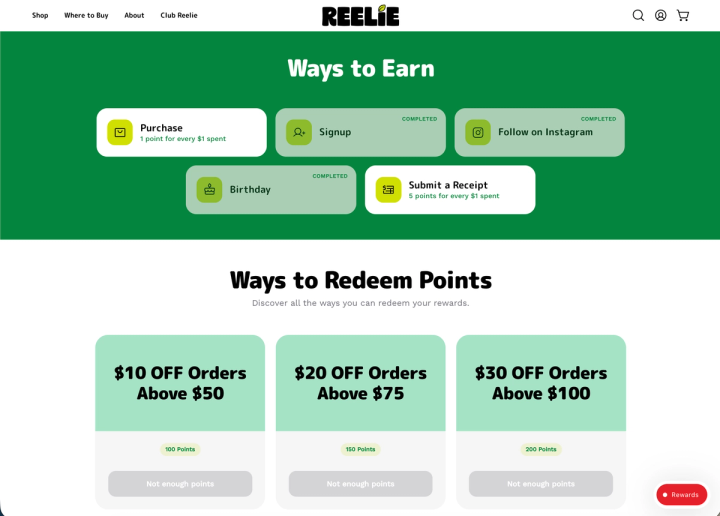
Receipt scanning is for purchases that cannot flow through Shopify POS, including stockists, pop-ups, wholesale partners, market stalls, salon counters, and other external tills.
Customers submit a receipt photo through the Rewards Widget, Account Sidebar, or Loyalty Page. They must be signed in, which connects the submission to a known loyalty account.
How validation and approval should work
Mage reads the store name, total, date, and transaction number from the receipt. It checks the submission against program settings and looks for tampering, edited images, impossible dates, and duplicate transaction numbers.
Merchants can configure a fixed reward or an amount-based reward, accepted stores, a receipt age limit, a minimum purchase amount, and a cap on submissions.
Start with manual approval. Review the first few weeks of submissions, then consider automatic approval for clean receipts. Suspicious receipts remain held for review even when automatic approval is enabled.
Controls that prevent abuse
Restrict accepted stores if the physical network is known. Set an earning limit so one customer cannot submit a large batch of receipts in a short period.
Receipt scanning adds customer effort and review work. Use it where direct POS integration is unavailable, then make the submission flow clear and worth completing.
How to handle salon software and other non-Shopify systems
| Situation | Recommended route | Main trade-off |
|---|---|---|
| Sale runs through Shopify POS | Direct POS loyalty workflow | Requires staff to attach the customer |
| Sale occurs in an external system with receipts | Receipt submission | Adds customer effort and review |
| System exports reliable customer and transaction data | Evaluate data connection options | Requires technical validation |
| No usable transaction record | Controlled manual exception process | Does not scale well |
Choose direct sync, receipt scanning, or a controlled exception process
Start with the system boundary. Can the salon or retail system send a customer identifier, transaction amount, date, and transaction ID into Shopify or your loyalty platform?
If the sale runs through Shopify POS, use the direct POS workflow. If it happens outside Shopify but produces a reliable receipt, use receipt submission with store restrictions and earning limits.
If neither is practical, keep the exception process narrow. Staff can make documented manual point adjustments for verified cases, but that should not become the normal route for every appointment.
The customer-identification questions to answer first
Ask how customers identify themselves at the counter. Is it an email address, phone number, booking profile, receipt number, or account login?
Then ask whether the external system can export transaction data, provide digital receipts, offer API access, or send webhooks. Those answers determine whether a future connection is realistic. Do not promise real-time syncing before confirming the available data.
For salons and beauty retailers, a beauty loyalty program can reward visits, product purchases, referrals, reviews, or replenishment behavior. The earning rules should match the customer journey, not force every interaction through one transaction type.
A practical rollout for staff and customers
Train staff on one standard question: “Can I add your loyalty account before we take payment?” Keep the lookup method consistent across every location.
Use receipt submission for purchases outside the connected checkout path. Review your current Mage integrations directory before committing to a data architecture, then document the fallback process for exceptions.
A launch checklist for an omnichannel physical retail loyalty program
Before launch
- Choose one customer identifier for online, POS, and receipt workflows.
- Decide which sales flow through Shopify POS and which need receipt submission.
- Configure separate earning rules for purchases, receipts, reviews, referrals, and other actions.
- Set accepted stores, receipt age, minimum purchase, and earning limits before announcing receipt rewards.
At the counter
- Train staff to add the customer before payment.
- Show staff how to open the Mage Loyalty tile, view rewards, apply active rewards, and record adjustment notes.
- Add the wallet-pass link to digital receipts, post-purchase messages, account pages, and counter signage.
After the first 30 days
Track identified POS customers, POS redemptions, receipt approval and rejection rates, duplicate submissions, manual adjustment volume, and repeat purchase behavior. Do not judge the program by pass installs alone.
Frequently asked questions
What is a wallet pass loyalty program?
A wallet pass loyalty program gives customers a digital card in Apple Wallet or Google Wallet. The pass can show a balance, tier, and available rewards, while the loyalty platform manages the earning rules and redemption eligibility behind it.
How does a digital loyalty card work in store?
A digital loyalty card works in store when staff use it to identify the customer in the checkout workflow and attach the correct customer profile to the cart.
Can Shopify POS sync loyalty points with online purchases?
Shopify POS can share the online balance when staff attach the correct customer to the POS cart and both channels use the same loyalty account.
How does receipt scanning rewards work?
Receipt scanning rewards work by having a signed-in customer upload a photo of an eligible receipt for validation. The loyalty platform checks rules such as store, date, amount, and duplicates, then either approves automatically or sends the submission for merchant review.
Can a loyalty program work with salon software?
A loyalty program can work with salon software when the system provides reliable customer and transaction data or usable receipts. If it cannot send transactions into Shopify, receipt submission can cover verified purchases, while a documented manual adjustment process can handle limited service exceptions.
Do customers need a mobile app for a physical retail loyalty program?
Customers do not need a mobile app for a physical retail loyalty program. A wallet pass can provide a digital loyalty card in Apple Wallet or Google Wallet, while customers can also access loyalty information through the storefront, Rewards Widget, Account Sidebar, or Loyalty Page.
Use Shopify POS for transactions that can run through Shopify, and use receipt scanning for the physical purchases that cannot. Keep the wallet pass focused on visibility and identification, train staff on one checkout workflow, and make every exception traceable.

Kris is the co-founder of Mage Loyalty. I spend most days talking to merchants, and making sure our customers get real results. If you run a Shopify store or Agency we should chat!