A store credit drop campaign is a timed balance addition for a defined group, and its value lies in what customers do after they receive it. It gives you a way to bring a relevant audience back without changing ongoing earning rules or making a public discount the default reason to buy. It can sit inside a broader Shopify loyalty program, but it needs its own audience, deadline, and measurement plan.
Short answer: A store credit drop campaign gives a selected audience a one-time balance with a deadline, rather than requiring customers to earn a reward first. Use it for targeted reactivation or event campaigns, then judge it by redeemed credit, recipient revenue, customers who ordered, orders placed, and repeat behavior, not by issued balance alone.
What a store credit drop campaign is, and when it beats a discount code
| Campaign goal | Better fit | Why | Main risk |
|---|---|---|---|
| Bring back known customers | Store credit drop | Value is tied to an account and a deadline | Subsidizing customers who would have bought anyway |
| Create a public promotion | Discount code | Shoppers can buy without joining a program | Less control over who uses it |
| Boost earning around an event | Bonus campaign | Customers earn more by completing actions | No immediate reason to return |
| Reward post-purchase value | Cashback offer | Credit is earned after a qualifying order | It does not create an immediate reactivation moment |
A one-time balance addition, not an earning rule
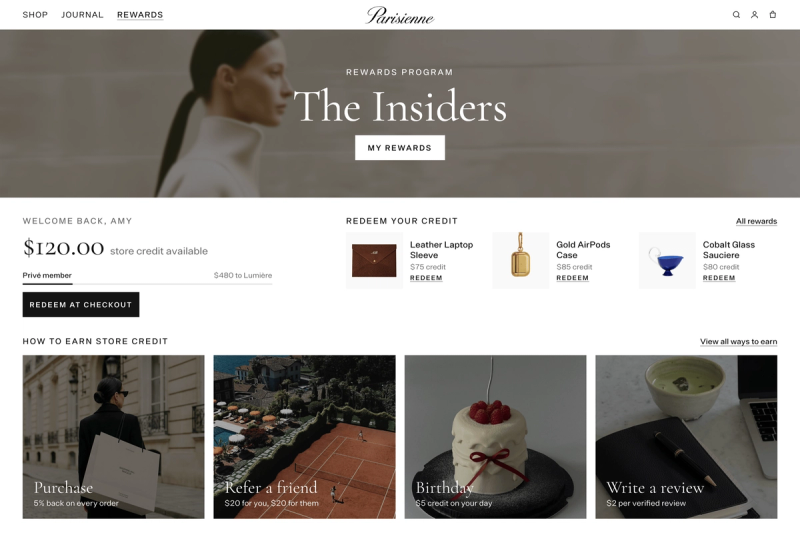
A store credit drop adds a fixed amount to a selected audience at a chosen time. Customers do not need to make a purchase, leave a review, or complete another action first. In Mage, Store Credit Drop is the store-credit version of the Points Drop workflow, which adds a one-time bonus to customer balances with an expiry window. See the documented drop workflow.
That makes a drop different from a bonus campaign. A bonus campaign changes what customers earn from an action, such as a purchase. A drop issues campaign-funded balance directly.
In Mage's loyalty store-credit mode, the drop is added to Mage's internal loyalty balance and redeemed through Mage's rewards and checkout experience. Do not assume it is the customer's Shopify-native StoreCreditAccount balance.
Use a drop for reactivation, launches, and short purchase windows
Use a drop when you have a specific reason for a specific group to return. That might be a seasonal reorder, an event, a product launch, or a lapsed-customer segment with a plausible reason to buy again.
Do not begin with every loyalty member by default. A broad drop can pay customers who were already about to order. Start with customers whose next purchase is commercially plausible, then compare their behavior with a pre-campaign baseline or an eligible group that did not receive the offer.
Choose a discount code when reach or acquisition matters more than account balance
A discount code can be better when you want anyone to purchase immediately, including shoppers who do not want to create an account or join a loyalty program.
A store credit drop works better when account-linked value, a defined recipient list, and a use-by date matter. Shopify supports store credit as a payment method for signed-in customers through customer accounts or Shop Pay, and it can support retention and marketing campaigns. Shopify’s store credit documentation explains those uses.
“I looked into so many different integrations for loyalty and referrals for our Shopify Store, but no one impressed me more than Mage on human connection, customer service, and value.”


Read the Reelie case study →
Plan the campaign before you create the drop
Choose one audience and one customer behavior
Write the objective in one sentence before opening the builder. For example: “Bring back one-time buyers who have not ordered recently,” or “Give top-tier customers a reason to shop the new collection this week.”
Then choose one audience:
- All loyalty members
- A VIP tier
- A Shopify customer segment
“All loyalty members” means customers already in your loyalty program, not every Shopify customer. Use a Shopify segment when the campaign should include people who have not joined yet. Shopify segments are dynamic, rule-based customer lists, although Mage evaluates the drop audience at the scheduled drop time. Shopify explains how customer segmentation works.
A lapsed segment is usually a better first test than an all-member blast. If you are trying to reactivate lapsed loyalty members, reach customers with a credible reason to return, not everyone who has ever enrolled.
Set the credit amount and expiry window
Budget from the maximum possible issued balance first. Then estimate how much credit you expect to be redeemed. These are different numbers.
Set the expiry window around the buying cycle. A short window can suit urgent reactivation or a launch. A longer window can suit considered purchases, replenishment products, or categories with less frequent buying. A food and beverage loyalty program may have a shorter reorder rhythm than a high-consideration purchase.
The deadline makes the balance a campaign rather than a permanent discount sitting in an account.
Decide how you will announce the drop
Mage does not automatically send an email, SMS, or marketing event when a drop lands. Plan the announcement before scheduling it.
Use your normal campaign channels and tracking. Keep the message tied to the recipient’s account balance, not a generic promotion. If you can maintain an eligible non-recipient group, do so. That comparison gives you a better read on whether the campaign changed behavior.
How to create a store credit drop in Shopify
Open the drop builder
From Shopify admin, open Mage Loyalty and select Loyalty. In the Points Drops section, select Create Drop.
The documented interface uses Points Drops because the same workflow supports both points and store-credit programs. When your loyalty currency is store credit, the campaign is a Store Credit Drop.
Add an internal drop name. Customers do not see this name, so make it useful for your team. Include the audience, campaign purpose, and timing, such as “Lapsed customers, spring reorder, April.”
Choose the audience
Enter the amount each customer should receive, then choose the audience:
- All loyalty members for customers already in Mage
- VIP Tier for customers currently in the selected tier
- Shopify Segment for a Shopify-defined group
For a Shopify segment, paste the segment ID from Shopify admin. Segment members who have not joined the loyalty program can have credit reserved for them. They receive it when they join, provided they join before the drop expires.
Schedule the amount and expiry
Set the date and time the drop should land. The schedule uses your store’s timezone, so check the shop-time indicator beneath the picker rather than relying on your local timezone.
Set the expiry window in hours, days, or weeks from the drop time. The credit is added at the scheduled time and unspent drop balance is removed when that window ends.
Review the summary before publishing
Review the Summary panel before selecting Schedule drop. Choose Save as draft if the audience, announcement, or tracking plan still needs approval.
A scheduled drop can be edited before it starts. Once it reaches Processing, it cannot be edited or stopped. Completed means recipients have received it, and Failed means the error is shown on the drop so you can create a new one with the same settings.
Customers excluded from the loyalty program are skipped. The same customer cannot receive the same drop twice. For the full field-by-field setup reference, use Mage’s How to Create a Points Drop guide.
Understand recipients, joins, and the drop audience
A Shopify segment can contain more people than your current loyalty recipient count. Mage reserves the drop for non-members in that segment. If they join before expiry, the credit is issued when they join. If they do not join before expiry, they do not receive the balance.
The audience is evaluated at the scheduled drop time. Customers added to the selected segment or VIP tier afterward do not receive that particular drop. A qualifying customer can receive that campaign once, not repeatedly.
At checkout, Mage spends the temporary drop balance before balance the customer earned themselves. When the expiry window ends, unspent drop credit is removed, while credit already spent remains spent. The drop does not count toward VIP tier progress or earned points.
Keep “segment size,” “current recipients,” and “new program members” separate in reporting. This is campaign-issued balance, not earned points.
Promote the drop without corrupting the test
Tell customers what they received
Tell recipients the amount, exact expiry date and time, eligibility, and where they can redeem it. Make clear that the balance is already in their account.
Avoid saying customers “earned” the credit if it was issued as a drop. Send the announcement when the drop lands, then remind customers close enough to expiry that they can still act.
Your follow-up should focus on available balance and the deadline. Mage’s guide on how to remind customers about unused store credit can help with the reminder sequence.
For lapsed customers, lead with a reason to return and a defined use window. For VIP customers, frame the credit as a tier benefit rather than a public markdown. Do not run the same drop so often that customers learn to wait for it.
How to read drop campaign reporting without mixing up the numbers
| Metric | What it counts | What it does not prove | How to use it |
|---|---|---|---|
| Customers reached | People selected for or issued the drop | That they saw or used it | Check campaign reach |
| Recipient revenue | Revenue from customers who received the campaign | Incremental revenue | Compare with a baseline or holdout |
| Customers who placed an order | Distinct recipients who bought | Total order volume | Measure buyer conversion |
| Orders placed | Total orders from recipient customers | Number of distinct buyers | Measure repeat ordering |
| Credit issued | Total potential campaign balance | Actual campaign cost | Budget liability |
| Credit redeemed | Drop balance used on purchases | Profitability on its own | Compare with order value and margin |
Customers reached versus recipients
“Customers reached” and “recipients” are audience measures. Depending on the reporting view, the number may refer to people selected for the campaign or customers who were actually issued balance.
Neither number tells you whether the campaign created revenue. Segment-based drops add another layer because some customers may have reserved credit waiting for them until they join the loyalty program.
Recipient revenue versus credit issued
Recipient revenue is revenue associated with orders from customers who received the campaign. It is useful attribution, but it is not proof that all of that revenue was incremental.
Credit issued is potential campaign liability. Credit redeemed is the balance actually applied to purchases. Read both alongside average order value, margin, and subsequent orders. Before setting the amount for the next test, calculate your loyalty reward rate so the credit cost fits the economics of the order.
Mage’s Loyalty and Overview analytics distinguish loyalty-attributed revenue from total store revenue. Loyalty-attributed revenue uses a deduplicated union when one order matches more than one loyalty source. Read Mage’s analytics definitions.
Placed an order versus orders placed
“Placed an order” should mean distinct recipient customers who purchased. “Orders placed” means the total number of orders from those customers.
For an illustrative example, 100 recipients could produce 18 customers who placed an order and 24 orders placed. That means 18 distinct buyers generated 24 total orders because some bought more than once. Read Mage’s analytics definitions.
Why a drop should not count as earned points
A drop is not an earning activity. It does not represent a purchase, review, referral, birthday, or another action completed by a customer.
Keep drop-funded credit separate from earned points and points redemption reporting. Mage defines Active Members as members who earned points or redeemed a reward during the selected period, while Program Members Added tracks new customers who joined during that period. Those definitions are documented in Mage analytics.
Decide whether the store credit drop worked
The minimum scorecard
Start with recipients, customers who placed an order, orders placed, redeemed credit, and recipient revenue. Then add redemption rate, average order value, repeat purchase rate, and revenue after the first drop-driven order where your data supports it.
The reactivation question
A reactivation campaign needs to show more than credit use. Look for distinct customers returning, another order after the initial return, and behavior after the expiry period.
Shopify reports that the chance of a customer returning rises from roughly 27% after a first purchase to more than 54% after a second purchase. This is general retention context, not proof that a drop caused the second order. Use a baseline or comparison group when assessing incrementality.
What to change in the next drop
If recipients redeem heavily but order value does not justify the credit cost, narrow the audience or reduce the amount. If few customers use the balance, improve the announcement before increasing the credit.
A drop that generates one discounted order and no further activity is functioning like a one-time promotion. Test a more relevant audience, a clearer deadline, or a different campaign moment.
Frequently asked questions
What is a store credit drop campaign?
A store credit drop campaign is a one-time balance addition sent to a selected customer audience at a scheduled time with a defined expiry window. Customers do not need to earn it through a purchase or action, and unspent campaign balance is removed when the expiry period ends.
How does a store credit drop work on Shopify?
A store credit drop works by selecting an audience, entering a per-customer amount, setting a drop time, and choosing an expiry window. In Mage, the balance appears in the customer’s loyalty account, and the temporary drop balance is spent before balance the customer earned themselves. In Mage's loyalty store-credit mode, this is an internal Mage balance, not automatically the customer's Shopify-native store credit balance.
Can I send a store credit drop to customers who have not joined my loyalty program?
A store credit drop can reach customers who have not joined your loyalty program when you target a Shopify customer segment. Mage reserves the drop for those customers and issues it when they join before expiry. “All loyalty members” only includes customers already enrolled in Mage.
What is the difference between placed an order and orders placed?
Placed an order counts distinct customers who bought after receiving the campaign. Orders placed counts the total number of orders those customers created. One recipient can place multiple orders, so orders placed can be higher than the number of customers who placed an order.
Should a store credit drop count as earned points?
A store credit drop should not count as earned points because it is a campaign-issued balance addition, not an earning activity completed by a customer. Analyze it separately from points earned, points redeemed, review activity, purchase activity, and other loyalty actions.
How do I know whether a store credit drop reactivated customers?
A store credit drop reactivated customers when recipients return and show stronger behavior than their normal pattern or a suitable comparison group. Review customers who ordered, total orders, redeemed credit, recipient revenue, repeat purchases, and post-expiry activity rather than relying on issued credit alone.
Run the first drop against a narrow, commercially credible segment, announce it clearly, and measure what happens after the first order. If the campaign only funds purchases that would have happened anyway, change the audience before increasing the credit amount.

Graeme is the co-founder at Mage Loyalty. He heads product development, from complex loyalty migrations and large-scale data handling to building the features shaping the future of loyalty on Shopify.